

As Amazon Associates, we earn from qualifying purchases. This means we may receive a small commission at no extra cost to you if you click through and make a purchase.
Alienware has long stood at the forefront of high-performance desktop displays, establishing an aggressive benchmark for immersion, industrial engineering, and display innovations in the ultrawide space. Across the 21:9 format, a 34 inch alienware monitor represents an ideal visual balance, offering a wraparound field of view that eliminates dual-bezel seam distractions without overwhelming desk ergonomics. For prospective buyers, however, selecting a display requires looking past futuristic enclosures and dynamic lighting to evaluate panel durability, thermal longevity, and warranty safeguards. Alienware builds monitors spanning contrasting panel architectures, ranging from resilient high-refresh vertical alignment LED screens to cutting-edge Quantum Dot OLED matrices. Understanding the operational tolerances and manufacturer safeguards of each technology is essential to making an investment that remains visually pristine over years of continuous desktop operation.
When conducting an alienware 34 monitor comparison across this lineup, the primary differentiation lies in panel chemistry and underlying longevity, separating high-velocity VA LED options engineered for static desktop durability from self-emissive QD-OLED flagships built for unrivaled color depth and backed by explicit pixel retention policies. For shoppers exploring an alienware ultrawide oled or a resilient backlit alternative, determining which technology aligns with your usage profile dictates overall satisfaction.
Alienware 34-Inch Monitors Compared
| Model | Display Technology | Refresh Rate | Curve & Aspect Ratio | Brightness & Contrast |
|---|---|---|---|---|
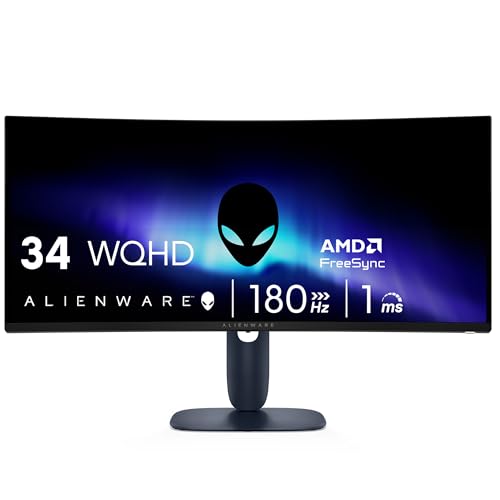
| Alienware AW3425DWM | LED (VA) | 180Hz | 1500R, 21:9 | 400 nits, 3,000:1 |
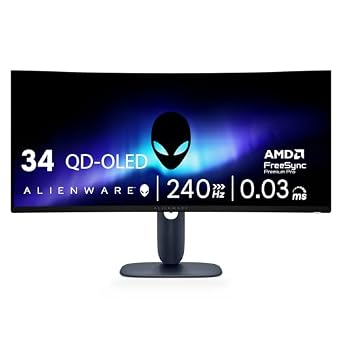
| Alienware AW3425DW | QD-OLED | 240Hz | 1800R, 21:9 | 250 nits (1000 nits peak HDR), 1,500,000:1 |
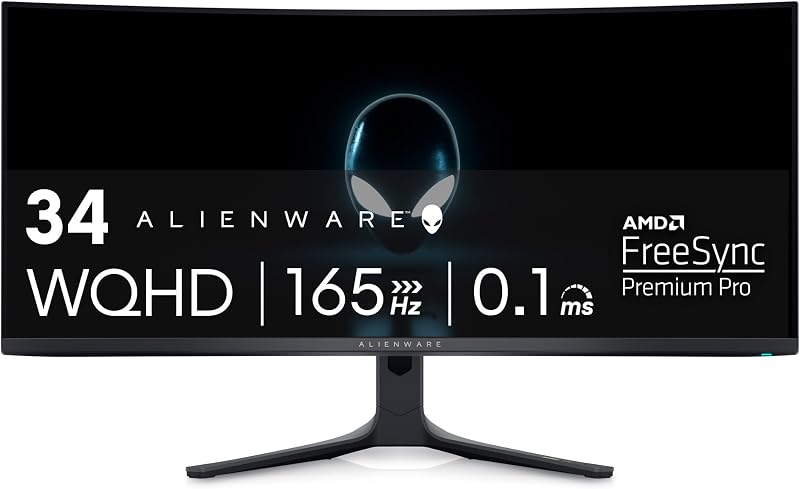
| Alienware AW3423DWF | QD-OLED | 165Hz | 1800R, 21:9 | 250 nits (1000 nits peak HDR), 1,000,000:1 |
| Alienware AW3426DWM | LED (VA) | 240Hz | Not listed, 21:9 | 400 nits, Not listed |
Alienware 34 Curved Gaming Monitor for Balanced Everyday Gaming

Best for: Extended gaming marathons without burn-in risk
Pros
- 180Hz refresh rate
- Deep 3000:1 contrast ratio
- Hardware low blue light
- Dedicated console mode
Cons
- Standard DisplayHDR 400 certification
- Lower color gamut than QD-OLED
The Alienware 34 Curved Gaming Monitor, cataloged under model number Alienware AW3425DWM, serves as an LED-backlit ultrawide display engineered to deliver broad visual immersion without the operational concerns associated with organic self-emissive pixels. Built with a 34-inch panel featuring an aggressive 1500R curve, this display wraps peripheral vision closely to enhance spatial depth in simulation, open-world, and strategy titles. The screen operates at a native WQHD resolution across an expansive 21:9 aspect ratio with a 110 pixel pitch, delivering balanced pixel density and visual clarity across complex digital environments.
In terms of gaming performance and motion fidelity, the panel achieves a 180Hz refresh rate combined with a 1ms gray-to-gray response time. Visual fluidity is reinforced by AMD FreeSync Premium and VESA Adaptive Sync Technology, which synchronize frame delivery to eliminate screen tearing and minimize stuttering during rapid perspective shifts. For color and luminance, the display provides a 3,000:1 contrast ratio alongside 400 brightness and 95 percent DCI-P3 color gamut coverage, complemented by VESA DisplayHDR 400 certification. Long-session endurance is supported through a dedicated console mode and a hardware-based low blue light solution engineered to reduce eye strain while preserving natural color temperature.
From an ownership and longevity standpoint, this model suits users who spend extended hours working with static desktop elements, code editors, or non-moving user interface menus. Because the LED-driven VA architecture does not rely on organic emissive compounds, it carries inherent resilience against image retention. Shoppers prioritizing peace of mind for daily office productivity paired with fluid 180Hz gaming will appreciate its robust construction, though competitive gamers seeking absolute black levels or faster pixel transitions will find higher ceiling specifications in the brand’s QD-OLED alternatives.
Alienware 34 240Hz QD-OLED Curved Gaming for Competitive Immersion

Best for: Competitive esports players wanting true blacks
Pros
- Rapid 240Hz refresh rate
- Ultra-low 0.03ms response time
- Infinite contrast ratio
- Wide 99.3% DCI-P3 color gamut
Cons
- Potential static image retention risk
- 250 nits baseline SDR brightness
The Alienware 34 240Hz QD-OLED Curved Gaming monitor, known as the Alienware AW3425DW, represents a substantial evolution in display speed and emissive clarity. Featuring a 34.2-inch WQHD curved panel with an 1800R radius, this screen merges Quantum Dot color performance with self-illuminating pixels. The result is an infinite contrast ratio, listed with a 1,500,000:1 specification, and true black reproduction where individual pixels switch off completely. Its 1800R curvature provides a subtle, natural wraparound effect that maintains uniform viewing distances across the wide 21:9 viewing plane without visual distortion.
Motion clarity on this unit reaches elite gaming tiers through a blazing 240Hz refresh rate paired with an instantaneous 0.03ms response time. Synchronized motion is handled through comprehensive adaptive sync support, including NVIDIA G-SYNC Compatible certification, AMD FreeSync Premium Pro, and VESA AdaptiveSync. Luminance performance is certified under VESA DisplayHDR TrueBlack 400, reaching up to 1000 nits peak HDR brightness while maintaining a standard 250 brightness baseline. Color reproduction is equally uncompromising, offering 99.3 percent DCI-P3 coverage alongside strict factory color tuning achieving a Delta E under 2.
This display caters directly to competitive enthusiasts and cinematic gamers who demand the fastest pixel response and deepest black reproduction available. While the self-emissive architecture requires active usage mindfulness to prevent uneven pixel wear from permanent static graphics, the matte finish and 178-degree viewing angles ensure stellar presentation under varied lighting. Gamers seeking pure velocity and contrast will excel with this unit, whereas users focused solely on static spreadsheet or desktop productivity might favor a resilient backlit LED configuration.
Alienware AW3423DWF Curved QD-OLED Gaming Monitor for Creative Precision
Best for: Color-critical content creators and HDR gamers
Pros
- 3-year warranty covering OLED burn-in
- Creator Mode with sRGB and DCI-P3
- Fast 0.1ms response time
- 360-degree thermal chassis ventilation
Cons
- 165Hz refresh rate below flagship speeds
- Baseline 250 nits brightness
The Alienware AW3423DWF Curved QD-OLED Gaming Monitor has established itself as an iconic benchmark in the ultrawide space, showcasing Quantum Dot Display Technology inside the manufacturer’s Legend 2.0 industrial design. Spanning 34 inches with a 21:9 aspect ratio and an 1800R curve, the display combines the authentic black levels and infinite contrast of an oled gaming monitor alienware with the expanded color saturation and higher luminance headroom unlocked by quantum dots. Visual output is bolstered by VESA DisplayHDR TrueBlack 400, a 1,000,000:1 contrast ratio, 1000 nits peak brightness, and a 0.23 pixel pitch across a matte-finished surface.
Engineered for dual-purpose environments, this model introduces a dedicated Creator Mode accessible via the centralized 5-axis joystick. This feature empowers designers and content creators to toggle freely between the native DCI-P3 color space (covering 99.3 percent) and the sRGB color space, backed by out-of-the-box factory calibration measuring Delta E under 2. For interactive entertainment, it delivers a smooth 165Hz refresh rate, an ultra-fast 0.1ms response time, AMD FreeSync Premium Pro support, and VESA AdaptiveSync certification. Long gaming sessions are made comfortable by TUV-certified ComfortView Plus hardware blue light reduction and customizable RGB AlienFX lighting.
A defining asset of this monitor is its transparent buyer protection. Alienware bundles a comprehensive 3-year premium warranty that explicitly includes coverage for OLED burn-in, giving reassurance to users concerned about panel degradation. Structural reliability is further augmented by 360-degree chassis ventilation designed to accelerate heat dissipation away from sensitive organic emissive layers. Content creators and high-end gamers seeking calibrated color fidelity and guaranteed warranty coverage will find this model exceptionally compelling, whereas pure esports players may prefer the higher 240Hz refresh rate found on the AW3425DW.
Alienware 34 Gaming Monitor AW3426DWM for High-Speed Esports Longevity

Best for: Fast competitive gaming and static desktop work
Pros
- Blazing 240Hz refresh rate
- Zero burn-in risk on VA panel
- 1ms response time
- Bright 400 nits output
Cons
- Contrast ratio not listed
- Curve radius not specified in listing
The Alienware 34 Gaming Monitor AW3426DWM brings together high-speed competitive refresh rates and the dependable durability of vertical alignment LED engineering. Designed around a 34-inch WQHD screen with a classic 21:9 aspect ratio, this model delivers crisp 110 pixel pitch imagery across a matte anti-glare panel. Measuring 31.71 inches wide, 9.13 inches deep, and 21.84 inches tall with an overall weight of 20.6 pounds, the monitor presents a stable, robust footprint built for rigorous desktop deployment.
At the heart of the AW3426DWM is a swift 240Hz refresh rate coupled with a 1ms response time, offering rapid frame cycling that keeps pace with high-octane multiplayer titles. The VA panel architecture provides solid visual consistency across 178-degree horizontal and vertical viewing angles, while maintaining a luminous 400 brightness level and 95 percent color gamut coverage. While the manufacturer listing does not specify the exact curve radius or static contrast ratio, the underlying LED display technology ensures punchy visuals that remain consistent during dynamic gameplay sequences.
In terms of reliability, this 240Hz VA display serves as an ideal solution for esports players and hybrid professionals who refuse to manage pixel refresh routines or worry about static window burn-in. It pairs competitive tournament-grade frame rates with the zero-degradation peace of mind inherent to backlit LED panels. Gamers who prioritize maximum longevity for daily multi-window productivity will gravitate to this display, conceding the infinite black levels of QD-OLED to gain lasting mechanical and thermal resilience.
How to Choose the Right Alienware 34-inch monitors
Selecting the best alienware ultrawide monitor requires aligning your daily workload and entertainment habits with the distinct strengths and maintenance requirements of each display technology. The primary dividing line across the lineup centers on panel architecture. Displays utilizing QD-OLED, such as the Alienware AW3425DW and AW3423DWF, deliver unrivaled pixel response times down to 0.03ms, infinite contrast ratios, and cinematic color accuracy. However, because organic light-emitting diodes wear over time when subjected to unchanging visual elements, they demand mindful usage habits and benefit from dedicated warranty protection. Conversely, backlit VA LED models like the AW3425DWM and AW3426DWM offer immune resistance against static retention, making them ideal workhorses for shared productivity and long desktop sessions.
Refresh rate requirements form another critical decision pillar. If your graphics hardware easily generates beyond 200 frames per second in fast-paced titles, moving up to a 240Hz display like the Alienware AW3425DW or the AW3426DWM ensures maximum frame delivery and fluid tracking. For players exploring an alienware monitor 240hz oled configuration, the pairing of 240Hz with near-instantaneous 0.03ms OLED transitions creates virtually blur-free motion. For gamers playing graphics-intensive adventure titles or working in professional video software, the 165Hz ceiling of the AW3423DWF or the 180Hz output of the AW3425DWM provides plenty of fluidity while leaving headroom for system resources.
Curvature and physical setup geometry also play an influential role in long-term comfort. The tighter 1500R curve found on the AW3425DWM brings the outer edges of the 34-inch screen closer to your peripheral vision, decreasing eye refocusing during wide panoramic gaming. On the other hand, the gentler 1800R curve on the AW3425DW and AW3423DWF provides a subtler bend that keeps straight lines relatively distortion-free, which is often preferable for creative timeline editing, drafting, and document management. When choosing, consider your viewing distance and whether your primary use involves color-critical geometry or pure simulation immersion.
Color workflows and warranty security must finalize your decision. If you engage in professional photo grading, digital illustration, or web asset creation, the AW3423DWF stands out thanks to its integrated Creator Mode, allowing seamless switching between native DCI-P3 and sRGB color profiles alongside factory-calibrated Delta E under 2 accuracy. Furthermore, reviewing the alienware qd oled burn in warranty terms provides essential buyer assurance when investing in organic panel tech. For shoppers who prefer zero maintenance overhead and guaranteed durability under static taskbars, the LED VA models provide a dependable alternative that performs consistently year after year.
FAQ
Does the Alienware QD-OLED burn-in warranty cover permanent image retention?
Yes, Alienware specifically includes burn-in coverage under its 3-year premium warranty for select QD-OLED models like the AW3423DWF. This warranty protects against visible, permanent image retention caused by static elements such as desktop taskbars, gaming head-up displays, or window borders. If qualifying burn-in occurs during the covered period, the manufacturer provides panel servicing or replacement according to their warranty service guidelines.
How does a VA panel compare to QD-OLED for everyday desktop durability?
Vertical Alignment LED panels, utilized in models such as the AW3425DWM and AW3426DWM, rely on inorganic liquid crystals backlit by light-emitting diodes. Because these inorganic materials do not degrade under sustained static electrical charges, they are virtually immune to the burn-in phenomena that can affect organic self-emissive displays. For shoppers evaluating an alienware oled 34 against a VA alternative for 8-hour static workdays, VA technology provides worry-free operational longevity.
Which Alienware 34 monitor to buy for mixed office work and high-refresh gaming?
If your schedule splits evenly between static desktop applications like spreadsheets and fast-paced gaming, the AW3426DWM represents a balanced pick by offering a blazing 240Hz refresh rate on a durable VA panel without image retention concerns. However, if your mixed workflow includes color-sensitive visual creation and you desire cinematic HDR, the AW3423DWF offers a dedicated sRGB Creator Mode alongside a 3-year burn-in warranty to safeguard your investment during productivity tasks.
What is the practical difference between a 1500R and an 1800R curve radius?
The rating indicates the radius of the circle the display curve would form in millimeters. A 1500R curve, as featured on the AW3425DWM, is more pronounced and pulls the monitor edges closer into your field of view, maximizing immersive wraparound for cockpit and simulation games. An 1800R curve, featured on the AW3425DW and AW3423DWF, offers a more gradual curve that minimizes geometric distortion for creative work and document viewing.
How do thermal cooling solutions protect Alienware curved gaming displays?
Heat buildup accelerates organic pixel degradation on high-performance displays. Alienware addresses thermal management on displays like the AW3423DWF by integrating 360-degree chassis ventilation, which directs heat away from sensitive internal components and emissive layers. Proper airflow helps sustain consistent peak brightness levels while protecting long-term panel stability.