As Amazon Associates, we earn from qualifying purchases. This means we may receive a small commission at no extra cost to you if you click through and make a purchase.
Acer has built a long-standing reputation in desktop computing by supplying practical, space-conscious office displays designed for continuous daily duty. In the compact workspace segment, an acer 21.5 inch monitor serves as a workhorse display for crowded cubicles, multi-screen command desks, and administrative counters where physical desk space is at a premium. These monitors prioritize essential productivity hardware, combining reliable Full HD resolutions with energy-efficient backlighting, flicker-reducing circuitry, and thin-bezel enclosures that facilitate tidy side-by-side configurations.
Across this specific product lineup, the models diverge across panel response timing, refresh frequency ceiling, stand mechanics, and video port versatility. While the entry-tier desktop models emphasize high refresh rates like 100Hz and 120Hz for fluid scrolling within compact footprints, higher-tier configurations introduce workstation-oriented versatility through integrated USB hubs, built-in speakers, and dedicated VESA mounting provisions.
Acer 21.5-Inch Monitors Compared
| Model | Screen Size & Panel Type | Refresh Rate & Response | Contrast & Brightness | Inputs & Mounting |
|---|---|---|---|---|
| Acer 21.5in FHD 1920×1080 100Hz Office | 21.5-inch VA | 100Hz, 1ms | 1000:1, 250 nits | Not listed, Stand included |
| Acer 21.5in FHD 1920×1080 120Hz Office | 22-inch VA (listed 21.5in) | 120Hz, 1ms | 100,000,000:1, Not listed | Not listed, Stand included |
| Acer5ms | 21.5-inch IPS | 75Hz, 5ms | Not listed, Not listed | HDMI, DisplayPort, VGA, USB Hub, VESA mountable |
| Acer 23.8in FHD 1920×1080 100Hz Office | 23.8-inch VA / LCD | 100Hz, 4ms (G to G) | 100,000,000:1, 250 nits | HDMI, VGA, Stand included |
| Acer Nitro 23.8in FHD 1920×1080 180Hz | 23.8-inch VA / LCD | 165Hz to 180Hz, 1ms (VRB) | 100,000,000:1, 250 nits | 1x DisplayPort 1.2, 2x HDMI 2.0, VESA 100x100mm |
Acer 21.5in FHD 1920×1080 100Hz Office for Everyday Workstations

Best for: Fluid scrolling on tight desktop footprints
Pros
- Smooth 120Hz refresh rate
- 1ms response speed
- High dynamic contrast ratio
Cons
- 170-degree viewing angle limit
- Stand adjustment unlisted

Best for: Basic dual-display office setups
Pros
- 100Hz refresh rate
- Flicker-less display
- Near bezel-less frame
Cons
- 1000:1 native contrast ratio
- Modest 250 nits brightness
The Acer 21.5in FHD 1920×1080 100Hz Office monitor (KB220Q H2bi) provides a disciplined visual foundation for general administrative duties and home workstation tasks. Built around a 21.5-inch VA display delivering Full HD 1080p resolution in a standard 16:9 aspect ratio, this model focuses on delivering crisp small details and legible typography. The panel features a matte screen finish to suppress ambient office glare, paired with an authentic 1000:1 static contrast ratio, 250 nits of brightness, and a 99 color gamut rating that ensures balanced color saturation for document editing, spreadsheets, and video playback.
Motion handling is an unexpected strength for a dedicated workplace monitor. The display operates at an upgraded 100Hz refresh rate combined with a 1ms response time and Adaptive-Sync support that provides FreeSync compatibility. This faster frame delivery minimizes the smearing and ghosting common to older 60Hz panels, rendering window dragging, page scrolling, and video transitions with noticeable fluidity. Long-term reliability is reinforced through integrated eye safety engineering, including a flicker-less display and low dimming capabilities designed to mitigate optical fatigue during extended shifts. The physical casing employs Acer’s ZeroFrame design, producing near-frameless borders that minimize sightline disruption when creating multi-display workspaces.
In this acer 17 inch laptop companion category, this unit suits office staff, accounting clerks, and students who require an uncluttered footprint measuring 19.4 inches wide and 7.9 inches deep. For shoppers conducting an acer kb220q review to determine workspace longevity, its compact dimensions and flicker-free backlight make it a dependable desk addition. However, users who demand wide mechanical articulation or legacy analog connections may find that specialized enterprise-tier models provide greater hardware flexibility.
Acer 21.5in FHD 1920×1080 120Hz Office for High-Motion Productivity
The Acer 21.5in FHD 1920×1080 120Hz Office display (SB223Q J0bi) steps up dynamic performance by incorporating a 120Hz refresh rate into a remarkably slim chassis. Listed with a 22-inch viewable VA screen in a compact form factor measuring 19.33 inches wide, this display operates at a native Full HD resolution of 1920×1080. It utilizes an aggressive dynamic contrast ratio of 100,000,000:1 alongside a 99 color gamut and a matte finish, yielding deep dark shades and solid color uniformity across its 170-degree viewing angle.
High-frequency motion rendering represents the primary appeal of this unit. Elevating the vertical refresh ceiling to 120Hz reduces input latency and shortens frame rendering cycles, while the rapid 1ms response time eliminates trailing artifacts on fast-moving content. Adaptive-Sync support synchronizes the monitor with graphics hardware to eliminate screen tearing during video scrubbing and casual rendering tasks. Workplace ergonomics are sustained via integrated eye protect technology, while Energy Star compliance guarantees that the panel operates with conservative power consumption, protecting internal circuitry against premature thermal wear.
This acer sb223q screen represents an excellent choice for data analysts, software testers, and creative operators who continuously review scrolling code or animation timelines. Its zero-frame housing allows two or three units to sit contiguously across small desks. Readers requiring broader vertical angles or integrated desktop audio should evaluate fully outfitted multimedia variants instead.
Acer5ms for Flexible Workspace Connectivity
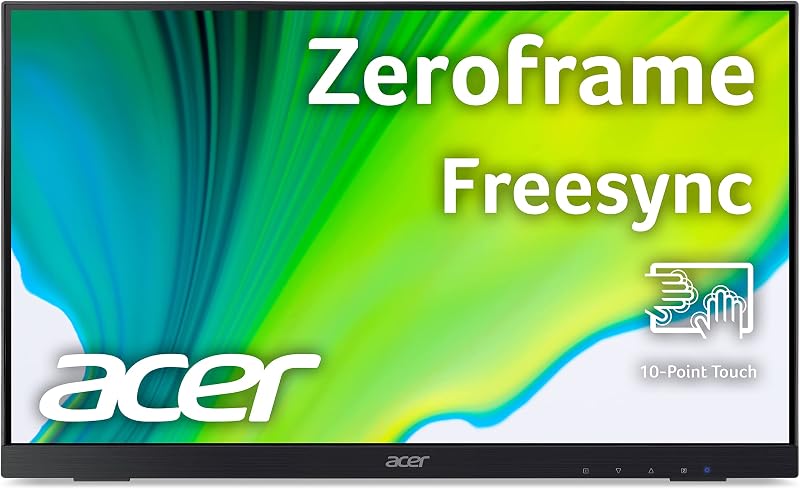
Best for: Versatile workstation connectivity and mounting
Pros
- Integrated USB hub and speakers
- VESA mount compatible
- HDMI DisplayPort and VGA inputs
Cons
- 75Hz refresh rate ceiling
- 5ms response time
The Acer5ms monitor (UT222Q bmip) diverges from the typical minimalist office display by packing comprehensive commercial connectivity and mounting flexibility into a 21.5-inch form factor. While entry-level monitors often omit auxiliary ports, the UT222Q listing confirms an expansive input array featuring HDMI, DisplayPort, and legacy VGA ports, alongside an integrated USB hub. This array transforms the display into a desktop docking station, enabling users to bridge modern digital outputs and legacy systems without relying on third-party dongles.
Underneath the bezel, the monitor utilizes an IPS panel running at Full HD 1920×1080 with a 75Hz refresh rate and a 5ms response time. The listing highlights essential workstation features including built-in speakers, AMD FreeSync synchronization, a dedicated bluelight filter, and flickerless technology to shield user vision over extended hours of operation. Additionally, the unit is fully VESA mountable, allowing office technicians to strip away the desktop footprint entirely and suspend the display on standard articulated monitor arms or communal wall brackets.
The acer ut222q is engineered specifically for institutional users, corporate conference desks, medical stations, and shared workstations where connectivity options cannot be compromised. The combination of integrated speakers and USB pass-through makes it the most self-contained workspace hub in this comparison. Buyers seeking high gaming refresh rates will note its 75Hz limit, but for day-to-day administrative endurance, its hardware versatility is unmatched.
Acer 23.8in FHD 1920×1080 100Hz Office for Wider Screen Real Estate

Best for: Expanded desktop productivity workspaces
Pros
- Wide 178-degree viewing angles
- Smooth 100Hz motion
- Ultrathin ZeroFrame enclosure
Cons
- 4ms gray-to-gray response
- Limited to HDMI and VGA
For desks capable of accommodating a marginally wider footprint, the Acer 23.8in FHD 1920×1080 100Hz Office display (SB242Y H1bi) delivers an expanded 23.8-inch diagonal canvas while maintaining tight space efficiency. Built with an LCD VA panel encased in an ultrathin zero-frame chassis, this monitor measures 21.19 inches wide and weighs a manageable 6 pounds. It operates at 1920×1080 Full HD resolution, backed by a 250-nit brightness rating, a matte screen surface, and an expansive 100,000,000:1 contrast ratio that ensures crisp delineation between dark tones and bright highlights.
A notable visual advantage of this model is its broad 178-degree viewing angle, which ensures that colors remain accurate and legible even when viewed off-center during collaborative project reviews. The panel achieves a 100Hz refresh rate combined with a 4ms gray-to-gray (G to G) response time, mitigating ghosting on scrolling text and high-motion media. Its video interface features both HDMI and VGA inputs, allowing it to seamlessly service both contemporary computing towers and older office hardware. Desk stability is anchored by an elegant base featuring concentric circular patterns.
This display suits remote professionals and office workers who find 21.5-inch screens restrictive when managing dual side-by-side spreadsheets. Those looking for larger immersive screens may look toward an acer gaming monitor 27 inch curved display, but for conservative commercial footprints, the SB242Y provides a balanced visual compromise. It gives way to specialized gaming panels only when ultra-high refresh ceilings are required.
Acer Nitro 23.8in FHD 1920×1080 180Hz for Smooth Frame Rates
Best for: High refresh productivity and entry gaming
Pros
- High 165Hz to 180Hz refresh
- AMD FreeSync Premium support
- VESA 100x100mm mounting compliant
Cons
- 72 percent NTSC color gamut
- 170-degree viewing angle limitation
The Acer Nitro 23.8in FHD 1920×1080 180Hz monitor (KG241Y Sbiip) introduces enthusiast-grade motion performance to compact workspace footprints. The listing title highlights an impressive 180Hz rating, while the detailed technical specifications note a rapid 165Hz base refresh rate with a 1ms Visual Response Boost (VRB) response speed. Constructed with a 23.8-inch Full HD (1920 x 1080) widescreen VA/LCD panel, this monitor is engineered to keep up with fast-moving gameplay and demanding video rendering tasks.
The panel features AMD FreeSync Premium technology to dynamically match the display cadence to output frames from the graphics card, eliminating screen tearing and reducing input lag. Additional display characteristics include HDR Ready processing, a matte finish, 250 nits of brightness, a 100,000,000:1 contrast ratio, 170-degree viewing angles, and 72 percent NTSC color saturation. Long-term eye protection is addressed through ComfyView, flicker-less circuitry, and low dimming functions. Video connectivity is exceptionally generous, incorporating one DisplayPort 1.2 port and two HDMI 2.0 inputs, with an HDMI cable packaged directly inside the box.
Physical flexibility is handled by an ergonomic tilt mechanism that adjusts between -5 degrees and 15 degrees, alongside VESA 100 x 100mm mounting compliance. While broad-format gamers often gravitate toward an acer 32 inch curved display, the KG241Y is the ultimate pick here for power users seeking high refresh speeds and multiple modern digital inputs in a compact frame. It represents a functional upgrade over entry-level office models for users who split their desk time between spreadsheets and high-speed simulation.
How to Choose the Right Acer 21.5-Inch Monitor
Selecting the proper display from Acer’s compact monitor catalog requires balancing screen size, panel architecture, refresh capability, and mounting options. When evaluating an acer 21.5 monitor comparison, you should measure your physical workspace to ensure the chassis will not interfere with desk accessories or adjacent screens.
- Display Dimensions and Workspace Footprint: Standard 21.5-inch to 22-inch units like the KB220Q and SB223Q span approximately 19.3 to 19.4 inches across, making them optimal for shallow workstations and dual-monitor side-by-side arrays. If your daily workflow requires comparing wide spreadsheets, stepping up to a 23.8-inch chassis like the SB242Y or KG241Y adds over an inch of horizontal real estate without consuming excessive desk space.
- Refresh Rate Demands: Everyday data entry and web navigation perform comfortably on an acer 21.5 inch 100hz monitor such as the KB220Q or SB242Y, which deliver noticeable smoothness over standard 60Hz panels. Users who want the utmost fluid motion on a standard budget can opt for the 120Hz SB223Q, while competitive gamers and motion editors should leverage the 165Hz to 180Hz ceiling of the Nitro KG241Y.
- Panel Technology and Viewing Angles: IPS panels, like the one on the UT222Q, provide superior color consistency and wide angles for shared viewing. VA panels, found on the KB220Q and SB223Q, deliver high contrast ratios that keep dark text sharp against bright backgrounds. For multi-angle collaboration, the SB242Y offers 178-degree viewing angles, while the SB223Q and KG241Y feature 170-degree angles.
- Port Connectivity and Mounting Provisions: When determining which acer monitor to buy, assess your computer’s video outputs. The UT222Q stands out by offering HDMI, DisplayPort, VGA, and an integrated USB hub, plus integrated speakers. The Nitro KG241Y supplies two HDMI 2.0 ports and a DisplayPort 1.2 connection. For mounting on third-party arms, verify VESA compatibility: the UT222Q and KG241Y support VESA mounting, whereas ultra-slim models like the SB242Y rely on their factory desktop stands.
- Visual Comfort and Panel Durability: For day-long operational endurance, prioritize acer fhd monitor reliability features such as flicker-less backlights, matte anti-glare coatings, and low-dimming modes. Models like the KB220Q, UT222Q, and KG241Y feature specialized blue light or flicker reduction hardware to prevent optical fatigue during grueling deadlines.
FAQ
What makes an Acer compact office monitor reliable for long daily shifts?
Acer builds continuous-use durability into its office lineup through flicker-less backlights, low dimming technology, and matte anti-glare screen finishes. These features stabilize the light output, preventing the rapid micro-flickering that contributes to optical fatigue and headaches during full-day computer work. Energy Star compliance on select models like the SB223Q also ensures cooler, thermally efficient operation that protects delicate internal backlighting circuits over years of service.
Can I mount an Acer 21.5-inch monitor on a standard monitor arm?
VESA mount compatibility varies by model across Acer’s compact catalog. The Acer UT222Q and the Acer Nitro KG241Y feature standard VESA mounting provisions (with the KG241Y utilizing a 100x100mm pattern), allowing them to be secured to multi-monitor desk clamps or articulating wall brackets. Conversely, ultrathin styling models like the KB220Q and SB242Y are designed around their included desktop bases, so shoppers must verify VESA compliance if arm mounting is required.
Is a 100Hz refresh rate beneficial for non-gaming office work?
Yes. A 100Hz refresh rate renders screen elements 100 times per second, which represents a substantial upgrade over traditional 60Hz office displays. This elevated refresh speed makes mouse cursor movement smoother, eliminates visual jitter when dragging windows across the desktop, and reduces motion blur when scrolling rapidly through dense text documents, PDF files, and complex spreadsheets.
What is the difference between VA and IPS panels in Acer compact monitors?
VA (Vertical Alignment) panels, featured on models like the KB220Q and SB223Q, excel in contrast performance, yielding deep blacks and vibrant image separation that make small text legible in varied lighting. IPS (In-Plane Switching) panels, featured on the UT222Q, prioritize color accuracy and wide viewing angles, making them the preferred choice when multiple viewers must view the screen from off-center angles without experiencing color shift.
Which input ports should I check before purchasing an Acer monitor?
Shoppers should verify whether their PC relies on legacy or modern video outputs. Models like the SB242Y and UT222Q offer VGA ports, which maintain compatibility with older desktop towers and server racks. For modern digital setups, displays like the Nitro KG241Y provide two HDMI 2.0 ports alongside a DisplayPort 1.2 connection, while the UT222Q provides HDMI, DisplayPort, VGA, and a built-in USB hub for peripheral connectivity.