



As Amazon Associates, we earn from qualifying purchases. This means we may receive a small commission at no extra cost to you if you click through and make a purchase.
Dell dominates the professional desktop monitor sector by building commercial displays focused on color stability, durable enclosure engineering, and comprehensive hub connectivity. Across corporate campuses and specialized creative studios, workstation users treat these displays as essential infrastructure rather than basic output screens. When evaluating long-term dell 27 inch 4k monitor reliability, commercial buyers prioritize reliable hardware engineering that runs cool during twelve-hour workdays, maintains uniform edge-to-edge illumination over years of service, and prevents power-delivery failures across connected laptops.
This roundup spans high-end UltraSharp hardware featuring high-wattage Thunderbolt 4 docking and contrast-rich IPS Black panels alongside streamlined S-series monitors designed for daily office productivity, showing distinct trade-offs in power delivery, refresh speed, and panel finishes.
Dell 27-inch 4K Monitors Compared
| Model | Resolution & Refresh Rate | Panel Tech & Contrast | Docking Power Delivery | Color Coverage |
|---|---|---|---|---|
| Dell UltraSharp U2725QE 27-Inch 4K UHD | 4K UHD (3840 x 2160) at 120Hz | IPS Black, 1000:1 (3000:1 dynamic) | Thunderbolt 4, up to 140W | 99% DCI-P3, 100% Gamut |
| Dell UltraSharp 27 4K Thunderbolt Hub | 4K UHD (3840 x 2160) at 120Hz | LED IPS, 3000:1 | Thunderbolt Hub (Daisy Chain) | 100% sRGB, 99% DCI-P3 |
| Dell UltraSharp U2723QE 27″ 4K UHD | 4K UHD (3840 x 2160) at 60Hz | IPS Black LCD, 2000:1 | USB-C, up to 90W | 100% Gamut |
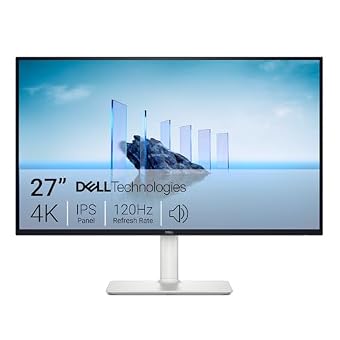
| Dell 27 Monitor S2725QC | 4K UHD (3840 x 2160) at 120Hz | IPS LED, 1500:1 | USB-C, up to 65W | 99% sRGB |
| Dell 27 Monitor S2725QS | 4K UHD (3840 x 2160) at 120Hz | IPS LED, 1500:1 | Not listed (No Power Delivery) | 99% sRGB |
| Dell UltraSharp 27 Thunderbolt Hub Monitor | QHD at 120Hz | IPS LCD, 2000:1 | Thunderbolt 4, up to 90W | 98% Display P3, 100% Gamut |
Dell UltraSharp U2725QE 27-Inch 4K UHD for High-Wattage Workstation Docking

Best for: Workstation laptops needing 140W single-cable charging
Pros
- 140W Thunderbolt 4 hub
- Fluid 120Hz IPS Black display
- Factory calibrated Delta E under 1.5
- Three-year Advanced Exchange warranty
Cons
- Chassis runs warm under full power delivery
- No built-in desktop speakers
The Dell UltraSharp U2725QE 27-Inch 4K UHD stands as Dell’s flagship professional display, pairing high-density 3840 x 2160 resolution with advanced IPS Black panel technology. Designed for enterprise workstations, this monitor operates at a fluid 120Hz refresh rate with a 5ms response time, significantly reducing desktop ghosting and eye fatigue during fast document scrolling. The screen achieves 450 cd/m² of brightness, holds VESA DisplayHDR 600 certification, and comes factory calibrated to a Delta E of less than 1.5 across 99% of the DCI-P3 color space. Long-term chassis stability is enhanced by an integrated ambient light sensor and hardware-level ComfortView Plus filtering to manage eye strain without distorting critical color work.
Connectivity is anchored by a cutting-edge Thunderbolt 4 single-cable hub capable of transmitting video, gigabit data, and up to 140W of laptop charging simultaneously. This 140W ceiling eliminates battery drain issues on heavy mobile workstations during intensive compilation or rendering cycles. The interface also supports daisy-chaining up to two additional 4K displays alongside standard HDMI 2.1, DisplayPort, USB-C downstream, USB-A, and RJ-45 Ethernet ports. In any direct dell u2725qe vs u2723qe evaluation, the newer U2725QE delivers twice the refresh frequency and substantially more charging overhead, reducing thermal strain on internal power components. Buyers building out complete professional spaces often complement this unit with systems chosen from dell computers desktops on sale to create a unified workstation environment.
This model suits creative professionals, CAD engineers, and software architects who run power-hungry performance laptops requiring robust, single-cable desktop docking. Dell backs this enterprise monitor with a 3-year Advanced Exchange warranty, ensuring minimal disruption should internal dock controller or backlight issues arise. It yields to simpler consumer models when buyers require straightforward display inputs without the cost of high-bandwidth Thunderbolt infrastructure.
Dell UltraSharp 27 4K Thunderbolt Hub for Precision Color Production
Best for: Developers switching between Mac and PC
Pros
- Integrated hardware KVM switch
- Thunderbolt 4 with 90W charging
- 98% Display P3 Mac compatibility
Cons
- QHD canvas instead of 4K UHD
- Baseline 350-nit brightness

Best for: Color-critical video and photo post-production
Pros
- Deep 3000:1 contrast ratio
- VESA DisplayHDR 600 certification
- Daisy-chain capable Thunderbolt hub
Cons
- Glossy finish prone to room reflections
- Demands high-bandwidth host systems
Operating as a specialized variant for high-end digital workflows, the Dell UltraSharp 27 4K Thunderbolt Hub combines 3840×2160 clarity with a sharp visual presentation. The listing specifies a 3000:1 static contrast ratio, 120Hz refresh rate, and 5ms response time, paired with an anti-reflective glossy panel finish that maximizes perceptual sharpness and black depth. Backlight output scales from a 450 cd/m² baseline up to 600 cd/m² under VESA DisplayHDR 600 conditions, delivering vivid dynamic range across both design boards and video timelines.
Color performance is tuned for demanding design environments, providing 100% sRGB and 99% DCI-P3 coverage with factory-calibrated verification straight out of the packaging. The built-in Thunderbolt hub simplifies clean desk management by routing uncompressed 4K video feeds, external peripheral data, and high-speed local storage links across a single display cable. The physical enclosure integrates a fully ergonomic stand with height, swivel, tilt, and 90-degree pivot adjustments, housed in sustainable, energy-efficient materials.
This display suits photographers, visual effects editors, and design teams who require deep contrast ratios, exceptional color reproduction, and effortless daisy-chaining. However, users working in offices with uncontrolled ambient window glare may find the glossy screen finish more prone to reflections than traditional matte treatments, making matte-finished UltraSharp alternatives more forgiving in sunlit rooms.
Dell UltraSharp U2723QE 27" 4K UHD for Proven Enterprise Reliability

Best for: Reliable corporate office and spreadsheet workflows
Pros
- Proven 2000:1 IPS Black panel
- Extensive 10Gbps USB and RJ-45 hub
- Matte anti-glare 3H coating
Cons
- Standard 60Hz refresh rate ceiling
- Charging capped at 90W
The Dell UltraSharp U2723QE 27″ 4K UHD remains one of Dell’s most widely deployed commercial productivity monitors. Built around a 60Hz 4K UHD panel with a 2000:1 contrast ratio, it was among the earliest displays to integrate IPS Black technology to minimize standard IPS backlight glow. The display features a matte screen finish treated with a 3H anti-glare hard coating, a 400-nit brightness rating, and VESA DisplayHDR 400 compliance. Pixel density measures 163.18 pixels per inch, resulting in tack-sharp text rendering across dense financial spreadsheets and coding environments.
Extensive desktop integration is the primary strength of this hardware. The rear input bay features an HDMI port, DisplayPort 1.4 input, DisplayPort output for daisy-chaining, RJ-45 wired network connectivity, multiple 10Gbps USB 3.2 Gen 2 downstream ports, and a multi-function USB-C port that provides 90W of laptop charging alongside video transfer. For organizations comparing a dell ultrasharp 27 4k comparison across generations, this unit represents a battle-tested desktop hub with proven firmware maturity and broad peripheral compatibility. Those considering sweeping desk setups often compare standard flat panels like this to a dell ultra wide monitor for workflow arrangement.
This unit is tailored for enterprise knowledge workers, data analysts, and corporate IT fleets seeking rock-solid reliability, dependable network passthrough, and stable USB switching. It relinquishes top positioning to the U2725QE for users who prioritize 120Hz fluid motion or require more than 90W of laptop charging.
Dell 27 Monitor S2725QC for Streamlined Everyday Connectivity
Best for: Dual-monitor setups with standalone PC docks
Pros
- Responsive 120Hz FreeSync panel
- Ultra-thin borders for multi-screen desks
- ComfortView Plus hardware eye protection
Cons
- Lacks USB-C laptop power delivery
- No integrated USB hub

Best for: Hybrid workers seeking all-in-one home audio
Pros
- Smooth 120Hz FreeSync motion
- Single-cable 65W USB-C charging
- Upgraded integrated speakers
Cons
- Color gamut limited to 99% sRGB
- No wired Ethernet port
The Dell 27 Monitor S2725QC bridges the gap between home entertainment and professional productivity by integrating modern convenience features into an accessible chassis. It sports a 27-inch 4K UHD IPS panel operating at up to 120Hz with AMD FreeSync Premium support, offering smooth window movement and artifact-free media playback.
Visual fidelity centers around 99% sRGB coverage, a 1500:1 contrast ratio, and a 350-nit brightness rating on a non-glare matte panel. Unlike bare-bones home displays, the S2725QC integrates a convenient single-cable USB-C connection providing up to 65W of power delivery to keep thin-and-light notebooks charged. The chassis also features upgraded integrated speakers engineered with expanded acoustic decibel range and deeper bass frequencies compared to older generations. When reviewing a dell s2725qc vs u2725qe setup, this S-series screen trades enterprise Ethernet ports and extreme wide-gamut calibration for built-in audio and higher baseline refresh rates at home.
This monitor is ideally suited for hybrid home-office workers, remote educators, and everyday users who want a single-cable 4K workspace without paying for heavy industrial hub components. Users with high-wattage gaming laptops or workstation machines requiring 90W or more will need a model with heavier power delivery.
Dell 27 Monitor S2725QS for Multi-Screen Office Layouts
The Dell 27 Monitor S2725QS provides crisp 4K visual performance inside an attractive lifestyle enclosure finished in ash white. Like its sibling, it features a 3840 x 2160 IPS panel running at 120Hz with AMD FreeSync Premium, delivering ultra-fluid motion with responsive panel timing down to 4ms in fast modes. The screen offers 350 nits of brightness, a 1500:1 contrast ratio, and 99% sRGB coverage, backed by hardware-based ComfortView Plus low blue light filtering.
The design emphasizes clean lines with an ultra-thin bezel profile on three sides, making it a natural candidate for side-by-side multi-monitor configurations where thick borders disrupt visual flow. Audio is handled by internal stereo speakers re-engineered for clear vocal reproduction during conferencing and casual media streaming. While it lacks an integrated USB-C power delivery hub, its matte display finish and robust mechanical build provide lasting day-to-day display reliability. Shoppers comparing layout options often contrast flat screens of this scale with a dell curved monitor when planning dual-display desks.
This model is best suited for desktop PC owners, dual-screen productivity workstations, and users who already rely on a separate powered docking station. It gives way to the S2725QC or UltraSharp line for anyone requiring single-cable laptop charging and extensive USB hub connectivity directly through the display panel.
Dell UltraSharp 27 Thunderbolt Hub Monitor for Cross-Platform Desks
The Dell UltraSharp 27 Thunderbolt Hub Monitor, carrying model designation U2726DER, targets multi-system productivity by focusing on smart workspace switching and premium mechanical refinement. The display utilizes an IPS LCD canvas operating at 120Hz with a 2000:1 contrast ratio and 350 nits of brightness. Finished with a matte anti-glare coating and an ash-colored rear chassis with minimal borders, it integrates seamlessly into contemporary office environments.
For creative tasks, the panel covers 98% of the Display P3 color space and provides 100% standard gamut coverage with factory-calibrated accuracy. Single-cable Thunderbolt 4 connectivity supplies uncompressed video, high-speed data transfer, and up to 90W of laptop power delivery. Productivity across two distinct computers is driven by an integrated hardware KVM switch, enabling software developers and system administrators to manage two separate PCs or a personal Mac and a corporate laptop using a single keyboard and mouse. The monitor integrates with macOS via the Dell Display and Peripheral Manager utility for software-level control.
This display suits developers, systems engineers, and creative leads who regularly alternate between multiple host computers and require dependable KVM switching. Note that the listing specifies a QHD canvas rather than 4K UHD resolution, so buyers who demand ultra-high 4K pixel density should look to the U2725QE instead.
How to Choose the Right Dell 27-inch 4K Monitor
Deciding which dell ultrasharp 27 4k to buy requires analyzing how your host computer connects to the screen and what power demands it places on the monitor. Laptop power delivery is a frequent point of failure in poorly matched setups. If you run a high-draw creative or engineering laptop, the 140W power delivery on the Dell UltraSharp U2725QE provides the safety margin necessary to prevent battery depletion during rendering sessions. For general ultrabooks, the 90W output on the U2723QE or 65W on the S2725QC is sufficient, but under-powering a high-draw computer can cause docking disconnections and thermal stress on the monitor’s internal power supply.
Panel technology and contrast ratios represent another major dividing line in any dell ultrasharp 27 4k comparison. Standard IPS displays found in the S2725QC and S2725QS deliver a respectable 1500:1 contrast ratio, but the IPS Black panels used in the UltraSharp series achieve static contrast between 2000:1 and 3000:1. This doubling of black depth significantly reduces the grayish backlight glow typical of IPS screens in low-light rooms, making UltraSharp models essential for color graders, photographers, and CAD operators who evaluate subtle shadow gradients.
Refresh rates also define modern desktop comfort. While traditional office monitors like the U2723QE run at standard 60Hz, newer models like the U2725QE, S2725QC, and S2725QS upgrade to 120Hz. The higher refresh rate creates noticeably smoother cursor tracking, fluid window dragging, and reduced visual fatigue over an eight-hour shift. If your system hardware supports DisplayPort 1.4 or Thunderbolt 4, investing in a 120Hz panel yields tangible day-to-day ergonomic benefits.
Finally, warranty structure separates Dell’s product tiers. Dell’s UltraSharp business monitors come standard with the Dell Advanced Exchange warranty, which dispatches a replacement display before requiring you to return a defective unit. This coverage provides indispensable peace of mind for self-employed professionals and enterprise businesses where unexpected downtime causes immediate financial loss.
FAQ
What is the Dell monitor Advanced Exchange warranty and how does it protect buyers?
The dell monitor advanced exchange warranty is Dell’s enterprise-tier support coverage designed to eliminate operational downtime. Under this agreement, if Dell technical support determines that a monitor issue cannot be resolved over the phone or via firmware updates, they ship a replacement display to your door the next business day. You place the malfunctioning unit into the replacement’s shipping container and return it using a prepaid shipping label. This contrasts with consumer depot warranties, which require you to ship your monitor away for weeks of repair before getting it back.
How do you troubleshoot Dell UltraSharp Thunderbolt hub issues?
Most dell ultrasharp thunderbolt hub issues stem from insufficient cable bandwidth, outdated dock controller firmware, or improper operating system sleep states. When connecting laptops via Thunderbolt 4, always use the 40Gbps-certified cable supplied in the box, as standard USB-C charging cables lack the bandwidth for simultaneous 4K 120Hz video and high-speed data. If downstream USB ports fail to enumerate after waking your computer, updating the monitor’s firmware via the Dell Display Manager utility and disabling aggressive USB power-saving states in your host OS typically restores handshake stability.
Which model is the best Dell 4K monitor for Mac users?
Determining the best dell 4k monitor for mac comes down to port architecture and color spaces. The Dell UltraSharp U2725QE is an outstanding choice for modern MacBooks due to its Thunderbolt 4 hub, 140W power delivery, and factory-calibrated 99% DCI-P3 coverage, which aligns closely with Apple’s native Display P3 color standard. Additionally, Dell’s Display and Peripheral Manager software for macOS allows Mac users to adjust brightness, contrast, and color presets directly from the menu bar without reaching for physical monitor buttons.
What are the primary differences in the Dell U2725QE vs U2723QE comparison?
In the dell u2725qe vs u2723qe matchup, the primary improvements in the newer U2725QE are a doubling of the refresh rate from 60Hz to 120Hz, an upgrade from USB-C to genuine Thunderbolt 4 with daisy-chaining, and an increase in laptop power delivery from 90W up to 140W. The U2725QE also upgrades peak brightness from 400 nits to 450 cd/m² and incorporates an ambient light sensor for automatic brightness tracking, whereas the U2723QE remains a dependable 60Hz business workhorse with lower power draw.
What should buyers weigh when evaluating the Dell S2725QC vs U2725QE?
The dell s2725qc vs u2725qe comparison highlights the difference between premium home-office gear and commercial workstation infrastructure. The S2725QC provides an agile 120Hz 4K IPS experience with built-in speakers and 65W USB-C charging, making it an all-in-one home desktop solution. In contrast, the UltraSharp U2725QE includes a full Thunderbolt 4 dock, enterprise gigabit Ethernet, an IPS Black panel with higher contrast, wider DCI-P3 color calibration, and a 3-year Advanced Exchange warranty, which justifies the investment for mission-critical enterprise environments.


