As Amazon Associates, we earn from qualifying purchases. This means we may receive a small commission at no extra cost to you if you click through and make a purchase.
MSI has established a formidable presence in the desktop display sector by engineering panels that balance dependable hardware durability with targeted performance features. Across both the commercial PRO series and the enthusiast MAG gaming lineup, the manufacturer emphasizes thermal stability, TÜV Rheinland eye-comfort certification, and high color accuracy out of the box. While many display makers rely solely on generic panel tuning, MSI differentiates its product catalog through proprietary utilities such as the EyesErgo suite, Display Kit desktop customization software, and active firmware maintenance that addresses video handshake and hardware sync stability over years of daily operation.
When conducting an msi 27 inch monitor 1440p comparison, shoppers will find that these six displays serve fundamentally distinct workspace demands, ranging from the budget-conscious 100Hz refresh rate of the PRO MP275Q and the versatile 144Hz hybrid tuning of the PRO MP273Q E14, up through the competitive speed of the 210Hz MAG 275QPF E21 and 320Hz MAG 274QRFW X32, the deep contrast of the MAG 274QP QD-OLED, and the specialized legacy connectivity of the 1080p PRO MP273L E14.
MSI 27-Inch 1440p Monitors Compared
| Model | Panel Technology | Refresh Rate | Native Contrast | Primary Connectivity |
|---|---|---|---|---|
| msi PRO MP275Q 27 Inch WQHD | IPS (Anti-Glare) | 100Hz | 1300:1 | HDMI 2.0b, DisplayPort 1.2a |
| msi PRO MP273Q E14 27-inch IPS | IPS (Matte) | 144Hz | 1500:1 | HDMI 2.0b, DisplayPort 1.2a |
| msi MAG 274QP QD-OLED X24 27-Inch | Quantum Dot OLED (Glossy) | 240Hz | 1,500,000:1 | HDMI 2.1, DisplayPort 1.4a |
| msi MAG 275QPF E21 27-inch 2560 | Rapid IPS (Matte) | 210Hz (OC) | Not listed | HDMI, DisplayPort |
| msi PRO MP273L E14 27-inch IPS | IPS (Matte, FHD) | 144Hz | 1500:1 | HDMI 2.0, D-Sub (VGA) |
| msi MAG 274QRFW X32 27-inch 2560 | Rapid IPS (Matte) | 320Hz | 100,000,000:1 (Dynamic) | HDMI, VGA Port |
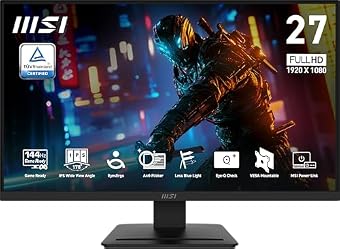
msi PRO MP275Q 27 Inch WQHD for Everyday Office Tasks

Best for: Office productivity and daily document work
Pros
- 100Hz refresh rate
- 1300:1 contrast ratio
- Built-in 2W speakers
- Tool-free assembly
Cons
- Tilt-only stand
- No HDR support
The msi PRO MP275Q 27 Inch WQHD is built specifically for users whose primary workload revolves around spreadsheets, code editing, and extensive web browsing. Featuring a 2560 x 1440 In-Plane Switching panel, this display delivers 100 percent sRGB color gamut coverage, 10-bit color depth supporting 1.07 billion colors, and a solid 1300:1 static contrast ratio that exceeds standard office panel baselines. Its 100Hz refresh rate and 1ms MPRT response time provide smoother mouse tracking and text scrolling than legacy 60Hz panels, reducing perceived eye fatigue during prolonged workstation sessions.
From an ergonomic and durability standpoint, the monitor incorporates the MSI EyesErgo package, featuring TÜV Rheinland-certified Anti-Flicker and Less Blue Light filtering, accompanied by the on-screen Eye-Q Check tool that guides users to evaluate eye fatigue directly through the display menu. The physical chassis includes a tool-free stand that snaps together without hardware, integrated cable management, and a pair of 2W speakers suited for casual video conferencing. Video inputs include HDMI 2.0b and DisplayPort 1.2a alongside a 3.5mm headphone audio output.
This monitor represents an ideal solution for office workers and remote professionals seeking crisp QHD resolution without spending resources on superfluous esports features. However, its tilt-only stand adjustment means that ergonomic purists will want to utilize its 100x100mm VESA mount with an aftermarket arm. Users who require higher refresh rates for gaming or hardware-level HDR performance will find better balance in higher-tier models such as the PRO MP273Q E14.
msi PRO MP273Q E14 27-inch IPS for Balanced Work and Play

Best for: Hybrid home office and casual gaming
Pros
- 144Hz fluid refresh
- 1500:1 contrast ratio
- Firmware update support
- HDMI-CEC integration
Cons
- Tilt-only stand
- 85 percent color gamut
Bridging productivity and recreational entertainment, the msi PRO MP273Q E14 27-inch IPS upgrades the standard commercial form factor with a 144Hz refresh rate and Adaptive-Sync compatibility. Operating at native 2560 x 1440 resolution, it offers an enhanced 1500:1 contrast ratio that brings deeper black levels and sharper document contrast compared to standard IPS alternatives. The matte panel finish combats distracting overhead reflections, while 300 nits of brightness maintain clear legibility in well-lit workspaces.
MSI integrates several longevity-focused features into this chassis, most notably user-accessible firmware update support to ensure future compatibility with changing operating systems and graphics drivers. The monitor features HDMI 2.0b with HDMI-CEC functionality, enabling synchronized power states across connected source hardware, alongside a DisplayPort 1.2a connection. The TÜV-certified Flicker Free and Low Blue Light hardware solutions eliminate high-frequency back-light pulsing to safeguard visual comfort during 10-hour workdays.
For buyers determining which msi 27 inch monitor to buy as a dual-purpose screen, this model shines as the best msi 1440p monitor for office and gaming on a shared desk. Its 144Hz panel keeps fast-paced motion tear-free while handling dense document layouts effortlessly. The primary concession remains the tilt-only stand (-5 to 20 degrees) and an 85 percent color gamut specification, which may fall short for demanding color-grading specialists who should look toward MSI’s QD-OLED options.
msi MAG 274QP QD-OLED X24 27-Inch for Premium Visual Fidelity

Best for: Enthusiast gaming and color-critical workflows
Pros
- 03ms response time
- 240Hz QD-OLED panel
- 4-way adjustable stand
- Fanless graphene cooling
Cons
- Requires burn-in mitigation
- Glossy screen reflections
The msi MAG 274QP QD-OLED X24 27-Inch sits at the pinnacle of MSI’s high-performance display engineering, deploying a 26.5-inch Quantum Dot OLED panel with an astounding 1,500,000:1 native contrast ratio. Because each pixel emits its own light, the screen achieves absolute black levels alongside a blistering 240Hz refresh rate and a virtually instantaneous 0.03ms gray-to-gray response time. The display carries a VESA ClearMR 13000 rating for top-tier motion clarity and reproduces 99 percent of the DCI-P3 color spectrum with factory-calibrated Delta E of two or less.
To address OLED longevity and burn-in risks, MSI equips this monitor with an advanced graphene heatsink that cools internal components passively without the noise, dust accumulation, or mechanical failure risks associated with internal fans. Complementing the thermal architecture is the MSI OLED Care 2.0 software suite, which runs automated pixel-cleaning cycles, taskbar detection, and static logo dimming. The physical structure includes a versatile 4-way adjustable stand offering height, tilt, swivel, and pivot adjustments, alongside DisplayPort 1.4a and HDMI 2.1 CEC inputs capable of driving native 1440p at 240Hz on modern graphics cards and consoles.
This display is tailored for competitive gamers and creative colorists who demand uncompromising visual depth and instantaneous pixel response. Buyers evaluating wider formats on our site, such as an msi 34 inch curved monitor, will find this flat 27-inch panel far more manageable for standard desktop depths. The glossy screen finish does show ambient reflections in brightly lit rooms, requiring controlled lighting to yield the best viewing experience.
msi MAG 275QPF E21 27-inch 2560 for Fast-Paced Competitive Play

Best for: High-frame-rate competitive gaming
Pros
- 210Hz overclocked refresh
- 5ms Rapid IPS
- Height-adjustable stand
- FreeSync Premium Pro
Cons
- Software-only blue light filter
- Tilt and height only
Designed as a dedicated msi 1440p gaming monitor, the msi MAG 275QPF E21 27-inch 2560 incorporates a high-speed Rapid IPS panel operating at an overclocked 210Hz refresh rate. It achieves a 0.5ms minimum gray-to-gray response time to suppress ghosting and visual trailing during rapid mouse movements. The panel supports both AMD FreeSync Premium Pro and NVIDIA G-SYNC compatibility, ensuring tear-free synchronization across modern graphics processing units.
The monitor is outfitted with MSI’s AI Vision image-processing engine, which dynamically calculates shadow tones, expands contrast in dark areas, and boosts color saturation without blowing out bright highlights. Physical ergonomics are a highlight on this model, offering both tilt and height adjustability directly on the factory stand to help players maintain healthy neck posture during extended sessions. The listing confirms a 3-year warranty policy, reflecting substantial hardware confidence for long-term ownership.
Competitive multiplayer enthusiasts playing first-person shooters, racing simulations, and fast-paced RPGs will extract maximum value from this display’s fluid frame rendering. While the software-driven Less Blue Light feature helps preserve eye comfort, the monitor relies on a matte finish and lacks the infinite contrast of OLED technology. It represents a resilient, burn-in-free choice for users who demand high framerates without the maintenance considerations of organic panels.
msi PRO MP273L E14 27-inch IPS for Legacy and Office Deployment
Best for: Workstations needing legacy video connections
Pros
- 144Hz refresh rate
- Legacy VGA connectivity
- 1500:1 contrast ratio
- Slim bezel design
Cons
- 1080p resolution
- Tilt-only stand
The msi PRO MP273L E14 27-inch IPS serves a specialized role within MSI’s 27-inch commercial catalog. While sharing the same physical footprint and 144Hz refresh rate as its QHD sibling, this model utilizes a 1920 x 1080 Full HD IPS panel paired with a 1500:1 contrast ratio. It is engineered to deliver fluid visual output for legacy enterprise workstations, point-of-sale setups, and auxiliary monitoring stations where lower rendering overhead is required.
A distinctive feature of the MP273L E14 is its connectivity array, which pairs a modern HDMI 2.0 port (with HDMI-CEC) alongside a legacy D-Sub VGA port. This configuration allows older enterprise PCs, server motherboards, and test benches to interface directly with the screen without active signal converters. The display incorporates TÜV Rheinland-certified Flicker Free backlighting, software-based Less Blue Light, and Eye-Q Check diagnostics to protect workers on extended shifts. A 4-side slim bezel aesthetic minimizes visual boundaries in multi-screen arrays.
This monitor is best suited for administrative desks, industrial control stations, or secondary displays requiring analog input compatibility. However, at a 27-inch screen size, a 1080p resolution results in a noticeably larger pixel pitch than the 1440p models in this roundup. Shoppers evaluating standard office alternatives across our platform, including our view sonic monitor 27 inch guides, should note that users working with dense spreadsheets will generally prefer the higher pixel density of the 1440p PRO MP275Q.
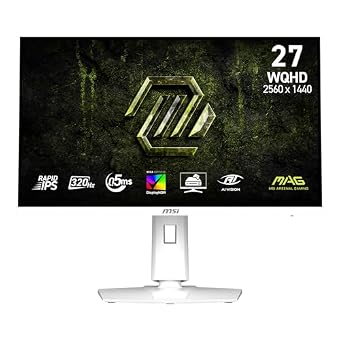
msi MAG 274QRFW X32 27-inch 2560 for Esports Speed and White Setups
Best for: Esports players wanting maximum motion clarity
Pros
- 320Hz extreme refresh
- 5ms Rapid IPS
- VESA DisplayHDR 400
- Distinctive white aesthetic
Cons
- Tilt-only stand
- VGA port limits modern bandwidth
The msi MAG 274QRFW X32 27-inch 2560 pushes LCD motion handling to the bleeding edge with a 320Hz Rapid IPS panel and a 0.5ms minimum gray-to-gray response time. Encased in a striking white chassis, this monitor targets competitive esports competitors who require maximum temporal resolution for rapid tracking and target acquisition. The display is certified for VESA DisplayHDR 400, offering elevated dynamic range and shadow delineation across high-contrast game scenes.
Hardware synchronization includes both AMD FreeSync Premium and NVIDIA G-SYNC compatibility, keeping fast-paced frames synchronized across a massive 320Hz dynamic window. MSI integrates AI Vision to bring out concealed enemies in shadowed corridors while preserving natural color saturation across the 95 percent color gamut. Video inputs comprise HDMI alongside an analog VGA port, offering an unusual blend of ultra-high-speed modern gaming performance and legacy video connectivity.
Esports players competing in titles where every millisecond of input latency counts will find this display’s 320Hz capability deeply advantageous. The white chassis also satisfies buyers constructing modern all-white PC builds. The primary trade-off is the factory stand, which provides tilt adjustment but omits height, swivel, or pivot flexibility, meaning users must rely on the rear VESA mount for comprehensive positioning.
How to Choose the Right MSI 27-Inch 1440p Monitor
Selecting the ideal display requires aligning panel technology, refresh rate capabilities, and physical ergonomics with your primary daily tasks. When reviewing msi 27 inch 1440p monitor specs, the first major decision is between IPS LCD and Quantum Dot OLED panel types. MSI’s IPS models, such as the PRO MP275Q, PRO MP273Q E14, and the Rapid IPS MAG displays, offer reliable long-term resilience against static image burn-in, making them safe investments for users who display static application windows, spreadsheets, and web browsers for eight to twelve hours every day. Conversely, the MAG 274QP QD-OLED provides unmatched contrast and instantaneous response times, but requires active utilization of the OLED Care 2.0 maintenance routine to ensure panel longevity.
Motion performance represents the next critical evaluation metric. For pure office work, document editing, and general web browsing, the 100Hz refresh rate on the PRO MP275Q delivers smooth cursor tracking without demanding substantial GPU power. If your workspace alternates between professional tasks and casual evening gaming, the 144Hz PRO MP273Q E14 provides the sweet spot of high refresh fluidity and commercial reliability. Dedicated gaming enthusiasts should focus their attention on the MAG 275QPF E21 (210Hz) or the esports-grade MAG 274QRFW X32 (320Hz), both of which employ Rapid IPS panels to compress pixel transition times down to 0.5ms.
Finally, inspect physical ergonomics and connectivity carefully before finalizing your choice. While the MAG 274QP QD-OLED includes a fully articulated 4-way stand and the MAG 275QPF E21 offers height adjustability, several models like the PRO MP275Q, PRO MP273Q E14, and MAG 274QRFW X32 feature tilt-only stands. If your desk setup requires height or pivot adjustments, ensure you plan for an aftermarket VESA 100x100mm monitor arm. For video signals, ensure your graphics card supports the required bandwidth: DisplayPort 1.4a and HDMI 2.1 are essential for high-refresh 1440p output, whereas the PRO MP273L E14 and MAG 274QRFW X32 retain legacy VGA ports for specialized multi-system environments.
FAQ
How does MSI OLED Care 2.0 prevent burn-in on QD-OLED monitors?
MSI OLED Care 2.0 is a multi-layered software and hardware management suite designed to protect the organic panel on models like the MAG 274QP QD-OLED. It operates automated Pixel Shift algorithms to subtly move the image over time, detects static logos and desktop taskbars to reduce local luminance, and runs automated pixel refresh cycles during standby. Combined with a custom fanless graphene heatsink that rapidly dissipates heat from the panel surface, these mechanisms mitigate thermal stress and significantly extend the lifespan of the display.
Can MSI PRO series office monitors handle casual gaming?
Yes, MSI PRO monitors such as the PRO MP275Q and PRO MP273Q E14 are fully capable of casual gaming. The PRO MP275Q operates at 100Hz with Adaptive-Sync, while the PRO MP273Q E14 delivers a 144Hz refresh rate with 1ms response tuning and FreeSync compatibility. Both displays prevent screen tearing and input stuttering during fast action, making them practical dual-purpose displays for users who want to transition from daytime spreadsheets to evening gaming without changing monitors.
What is the benefit of MSI Eye-Q Check on 27-inch displays?
Eye-Q Check is an on-board diagnostic utility embedded within MSI’s on-screen display menu. It provides visual testing patterns, including an Amsler Grid and astigmatism testing charts, that allow users to self-assess visual fatigue and posture during long work sessions. By reminding professionals and students to take visual breaks and verify screen distance, it actively works alongside TÜV-certified Less Blue Light and Anti-Flicker hardware to minimize eye strain.
Why do some MSI 1440p monitors include HDMI-CEC support?
HDMI Consumer Electronics Control (HDMI-CEC) allows the monitor to communicate directly with connected source hardware, such as gaming consoles, mini PCs, and media hubs, over a standard HDMI cable. When you power on a connected device, the monitor automatically wakes from standby and switches to the correct active input. Conversely, turning off the primary source can automatically put the display to sleep, simplifying daily operation in multi-device setups.
How do Rapid IPS panels differ from standard IPS panels in MSI monitors?
Rapid IPS panels utilize a thinner liquid crystal layer and optimized driving voltages compared to conventional IPS displays. This architectural modification accelerates pixel color transitions, enabling models like the MAG 275QPF E21 and MAG 274QRFW X32 to reach gray-to-gray response times as low as 0.5ms without introducing excessive overshoot or ghosting artifacts. Users retain the wide 178-degree viewing angles and accurate color reproduction of IPS technology while gaining the motion clarity needed for fast-paced competitive gaming.