As Amazon Associates, we earn from qualifying purchases. This means we may receive a small commission at no extra cost to you if you click through and make a purchase.
Acer has built an extensive footprint in the competitive display market by pairing high-speed liquid crystal displays with synchronized frame delivery. Gamers looking for an responsive visual platform regularly evaluate an acer gaming monitor 144hz 1ms configuration because it represents the baseline for competitive responsiveness without demanding specialized hardware. From a buyer advocate perspective, evaluating these displays requires looking past marketing claims to examine physical durability, stand articulation, panel illumination longevity, and warranty serviceability. A fast refresh rate offers little lasting value if the panel develops vertical line anomalies, suffers from excessive edge-lit backlight bleed, or rests on an unstable pedestal that induces neck fatigue during prolonged daily sessions.
While all four displays featured in this comparison deliver fluid 1ms motion handling and 144Hz refresh speeds, they split fundamentally between standard 1080p resolution on minimalist stands and high-density 1440p panels equipped with comprehensive ergonomic adjustments.
Acer Gaming Monitors Compared
| Model | Native Resolution | Refresh Rate | Stand Adjustments | Integrated Audio |
|---|---|---|---|---|
| Acer Nitro KG270U P1biip 27″ WQHD | 2560 x 1440 | 144Hz | Tilt Only | Not listed |
| Acer SH273 P1si 27″ IPS Full | 1920 x 1080 | Up to 144Hz | Tilt, Swivel, Height Adjustment | Not listed |
| Acer 27in FHD 1920×1080 IPS 144Hz | 1920 x 1080 | 144Hz | Tilt Only | Not listed |
| Acer Nitro 27in QHD 2560×1440 IPS | 2560 x 1440 | 180Hz DP / 144Hz HDMI | Tilt, Height Adjustment, Swivel, Pivot | 2 x 2W Speakers |
Acer Nitro KG270U P1biip 27" WQHD for High-Density Detail
Best for: Budget-conscious creators needing 1440p visual fidelity
Pros
- Crisp 1440p WQHD resolution
- Wide 99% sRGB color accuracy
- Fluid 144Hz refresh rate
Cons
- Chassis lacks height adjustment
- Basic tilt-only desktop stand
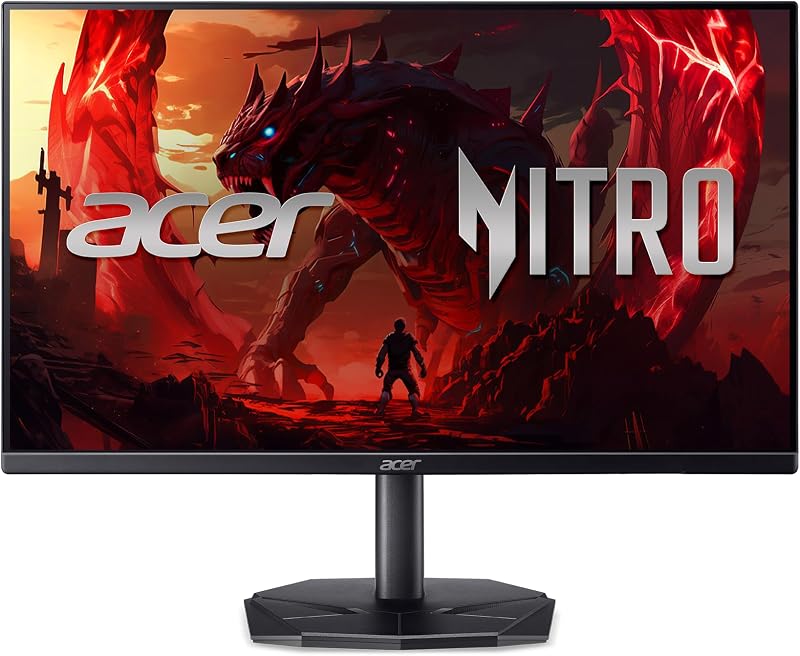
The Acer Nitro KG270U P1biip 27″ WQHD delivers a 2560 x 1440 In-Plane Switching panel engineered for players who want fine image definition alongside standard competitive speed. The 27-inch screen size paired with QHD resolution produces a density of roughly 108 pixels per inch, eliminating the visible pixel grid common to lower-resolution panels of this size. Acer equips the display with AMD FreeSync technology to prevent screen tearing, a 144Hz refresh rate, a 1ms response time, and HDR 10 decoding with 99% sRGB color space coverage. The ZeroFrame enclosure minimizes outer bezel borders, making it an appealing option for multi-monitor arrangements. Shoppers evaluating panoramic desktop layouts can also review our analysis of an acer gaming monitor 27 inch curved option to weigh flat versus contoured viewing fields.
From an engineering and long-term reliability standpoint, the chassis of the acer nitro kg270u p1biip emphasizes compact desk economy over mechanical versatility. The monitor weighs 7.9 pounds and measures 8.28 inches deep on its pedestal, utilizing a tilt-only mechanism without native height, swivel, or pivot capabilities. For daily durability, the slim ZeroFrame edges leave the outer perimeter of the LCD glass relatively exposed, requiring caution when handling or relocating the unit. The display integrates ComfyView matte anti-glare surfacing, flicker-less backlighting, and low-dimming circuitry, which help mitigate optical fatigue during extended sessions. Thermal dissipation relies on passive convection vents along the rear housing, making it critical to keep the upper vents clear of dust buildup to preserve internal power board health.
This display suits visual-focused gamers, digital illustrators, and office workers who demand crisp font rendering and broad color gamut coverage without paying for complex mechanical pedestals. It provides a sharp visual upgrade over standard 1080p monitors while maintaining reliable 144Hz pacing. However, users who require ergonomic height adjustments to prevent physical strain will find this fixed pedestal lacking, making the more flexible Nitro XV271U a better physical investment unless an aftermarket mounting arm is added.
Acer SH273 P1si 27" IPS Full for Ergonomic Office Hybrids

Best for: Home office workers playing evening esports
Pros
- Full ErgoStand with 360-degree swivel
- 93-inch smooth height adjustment
- Flicker-less display with low dimming
Cons
- Lower 1080p resolution at 27 inches
- VGA port limits modern dual-monitor setups
The Acer SH273 P1si 27″ IPS Full serves as a dual-role display tailored for hybrid work environments and recreational gaming. Built around a 1920 x 1080 IPS panel, it pairs Full HD visual fidelity with an agile refresh rate reaching up to 144Hz and a 1ms Visual Response Boost (VRB) mode to suppress ghosting artifacts during rapid scene transitions. Visual synchronization is managed through AMD FreeSync, ensuring that fluctuating frame output from a graphics card does not cause horizontal image slicing. The display features a matte surface finish, a 99% color gamut rating, and wide 178-degree viewing angles that maintain uniform color saturation across the entire panel face.
Where this unit distinguishes itself within the category of an acer 144hz 1ms monitor is its integrated ErgoStand. Unlike typical entry-level displays that lock the panel into a fixed elevation, the acer sh273 p1si includes 3.93 inches of vertical height adjustment, full 360-degree swivel capability, and a tilt range spanning -5 to 25 degrees. This mechanical range allows users to position the screen at true eye level, substantially reducing cervical spine strain over eight-hour workdays. The stand also incorporates a quick-release latch that disconnects the neck from the panel, granting immediate access to VESA mounting points. For video input, the chassis provides an HDMI port alongside an analog VGA port, offering practical compatibility for legacy office workstations while supporting modern digital graphics cards.
This model is an exceptional match for telecommuters and students who spend long daytime hours analyzing spreadsheets before transitioning to casual gaming at night. The robust ergonomic stand provides immediate health and comfort benefits straight out of the carton. Conversely, competitive gamers seeking pure graphic sharpness will notice that spreading a 1080p resolution across a 27-inch panel softens smaller environmental textures and text, making 1440p alternatives preferable for detail-oriented tasks.
Acer 27in FHD 1920×1080 IPS 144Hz for Streamlined Competitive Play

Best for: Esports players prioritizing low system load
Pros
- Responsive 1ms motion rendering
- Wide 178-degree IPS viewing angles
- Low Blue Light eye protection
Cons
- Fixed stand lacks height travel
- Coarser pixel density on 27-inch panel
The Acer 27in FHD 1920×1080 IPS 144Hz, designated under model code KB272 P6bi, focuses strictly on the fundamental performance criteria of high-speed gaming. It utilizes a 27-inch 1920 x 1080 IPS panel operating at a native 144Hz refresh rate with a 1ms response time and AMD FreeSync support. The display produces 250 nits of peak brightness and is backed by a dynamic contrast ratio rated at 100,000,000:1. The ZeroFrame construction eliminates bulky plastic borders along the top and sides, presenting a low-profile aesthetic that maximizes screen space on crowded gaming desks. To compare this baseline configuration against alternative display categories, readers can explore our wider gaming monitors acer overview for additional context on hardware tiers.
In terms of component resilience and physical architecture, the acer kb272 p6bi utilizes a stripped-down chassis to prioritize essential gaming metrics. The stand employs a circular footprint that occupies minimal surface area, though mechanical motion is limited entirely to basic forward and backward tilt. Reliability advocates should note that operating a 27-inch monitor on a tilt-only stand often forces users to prop the base on risers to achieve ergonomic eye alignment. Acer integrates its VisionCare suite into the firmware, incorporating Low Blue Light modes, ComfyView anti-reflective surface treatment, and flicker-less LED backlighting to shield users from ocular fatigue during sustained use. The internal electronics run cool due to the modest power draw of the 1080p backlighting system, supporting long-term component longevity.
This display is suited for competitive esports players whose primary goal is driving maximum frame rates on mainstream graphics hardware without overloading their system at higher resolutions. It delivers responsive motion handling and wide IPS viewing angles for communal gaming. Nevertheless, users looking for high text sharpness or integrated stand articulation should bypass this minimalist configuration in favor of the fully adjustable SH273 or the pixel-dense Nitro models.
Acer Nitro 27in QHD 2560×1440 IPS for Complete Ergonomics and Speed

Best for: Demanding gamers requiring full ergonomic articulation
Pros
- High-speed 180Hz DisplayPort refresh rate
- Fully articulated ErgoStand with pivot
- Crisp 1440p WQHD panel
Cons
- Refresh capped at 144Hz over HDMI
- Speakers provide modest 2-watt audio output
The Acer Nitro 27in QHD 2560×1440 IPS, carrying model number XV271U M3bmiiprx, stands as the most comprehensively equipped display in this evaluation group. It merges a 2560 x 1440 WQHD panel with an overclocked 180Hz refresh rate across its DisplayPort 1.2 connection, while maintaining a dependable 144Hz ceiling over its dual HDMI 2.0 inputs. Response performance is rated at 1ms gray-to-gray, with overdrive capabilities reaching down to 0.5ms. The display integrates AMD FreeSync Premium technology to maintain frame synchrony under heavy visual loads, alongside a pair of integrated 2-watt speakers, an audio pass-through jack, and a pixel pitch of 0.233mm for sharp image reproduction. Gamers researching high-velocity hardware can also examine our evaluation of an acer 240hz monitor to gauge whether pushing beyond 180Hz provides tangible competitive benefits.
Chassis build quality on the acer nitro xv271u m3bmiiprx represents a noticeable step up in mechanical stability and thermal management. The unit features Acer’s ErgoStand system, providing 4.7 inches of height adjustment, 360 degrees of swivel, -5 to 25 degrees of tilt, and full 90-degree bidirectional pivot for vertical document or code viewing. This extensive range of movement minimizes mechanical strain on the mounting neck and removes the need for aftermarket monitor arms. The internal power supply and logic boards are encased within a reinforced rear housing featuring dedicated ventilation grilles, promoting steady heat dissipation even when running at 180Hz. The 1000:1 native contrast ratio, 250-nit brightness, and VisionCare suite ensure consistent optical comfort across varied lighting conditions.
This flagship model is ideal for enthusiasts seeking an all-in-one desktop solution that balances top-tier gaming speeds, 1440p resolution, and complete physical adjustability. It handles both high-end PC gaming via DisplayPort and secondary console connections through its twin HDMI ports with ease. While it occupies a slightly deeper desktop footprint than basic tilt-only units, its exceptional mechanical adjustability and input versatility make it the definitive choice for demanding users who refuse to compromise on ergonomics.
How to Choose the Right Acer Gaming Monitor
Navigating an acer gaming monitor comparison requires balancing panel resolution, mechanical adjustability, and connectivity against your daily computing requirements. When deciding which acer gaming monitor to buy, the initial technical decision centers on native resolution versus screen size. At a 27-inch diagonal measurement, a 1080p panel such as the KB272 P6bi or SH273 P1si yields approximately 81 pixels per inch. This lower pixel density allows budget-friendly graphics cards to easily push frame rates to the 144Hz ceiling, but it results in noticeable pixelation on small text and fine geometric lines. Conversely, an acer 1440p 144hz gaming monitor like the KG270U P1biip or XV271U M3bmiiprx provides 108 pixels per inch, rendering exceptionally crisp visual elements and vast desktop workspaces at the cost of higher graphics hardware processing demands.
Mechanical ergonomics represents the next critical factor governing long-term ownership satisfaction. Fixed pedestals that offer only forward and backward tilt—found on both the KG270U and KB272—force the display panel to sit relatively low to the desk surface. Unless elevated with a desktop riser, these rigid stands can induce slouching and neck discomfort during multi-hour computing sessions. In contrast, models outfitted with Acer’s ErgoStand mechanism, such as the SH273 and XV271U, provide comprehensive height adjustment, horizontal swivel, and pivot articulation. Investing in fully articulated stands protects buyer health and eliminates the immediate necessity of purchasing separate VESA monitor arms, making them physically sound investments over years of service.
Assessing acer gaming monitor reliability also involves examining the interface ports and physical connectors on the rear panel. Displays equipped solely with standard HDMI and legacy VGA ports, like the SH273, serve mixed-use office workstations well but restrict high-end PC graphics cards from using DisplayPort protocols. DisplayPort connectivity, featured prominently on the Nitro XV271U, is necessary to unlock higher overclocked refresh tiers up to 180Hz and maintain adaptive synchronization across diverse graphics architectures. Additionally, multi-input displays featuring dual HDMI ports permit multiple systems, such as a desktop computer and a home entertainment console, to stay connected simultaneously, preventing mechanical wear and tear on the physical video ports caused by frequent cable swapping.
Finally, visual endurance technologies should guide your display selection. All four models incorporate In-Plane Switching panel engineering, ensuring wide 178-degree horizontal and vertical viewing fields with consistent color rendition. However, Acer’s integration of flicker-less backlights, low-dimming hardware circuitry, and ComfyView matte finishes plays a decisive role in protecting vision during night sessions. Ensuring that your chosen monitor includes robust anti-glare filtering and low blue light emissions will reduce eye strain, allowing you to maximize the benefits of an acer gaming monitor 144hz 1ms configuration without causing optical fatigue.
FAQ
Does an Acer 144Hz 1ms monitor support AMD FreeSync on both AMD and Nvidia graphics cards?
Yes, Acer monitors equipped with AMD FreeSync communicate through standard adaptive sync protocols. While AMD FreeSync is natively engineered for AMD Radeon graphics cards, Nvidia GeForce cards starting with the GTX 10-series and newer can utilize variable refresh rates over a DisplayPort connection by enabling G-Sync Compatible mode within the graphics control panel. On models restricted to HDMI or legacy inputs, FreeSync functionality remains dependable on AMD hardware, while compatibility with alternative graphics platforms may depend on specific driver support.
What is the difference between 1ms VRB and 1ms G to G response times?
The 1ms VRB (Visual Response Boost) rating indicates that the monitor utilizes an internal backlight strobing system to switch off illumination between frame refreshes, effectively minimizing perceptible optical motion blur to the equivalent of a 1ms transition. A 1ms Gray-to-Gray (G to G) measurement reflects the actual physical time required for liquid crystal molecules inside the IPS panel to shift between two distinct shades of gray. While VRB reduces visible ghosting, it can diminish screen luminance and introduce minor flicker, whereas low G to G transition times achieve visual clarity without altering backlight consistency.
Is a 27-inch screen size suitable for 1080p resolution in competitive gaming?
A 27-inch screen operating at 1920 x 1080 Full HD provides a spacious visual field that allows competitive players to track opponents and crosshairs without excessive peripheral eye movement. Because the pixel count is lower than 1440p, your graphics hardware can sustain steady 144Hz frame rates with minimal performance overhead. The primary trade-off is a lower pixel density of approximately 81 pixels per inch, which can make fine text, spreadsheets, and detailed textures appear slightly coarse compared to a QHD display of the same physical dimensions.
Can Acer gaming monitors be mounted on standard aftermarket monitor arms?
Most Acer gaming monitors feature standardized VESA mounting screw patterns, typically measuring 100 x 100 millimeters or 75 x 75 millimeters, allowing them to interface with standard desk clamps and articulating wall mounts. Models such as the SH273 incorporate quick-release mechanisms that separate the panel housing from the factory pedestal within seconds, exposing the VESA mounting holes directly. Always verify the monitor’s net weight without its stand against the load limits of your aftermarket arm to ensure stable, sag-free articulation.
Why does the Acer XV271U operate at 144Hz on HDMI but 180Hz on DisplayPort?
The discrepancy in refresh rates across the Acer Nitro XV271U stems from the hardware bandwidth ceilings of its respective input ports. The DisplayPort 1.2 interface provides the digital data transfer bandwidth required to transport an uncompressed 2560 x 1440 resolution signal at an overclocked 180Hz refresh frequency. The included HDMI 2.0 ports possess lower total transmission throughput, establishing a stable, standardized bandwidth ceiling of 144Hz at 1440p resolution. Connecting your primary gaming PC through DisplayPort ensures full access to the panel’s maximum 180Hz operating mode.