


As Amazon Associates, we earn from qualifying purchases. This means we may receive a small commission at no extra cost to you if you click through and make a purchase.
UGREEN has established a practical footprint in desktop peripherals by designing functional, ergonomic hardware aimed at mitigating repetitive workplace strain. Within its peripheral lineup, the brand focuses on ergonomic mice engineered to prevent forearm pronation, wrist friction, and tendon fatigue during prolonged computing sessions. Rather than forcing users into standard horizontal orientations that compress the carpal tunnel, these peripherals prioritize neutral skeletal alignment, acoustic sound dampening, and flexible wireless switching protocols suited for hybrid office environments.
When selecting between these six models, users will find the primary differences lie in forearm positioning angles, cursor control mechanisms such as stationary trackballs versus optical sensors, and power architectures alternating between rechargeable internal lithium cells and single AA batteries.
UGREEN Ergonomic Mice Compared
| Model | Tracking Mechanism | Wireless Connectivity | Power Architecture | Form Factor Ergonomics |
|---|---|---|---|---|
| UGREEN Ergonomic Wireless Mouse | Optical (1000 to 4000 DPI) | Bluetooth & 2.4G (3 Devices) | 1 AA Battery (Up to 12 Months) | Vertical Handshake Design |
| UGREEN Vertical Wireless | Optical (1000 to 4000 DPI) | Bluetooth 5.0 & 2.4G (3 Devices) | 1 AA Battery | 57-Degree Vertical Contour |
| UGREEN Ergonomic Vertical Mouse | Optical (1000 to 4000 DPI) | Bluetooth & 2.4G (3 Devices) | 500mAh Rechargeable (135 Hours) | Vertical Handshake Contour |
| UGREEN 2.4G Mouse Wireless Vertical Ergonomic | Optical (1000 to 4000 DPI) | 2.4G USB Dongle Only | 1 AA Battery (Up to 12 Months) | 57-Degree Vertical Angle |
| UGREEN M785DR Wireless Trackball Mouse | Thumb Trackball (400 to 2000 DPI) | Bluetooth & 2.4G (3 Devices) | 500mAh USB-C Rechargeable | Stationary Vertical Base |
| UGREEN Wireless Mouse | Optical (1000 to 4000 DPI) | Bluetooth 5.0 & 2.4G | 1 AA Battery | Contoured Horizontal Palm Grip |
UGREEN Ergonomic Wireless Mouse for Large-Hand Comfort
Best for: Large-handed users wanting multi-device vertical navigation
Pros
- PTFE glide pads for smooth motion
- Dual-band Bluetooth and 2.4G wireless
- Silent-click button switches
- 12-month battery life on AA cell
Cons
- Requires disposable AA battery replacement
- Limited to four preset DPI tiers
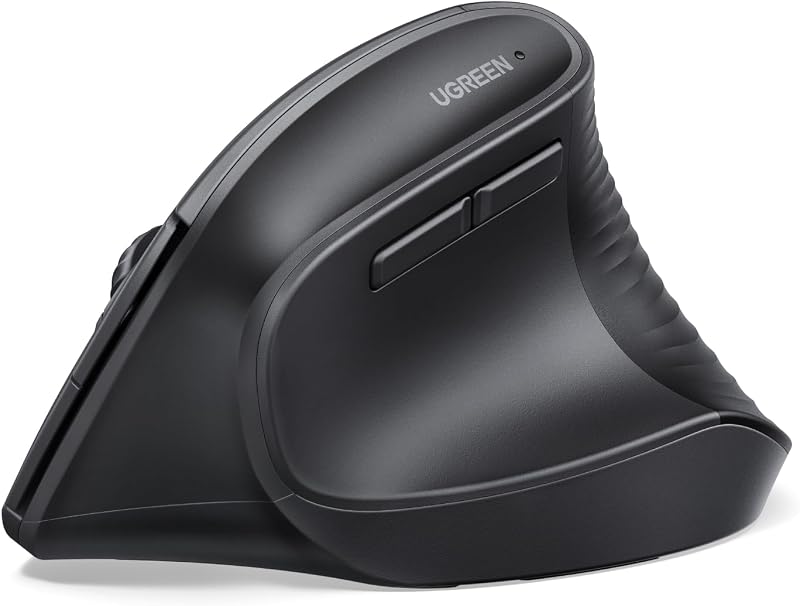
The UGREEN Ergonomic Wireless Mouse is built around an upright vertical posture that rotates the user forearm into a natural handshake orientation. By realigning the wrist away from traditional flat desk positioning, this ugreen mouse ergonomic peripheral reduces muscular torque along the forearm. The underside is fitted with durable Teflon PTFE glide feet that lower surface friction across desk pads and hard table surfaces, allowing effortless gliding while minimizing shoulder engagement during continuous tracking.
Operational features center on workplace productivity and quiet tactile feedback. The five-button layout utilizes silent-click switches designed to minimize acoustic distraction in communal offices or quiet home workspaces. Cursor tracking relies on an optical sensor with four selectable DPI tiers: 1000, 1600, 2000, and 4000. For wireless connectivity, the mouse supports both a 2.4G USB dongle and dual Bluetooth channels, enabling users to pair and alternate across three separate devices. Power is supplied by a single AA battery that yields an average life of up to twelve months when paired with the onboard smart sleep mode.
This model is particularly suited for individuals with larger hands who suffer from wrist compression when gripping small, flat mice. The broad vertical chassis provides ample resting area for the palm and fingers. However, shoppers who prioritize rechargeable lithium internal cells over replaceable alkaline batteries may find this unit less optimal than internal battery counterparts in the lineup.
UGREEN Vertical Wireless for Multi-OS Workstations

Best for: Mac and Windows multi-device desk setups
Pros
- Neutral 57-degree ergonomic angle
- Dedicated macOS application switching buttons
- Multi-device switching across three pairings
- Whisper-quiet acoustic button operation
Cons
- Uses disposable AA battery
- Requires modern operating system versions
The UGREEN Vertical Wireless provides an engineered 57-degree vertical tilt designed to relieve repetitive tension along the pronator teres muscle. This right-handed peripheral supports multi-display desks, where seamless pointer movement can be paired with workstation hardware like a ugreen displayport to hdmi adapter to route extended displays cleanly across desktop monitors.
The mouse houses six functional buttons engineered with soundless click mechanisms. Hardware switches on the underside include an operating system selector toggle that calibrates the mouse specifically for macOS or Windows. Under the Mac mode, the forward and back thumb keys execute Command+] and Command+[ commands to streamline application switching. Sensor tracking is adjustable across four stages (1000, 1600, 2000, and 4000 DPI). The wireless engine offers dual connectivity through Bluetooth 5.0 and 2.4G RF with a ten-meter operating range, supporting three distinct devices indicated by dedicated numerical LED lights on the housing.
This ugreen vertical wireless mouse serves professionals managing dual operating systems who require integrated OS-level shortcut commands. Because it relies on a single AA battery cell, buyers should factor in periodic battery replacements rather than plug-in USB-C recharging convenience.
UGREEN Ergonomic Vertical Mouse for Cordless Rechargeability

Best for: Desk workers wanting rechargeable vertical navigation
Pros
- Integrated 500mAh rechargeable battery
- Five distinct DPI settings up to 4000
- Dedicated OS mode selector switch
- Three-device wireless pairing versatility
Cons
- Battery runtime capped at 135 hours
- Fixed right-handed chassis contouring
Eliminating the dependence on disposable cells, the UGREEN Ergonomic Vertical Mouse incorporates an integrated 500mAh rechargeable lithium battery that delivers up to 135 hours of continuous computing per full cycle. This ugreen rechargeable vertical mouse maintains a sculpted handshake chassis that conforms to the natural hollow of the user palm, keeping the wrist elevated above harsh work surfaces.
The technical architecture provides five distinct DPI increments—1000, 1600, 2000, 3200, and 4000—allowing precise cursor matching for high-resolution 4K displays or high-density document editing. A dedicated DPI toggle switch and visual indicator confirm current sensitivity. Wireless duties are handled through 2.4G wireless and Bluetooth profiles, supporting up to three paired devices across a 33-foot working range. A dedicated bottom-mounted system switch alternates control profiles between Windows and macOS systems.
Desk workers seeking an eco-conscious power configuration will find this model ideal. While the 135-hour operational runtime requires intermittent recharging intervals, it avoids dead-battery interruptions. Buyers desiring long-term mechanical simplicity without internal battery degradation over many years may lean toward the brand’s AA-powered vertical variants.
UGREEN 2.4G Mouse Wireless Vertical Ergonomic for Interference-Free Desktops

Best for: Larger hands needing dedicated USB wireless
Pros
- 57-degree handshake posture relief
- Substantial chassis sized for 17cm+ hands
- Stable 2.4G USB-A dongle connection
- Quiet-click mechanical microswitches
Cons
- Lacks Bluetooth connectivity entirely
- AA battery not included in box
The UGREEN 2.4G Mouse Wireless Vertical Ergonomic delivers targeted ergonomics for users who want dependable RF transmission without Bluetooth pairing overhead. Crafted with a 57-degree posture contour, this right-handed chassis measures 119.8 by 85.8 by 73 millimeters and weighs 105 grams, making it purposefully sized for hands measuring 17 centimeters and larger.
Unlike hybrid connectivity mice, this model relies solely on an included 2.4G USB-A wireless receiver operating over a ten-meter range. Cursor motion is governed by an optical sensor featuring four adjustable DPI presets: 1000, 1600, 2000, and 4000. It features a six-button soundless layout, incorporating forward and back thumb navigation switches that operate as application switchers on Mac environments. A single AA battery powers the unit with an average life expectancy of twelve months, though the battery is not included in the packaging.
This ugreen 2.4g mouse wireless vertical ergonomic design is best suited for corporate office terminals or desktop environments with restricted Bluetooth policies or heavy 2.4 GHz signal congestion. However, users managing multiple portable laptops or tablets simultaneously will notice the lack of multi-device Bluetooth toggling.
UGREEN M785DR Wireless Trackball Mouse for Stationary Workstations
Best for: Confined workstations needing stationary precision control
Pros
- Zero wrist translation with thumb control
- 4D hyper-fast multidirectional scroll wheel
- USB-C rechargeable internal battery
- Eight programmable physical buttons
Cons
- Requires routine trackball socket maintenance
- Maximum resolution tops out at 2000 DPI
Departing from traditional sliding mice, the UGREEN M785DR Wireless Trackball Mouse combines an ergonomic vertical base with a precision thumb-controlled trackball. Because cursor navigation is driven entirely by thumb rotation while the 155-gram mouse base remains completely motionless, this model eliminates shoulder translation and wrist deviation entirely. It functions seamlessly on crowded desks, soft couches, or user laps without requiring an auxiliary mouse pad.
The unit features an advanced 4D hyper-fast scroll wheel that executes both vertical line scrolling and horizontal pan movements alongside variable scroll speed switching. Tracking resolution spans five dedicated DPI settings calibrated between 400 and 2000 DPI to maintain stability across broad multi-monitor workflows. Connectivity spans 2.4G wireless and dual Bluetooth bands for up to three simultaneous endpoints. It houses an internal 500mAh battery recharged via standard USB-C cables, and features eight customizable physical buttons. To maintain tracking fluidity, the bottom features a release aperture where the trackball can be popped out for regular socket wiping.
The ugreen m785dr wireless trackball mouse suits power users, financial analysts navigating massive spreadsheets, and individuals with severe wrist impingement who cannot tolerate moving a mouse across a pad. Precision designers requiring micro-level sensor sensitivity above 2000 DPI may prefer standard optical tracking instead.
UGREEN Wireless Mouse for Classic Grip Ergonomics
Best for: Traditional palm grip users seeking ergonomic support
Pros
- Familiar contoured horizontal grip
- Dual-mode Bluetooth 5.0 and 2.4G
- Muffled acoustic sound dampening
- Wide cross-platform operating system support
Cons
- Does not provide true vertical handshake posture
- Requires disposable AA battery power
For individuals hesitant to adopt an extreme vertical posture, the UGREEN Wireless Mouse offers an ergonomic middle ground. This full-size peripheral utilizes an anatomically contoured right-handed chassis that supports the natural arch of the palm while maintaining the familiar horizontal grip orientation. Its muted microswitch design produces quiet clicks suitable for shared workspaces, study halls, and home offices.
Internally, this model provides dual-mode wireless freedom using Bluetooth 5.0 and an included 2.4G USB receiver with quick-switch capability and automatic pairing pop-up support on supported operating systems. The optical tracking sensor delivers 1000, 1600, 2000, and 4000 DPI levels to handle varying monitor resolutions. Power is drawn from a single AA battery cell, and the chassis houses six responsive physical buttons configured for quiet daily web browsing and office productivity.
This contoured model represents a reliable choice for budget-conscious office workers transitioning away from cramped laptop trackpads or flat travel mice. While it provides palm arch support, it does not achieve the full forearm strain relief delivered by the brand’s 57-degree vertical products.
How to Choose the Right UGREEN Ergonomic Mouse
Conducting a comprehensive ugreen ergonomic mouse comparison requires examining your physical workstation layout, biomechanical strain symptoms, and hardware connectivity needs. If you experience burning sensations along the top of your wrist or inside the carpal tunnel, moving to a vertical handshake model is critical. Devices with a 57-degree tilt angle keep the radius and ulna bones parallel, preventing painful tissue twisting during long work shifts.
Power management represents another significant decision factor. Shoppers must determine whether they prefer the continuous convenience of disposable AA batteries or the modern footprint of integrated USB-C rechargeability. Models running on a single AA cell frequently achieve up to twelve months of operation through automatic sleep states, avoiding cord clutter entirely. Conversely, rechargeable units like the 500mAh models eliminate battery disposal, requiring only an occasional connection to a desktop port or dedicated ugreen charging station to top off internal reserves.
Workstation surface constraints also dictate which ugreen ergonomic mouse to buy. In tight cubicles, on uneven surfaces, or for mobile professionals working from cafe tables, the stationary base of the UGREEN M785DR eliminates the need for clear desk radius and tracking pads. For standard expansive desks, traditional gliding optical vertical mice provide natural kinetic feedback that requires zero thumb adjustment learning curve.
Finally, consider your overall physical workstation configuration. A properly positioned input device works best alongside comprehensive ergonomic adjustments, such as supporting your lower spine and hip alignment using an everlasting comfort doctor recommended memory foam seat cushion for office chairs & car – ergonomic to preserve neutral posture from shoulder to wrist. Ensuring your operating system matches the mouse’s button capabilities guarantees that side shortcut keys function reliably without extensive driver modifications.
FAQ
How does the 57-degree angle on UGREEN vertical mice prevent forearm fatigue?
Standard horizontal computer mice force the human hand into full pronation, rotating the palm downward against the desk surface. This twisting compresses the median nerve and exerts static load on the forearm muscles. A 57-degree vertical angle shifts the hand into a semi-upright handshake posture, keeping the skeletal structure of the arm in a neutral alignment that substantially relieves forearm muscle tension.
What is the status of UGREEN vertical mouse Mac compatibility?
UGREEN models featuring dedicated system toggle switches offer robust ugreen vertical mouse mac compatibility. When switched to Mac mode, the side thumb buttons translate directly to Command+] and Command+[ inputs, which serve as application switching commands across macOS. Basic tracking and primary silent clicks operate out of the box via both 2.4G wireless dongles and Bluetooth without requiring specialized peripheral management software.
How do you clean and maintain the UGREEN M785DR trackball?
Over time, skin oils and airborne dust accumulate within the trackball housing, which can cause erratic cursor movement. The trackball can be easily serviced by pressing a blunt instrument through the circular access opening on the underside of the mouse to dislodge the spherical ball. Wipe the ball with a soft microfiber cloth and clean the internal optical sensor lens and support bearings using a dry cotton swab before snapping the ball back in place.
Which is the best UGREEN ergonomic mouse for multi-device workflows?
The best ugreen ergonomic mouse for cross-device switching is any model featuring dual-mode Bluetooth and 2.4G connectivity with integrated multi-channel switching. The UGREEN Vertical Wireless and the UGREEN Ergonomic Vertical Mouse both allow concurrent pairing with up to three distinct host devices, letting users switch between personal laptops, office workstations, and tablets with a single tactile button press.
What is the difference between optical gliding mice and trackball models?
Optical vertical mice require the entire peripheral to glide over a surface, engaging the user elbow and shoulder muscles while maintaining a neutral wrist angle. Trackball models like the M785DR remain completely stationary on the desk while cursor translation is driven entirely by rotating a thumb-guided ball. Trackballs require zero desk clearance and eliminate friction-based arm movement entirely, though they require a brief adjustment period for muscle memory.


