


As Amazon Associates, we earn from qualifying purchases. This means we may receive a small commission at no extra cost to you if you click through and make a purchase.
ASUS has built its mainstream laptop reputation on the Vivobook family, engineering slim, accessible portables that deliver modern ergonomic inputs, NanoEdge displays, and balanced processing hardware across home, student, and office environments. The lineup targets practical day-to-day functionality, incorporating functional safeguards such as physical webcam privacy shutters, Antimicrobial Guard surface treatments, and MIL-STD 810H durability certifications into slim clamshell chassis.
Across this asus vivobook laptop comparison, the six configurations diverge noticeably in their internal hardware layouts, spanning three distinct display formats from fourteen to seventeen inches, three competing silicon architectures covering Intel Core, AMD Ryzen AI, and Qualcomm Snapdragon, and a critical distinction between true unified internal solid-state storage and bundled external expansion drives.
ASUS Laptops Compared
| Model | Display & Weight | Processor & Graphics | Storage Configuration | Key Reliability Features |
|---|---|---|---|---|
| ASUS Vivobook 17 Laptop | 17.3-inch FHD NanoEdge, 0.78-inch thickness | Intel Core 7 150U, Intel Integrated | 1TB Internal SSD (DDR5 RAM) | MIL-STD 810H, Fast Charging, Antimicrobial Guard Plus |
| ASUS Vivobook 14 FHD Laptop | 14-inch FHD Anti-Glare, 3.09 lbs | Intel Core i7-1355U, Intel UHD Graphics | 1TB PCIe SSD (DDR4 SO-DIMM) | MIL-STD 810H, Spill Resistant, NumberPad Touchpad |
| ASUS Daily Vivobook Laptop | 14-inch FHD IPS-Level, 3.09 lbs | Intel Core i3-1215U, Intel UHD Graphics | 1TB PCIe NVMe M.2 SSD | Wi-Fi 6, 250 nits display, physical webcam shutter |
| ASUS Vivobook Laptop Business Computer 2025-2026 | 14-inch FHD IPS-Level, 3.1 lbs | Intel Core i5-1334U, Intel Iris Xe Graphics | 512GB Internal SSD + 500GB External Drive | Windows 11 Pro, Office 2024, 180° Lay-Flat Hinge |
| ASUS Vivobook 16 Laptop | 16-inch WUXGA (16:10), 4.14 lbs | AMD Ryzen AI 7 350, AMD Radeon Graphics | 1TB PCIe 4.0 SSD (DDR5 RAM) | AMD XDNA NPU (50 TOPS), Backlit Keyboard with NumKey |
| ASUS Vivobook 16″ Copilot+ PC Laptop | 16-inch WUXGA (16:10), 5.0 lbs | Snapdragon X – X126100, Qualcomm Adreno | 1TB PCIe Gen 4 SSD (LPDDR5X RAM) | Qualcomm Hexagon NPU (45 TOPS), Anti-Glare Panel |
ASUS Vivobook 17 Laptop for Large Display Productivity
Best for: Desk-bound professionals wanting maximum screen space
Pros
- Expansive 17.3-inch display
- Fast charging to 60 percent
- MIL-STD 810H durability
- Full ErgoSense numeric keypad
Cons
- Heavier footprint
- Polycarbonate chassis
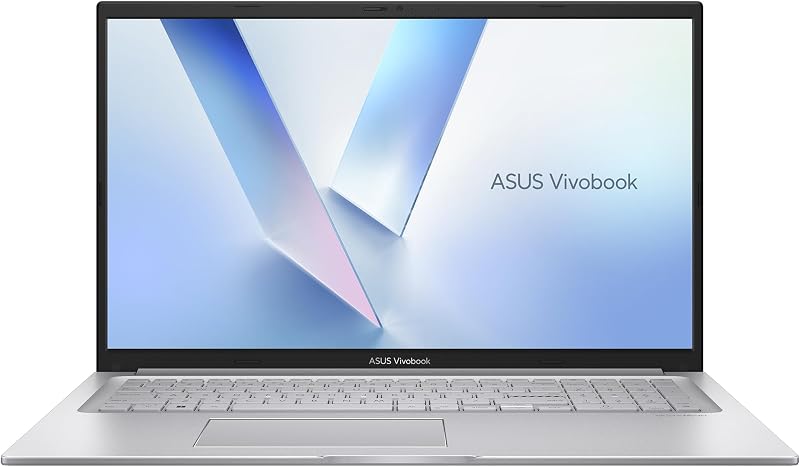
The ASUS Vivobook 17 Laptop serves users who require expansive screen real estate without moving to a stationary desktop workstation. Anchored by a 17.3-inch Full HD NanoEdge display with TÜV Rheinland eye-care certification, this chassis prioritizes visual comfort and generous input spacing. Beneath the Cool Silver exterior, ASUS equips the notebook with an Intel Core 7 150U processor, 16GB of DDR5 memory, and a genuine internal 1TB solid-state drive. Connectivity covers everyday desktop peripherals via multiple USB Type-A ports, a versatile USB Type-C port supporting power delivery, dedicated HDMI video output, and modern Wi-Fi 6 wireless networking.
From a hardware longevity perspective, this desktop replacement includes valuable structural defenses, notably passing US MIL-STD 810H military-grade endurance tests to survive flex and everyday physical handling. ASUS Antimicrobial Guard Plus coats frequently touched surfaces to inhibit bacterial accumulation, while a 180-degree lay-flat hinge relieves mechanical tension when opening the wide lid. Fast charging is integrated into the power management architecture, restoring a depleted battery up to 60 percent capacity in approximately 49 minutes. The full ErgoSense keyboard includes a dedicated numeric keypad and soft backlighting, catering directly to accounting tasks, spreadsheet navigation, and extended typing sessions.
This large-format machine suits spreadsheet analysts, remote office workers, and home administrators who value an expansive workspace and dedicated numeric keys over ultra-portable commuting. However, weighing more and measuring over fifteen inches wide, it gives way to the compact 14-inch Vivobooks for frequent travelers or students needing an everyday backpack companion.
ASUS Vivobook 14 FHD Laptop for Mobile Daily Productivity

Best for: Mobile professionals needing durable multi-core power
Pros
- Spill-resistant keyboard deck
- Integrated NumberPad touchpad
- 10-core Intel Core i7
- Lightweight 3.09-pound build
Cons
- Modest 250-nit brightness
- Wi-Fi 5 wireless standard
Designed for users who commute between office desks, lecture halls, and home workspaces, the ASUS Vivobook 14 FHD Laptop pairs a compact 14-inch footprint with higher-tier processing capability. Built around a 13th Generation Intel Core i7-1355U processor with 10 cores, 12 threads, and boost capability up to 5.0 GHz, it handles multithreaded productivity workflows smoothly. The internal storage setup consists of a true 1TB PCIe x4 solid-state drive matched to 16GB of DDR4 SO-DIMM memory. The 14-inch Full HD anti-glare display achieves an 83 percent screen-to-body ratio with 250 nits brightness, reducing distracting reflections under indoor overhead lights.
For reliability advocates, this model introduces notable defensive measures, including official spill resistance across the keyboard deck and EPEAT Silver environmental certification alongside MIL-STD 810H compliance. Input functionality is bolstered by the ASUS NumberPad embedded directly into the touchpad surface, letting mobile workers input numeric data without needing a wide 17-inch chassis. Daily operation is quiet and secure, supported by SonicMaster audio with AI noise cancellation, a 720p HD webcam protected by a physical privacy shutter, and rapid battery charging that reaches 60 percent power in roughly 49 minutes with up to 8 hours of battery life.
This configuration directly suits mobile professionals and university students who require reliable multi-core processing in a travel-friendly 3.09-pound shell. It gives way to the larger 16-inch and 17-inch models when continuous dual-document side-by-side editing or dedicated physical numeric keys are mandatory for your workload.
ASUS Daily Vivobook Laptop for Basic Everyday Computing

Best for: Budget-focused users doing everyday computing tasks
Pros
- Fast 1TB NVMe drive
- Modern Wi-Fi 6 connectivity
- 16GB multitasking memory
- IPS-level anti-glare display
Cons
- Entry-level Core i3 processor
- Standard plastic housing
The ASUS Daily Vivobook Laptop targets practical, routine computing tasks where extreme processing overhead is unnecessary. It integrates a 12th Generation Intel Core i3-1215U processor featuring 6 cores and 8 threads with max turbo speeds reaching 4.4 GHz, paired with integrated Intel UHD Graphics. While positioned for general productivity, the listing specifies a generous internal configuration featuring 16GB of high-bandwidth DDR4 RAM and a fast 1TB PCIe NVMe M.2 solid-state drive operating over a PCIe x4 interface.
The chassis features a 14-inch Full HD anti-glare display with an IPS-level panel and 250 nits brightness, framed within slim bezels. ASUS outfits this 3.09-pound notebook with comprehensive legacy and modern ports, including one USB 3.2 Gen 1 Type-C port, two USB 3.2 Gen 1 Type-A ports, a legacy USB 2.0 port, HDMI 1.4 video output, and Wi-Fi 6 wireless networking. A physical webcam shutter protects privacy, while the standard touchpad allows quick disabling via an F6 shortcut key. When deciding which asus vivobook to buy for basic tasks, shoppers should remember that while the i3 processor limits intense media rendering, the 1TB NVMe drive ensures fast Windows 11 Home boot times and local file access.
This model serves students, home budgeting users, and casual web researchers who prioritize generous local storage and responsive memory over complex multithreading. It relinquishes ground to the Core i7 Vivobook 14 or the AMD Ryzen AI 16 when users demand higher sustained computation or advanced multitasking capabilities.
ASUS Vivobook Laptop Business Computer 2025-2026 for Bundled Office Deployments

Best for: Offices needing bundled tools and Pro OS
Pros
- Windows 11 Pro included
- Lifetime Office license
- Included docking hub
- 10-core Intel i5 CPU
Cons
- Storage split across external drive
- Standard 60Hz refresh rate
The ASUS Vivobook Laptop Business Computer 2025-2026 provides a specialized commercial bundle centered around a 14-inch Full HD clamshell chassis. Inside, it runs a 10-core Intel Core i5-1334U processor paired with integrated Intel Iris Xe Graphics, 16GB of DDR4 RAM, and a pre-installed Windows 11 Pro operating system alongside a lifetime Microsoft Office 2024 license. The anti-glare 14-inch screen delivers 1080p resolution at 60Hz with 250 nits of brightness, complemented by a 180-degree lay-flat hinge, physical webcam shield, and ASUS Antimicrobial Guard Plus coating.
Prospective buyers must pay close attention to the storage configuration on this listing. Unlike models containing a single factory internal 1TB drive, this machine achieves its advertised one terabyte of total capacity through an internal 512GB M.2 NVMe SSD paired with an included 500GB external drive. This split storage arrangement, bundled alongside a MarxsolAccessory package featuring a 6-in-1 USB-C docking hub, HDMI cable, and wireless mouse, impacts how system data is managed. Readers evaluating split versus unified drives often compare this setup with our baseline evaluation of a standard hp 16gb 512gb setup to determine whether external storage matches their daily routine.
This bundle appeals to small business owners, administrative contractors, and home offices that benefit immediately from included Windows 11 Pro security tools, lifetime productivity software, and external connectivity accessories. It gives way to the single-drive Vivobooks for field operators who require all 1TB of storage to reside permanently inside the internal M.2 slot without carrying external drives.
ASUS Vivobook 16 Laptop for High-Efficiency Multitasking
Best for: Creative multitaskers needing modern AI power
Pros
- AMD Ryzen AI processor
- Sharp 16:10 WUXGA panel
- Gen 4 PCIe 1TB SSD
- 50 TOPS dedicated NPU
Cons
- 14-pound chassis weight
- Non-touch display panel
Representing modern processing architecture, the ASUS Vivobook 16 Laptop incorporates next-generation silicon into a 16-inch clamshell chassis. At its core is the AMD Ryzen AI 7 350 processor, featuring 8 cores, 16 threads, and a dedicated AMD XDNA neural processing unit capable of up to 50 TOPS for on-device artificial intelligence tasks. ASUS pairs this advanced processor with 16GB of high-speed DDR5 memory, integrated AMD Radeon Graphics, and a genuine 1TB PCIe 4.0 solid-state drive, creating an exceptionally responsive hardware platform for content creation and demanding office work.
The visual experience is centered on a 16-inch WUXGA display featuring a 1920 x 1200 resolution and a taller 16:10 aspect ratio. The panel outputs 300 nits of sustained brightness, providing better visibility and vertical document space than older 16:9 displays. Thermal and structural engineering maintains a slim 0.7-inch profile at 4.14 pounds, incorporating Wi-Fi 6, Bluetooth 5.3, and an illuminated keyboard complete with a physical numeric keypad. Battery longevity extends up to 8 hours under typical use, supported by fast-charging capabilities that reach 100 percent capacity in 1 hour and 20 minutes.
This machine fits creative professionals, software developers, and productivity power users who require modern AMD AI capabilities, 16:10 visual space, and PCIe 4.0 data speeds. Shoppers needing even heavier computing power often investigate an asus laptop i7 32gb ram 1tb ssd for extreme memory headroom, while those seeking pure battery efficiency may look toward ARM-based alternatives.
ASUS Vivobook 16" Copilot+ PC Laptop for Next-Generation ARM Efficiency
Best for: Commuters prioritizing silent efficiency and battery
Pros
- Snapdragon X ARM architecture
- Dedicated 45 TOPS Hexagon NPU
- 16:10 anti-glare display
- Fast 1TB PCIe G4 SSD
Cons
- 5-pound listing weight
- Potential ARM emulation limits
The ASUS Vivobook 16″ Copilot+ PC Laptop marks a fundamental architectural shift in the Vivobook series, adopting Qualcomm’s Snapdragon X processor instead of traditional x86 silicon. Powered by an 8-core Snapdragon X – X126100 platform clocked up to 3.0 GHz alongside a Qualcomm Hexagon NPU producing 45 TOPS, this Copilot+ PC is engineered for continuous AI acceleration and exceptional thermal efficiency. The internal configuration includes 16GB of power-efficient LPDDR5X RAM and a 1TB PCIe Gen 4 solid-state drive running Windows 11 Home.
Visuals are displayed on a 16-inch anti-glare IPS WUXGA panel with a 1920 x 1200 resolution, 60Hz refresh rate, 300 nits brightness, and 45 percent NTSC color coverage. Qualcomm Adreno integrated graphics drive external monitors while the ARM architecture dramatically reduces heat output during standard productivity tasks. Hardware longevity relies heavily on reduced thermal stress across the internal motherboard, although users must ensure their specialized software runs natively or smoothly through Windows on ARM emulation.
This laptop represents the ideal choice for early AI adopters, mobile office workers, and travelers who prioritize quiet, cool operation and Windows 11 Copilot+ capabilities. Users coming from a traditional legacy laptop hp i5 16gb ram 1 tb workstation will experience completely different power dynamics, though buyers who rely heavily on niche x86 legacy software will prefer Intel or AMD Vivobooks.
How to Choose the Right ASUS Laptops
Selecting the best model from the Vivobook family requires looking past superficial spec sheets and evaluating physical build, thermal behavior, and internal storage design.
First, verify internal storage configurations to avoid unpleasant surprises. Most models featured here, including the Vivobook 17 and Vivobook 16 variants, utilize a unified internal 1TB M.2 solid-state drive operating over high-speed PCIe interfaces. Conversely, certain bundles like the Vivobook Business Computer divide storage between a 512GB internal SSD and an external 500GB drive. If you frequently travel without accessories, an internal drive prevents asus vivobook 16gb ram 1tb ssd issues related to disconnected cables, external drive wear, and fragmented file directories.
Second, consider processor architecture and the ongoing debate surrounding asus vivobook snapdragon vs intel. Traditional Intel Core processors (such as the Core 7 150U, i7-1355U, and i5-1334U) and AMD Ryzen AI processors offer universal software compatibility with legacy x86 Windows applications, specialized enterprise tools, and broad driver ecosystems. In contrast, the Snapdragon X ARM platform delivers superior thermal efficiency, lower idle power draw, and high-efficiency NPU performance, though specialized legacy programs may require emulation.
Third, evaluate the display footprint and chassis portability. The 14-inch models weigh just over three pounds, making them optimal for backpack transit and cramped lecture desks, with select models offering creative inputs like the touchpad NumberPad. The 16-inch laptops introduce modern 16:10 aspect ratio panels that provide extra vertical viewing area for editing and documents, while the 17.3-inch Vivobook 17 serves primarily as an anchored desk replacement where screen visibility and a wide physical keyboard take priority over travel convenience.
Finally, inspect asus vivobook build quality indicators. Models tested against MIL-STD 810H standards feature reinforced chassis resistance against shock and vibration. Features like physical webcam privacy shields, lay-flat hinges that mitigate torque stress, and spill-resistant keyboards on select 14-inch units directly determine how well these budget-conscious laptops endure years of daily mechanical wear.
FAQ
Does every ASUS Vivobook with 16GB RAM and 1TB storage feature a single internal SSD?
Not always. While standard factory configurations like the Vivobook 17, Vivobook 14 FHD, and Vivobook 16 house a single internal 1TB PCIe solid-state drive, certain third-party merchant packages split storage. For instance, bundled business models may pair an internal 512GB M.2 SSD with an included 500GB external drive to reach the 1TB threshold. Always inspect technical specifications to confirm single-drive integration.
How does ASUS Vivobook build quality compare across plastic and metal chassis designs?
ASUS incorporates US MIL-STD 810H military-grade testing across several Vivobook tiers to ensure resistance against drops, vibration, and thermal fluctuations. While many Vivobook chassis utilize engineered polycarbonate materials rather than full aluminum unibodies, features such as 180-degree lay-flat hinges, reinforced port anchors, and Antimicrobial Guard coatings ensure durable operation when handled responsibly.
Can the 16GB RAM be upgraded on ASUS Vivobook laptops?
Memory expandability depends entirely on the processor platform and motherboard layout. Models like the Vivobook 14 FHD specify DDR4 SO-DIMM slots that permit memory expansion, whereas systems powered by modern DDR5, LPDDR5X, or ARM architectures often feature memory permanently soldered to the motherboard. Check the specific motherboard schematic before purchasing if future RAM expansion is required.
What are the practical differences between Snapdragon and Intel Vivobooks?
Intel-powered Vivobooks provide flawless legacy x86 program compatibility, broad driver support for specialized peripherals, and familiar thermal management. Snapdragon X ARM laptops deliver cooler operating temperatures, extended battery endurance, and dedicated NPU hardware for Copilot+ AI features, but require Windows on ARM emulation to run older non-native x86 software.
How reliable are ASUS Vivobook Copilot PC models for business workloads?
Regarding asus vivobook copilot pc reliability, these machines offer high structural stability, rapid boot times, and robust hardware security through Windows 11. However, reliability in business environments also depends on software compatibility; standard cloud tools, Microsoft 365, and web browsers run seamlessly, while proprietary corporate software should be validated for ARM or specific AI hardware accelerators prior to fleet adoption.


