


As Amazon Associates, we earn from qualifying purchases. This means we may receive a small commission at no extra cost to you if you click through and make a purchase.
UGREEN has earned a strong reputation among digital creators for dependable, aluminum-clad connectivity gear, and the company’s video capture card lineup applies that same design philosophy to streaming and recording hardware. These devices translate HDMI video feeds from consoles, cameras, and secondary computers into high-speed USB data streams for recording and broadcasting software. However, navigating the brand’s catalog requires a critical eye, as product marketing frequently highlights 4K capabilities that describe incoming signal passthrough rather than native video encoding. Buyers who examine the technical specifications closely will find that actual performance varies drastically across the lineup, spanning basic high-definition web streaming tools to full-fledged desktop capture units designed for high-refresh gaming.
The core differences between these models center on capture resolution, passthrough bandwidth, and thermal overhead. While entry-level dongles cap video capture at 1080p or 2K resolutions and lack monitor outputs, flagship desktop units support true 4K 60Hz or 4K 144Hz encoding alongside zero-latency HDMI loop-out and dedicated 3.5mm analog audio jacks. Making an informed choice in this ugreen hdmi capture card comparison comes down to identifying whether your workflow demands native 4K capture or simply requires a stable bridge for console gameplay at standard broadcast framerates.
UGREEN Capture Cards Compared
| Model | Max Capture Resolution | HDMI Passthrough | Host Interface | Audio Monitoring |
|---|---|---|---|---|
| UGREEN 2K@30Hz 1080P 60FPS Video Capture | 2K @ 30fps / 1080p @ 60fps | Not listed | USB 3.0 Type-A / Type-C | Not listed |
| UGREEN 4K@30Hz Loop Out HDMI Capture | 2K @ 30fps / 1080p @ 60fps | 4K @ 30Hz | USB 3.0 Type-A / Type-C | Not listed |
| UGREEN Full HD 1080P 30fps Video | 1080p @ 30fps | Not listed | USB 2.0 Type-A / Type-C | Not listed |
| UGREEN 4K@60Hz Video Capture Card | 4K @ 60fps / 1080p @ 240Hz | 4K @ 60Hz (VRR / HDR) | USB 3.0 / USB 3.2 Gen 1 Type-C | 3x 3.5mm (Headphone, Mic, Line-in) |
| UGREEN 2K@30Hz USB 3.0 Video Capture | 2K @ 30fps / 1080p @ 60fps | 4K @ 30Hz | USB 3.0 Type-C / Type-A (100W PD) | Not listed |
| UGREEN 4K 144Hz Video Capture Card | 4K @ 144Hz | 4K @ 144Hz (HDMI 2.1, VRR / HDR) | USB 3.2 Gen 2 Type-C (10 Gbps) | 3x 3.5mm (Headphone, Mic, Line-in) |
UGREEN 2K@30Hz 1080P 60FPS Video Capture for Compact Streaming

Best for: Budget streamers wanting 1080p 60fps video
Pros
- Dual USB-A and USB-C connectors
- 5 Gbps USB 3.0 transfer speed
- Lightweight aluminum casing
Cons
- No HDMI passthrough loop-out
- Caps at 2K 30fps capture
The UGREEN 2K@30Hz 1080P 60FPS Video Capture is an ultra-compact dongle engineered for straightforward streaming setups where space and simplicity are paramount. Built with an integrated cable utilizing 26AWG and 30AWG tinned copper conductors, this card accepts an input resolution up to 4K at 30Hz and outputs at either 2K at 30fps or 1080p at 60fps. By utilizing a 5 Gbps USB 3.0 connection with tethered USB-A and USB-C connectors, it delivers low-latency video feeds directly to recording applications without requiring external power supplies or proprietary software drivers. Its aluminum alloy casing serves double duty by shielding against electromagnetic interference and dissipating heat during extended streaming sessions.
In terms of hardware compatibility, the device functions across Windows 11, 10, 8.1, 7, macOS, Linux, and mobile operating systems such as iPadOS 17 and Android. It handles direct feeds from gaming consoles including the Nintendo Switch, Switch 2, PlayStation 4, PlayStation 5, Xbox Series X, and Meta Quest headsets, though users connecting a PlayStation console must remember to disable HDCP within system settings to avoid handshake failure. Weighing just 50 grams with dimensions of 5.91 by 3.94 by 0.67 inches, it packs neatly into a gear bag for mobile field production or quick laptop broadcast sessions.
This model is best suited for creators who want fluid 1080p 60fps capture for webcams or handheld gaming systems without managing multiple external cables. However, because the listing does not specify an HDMI loop-out port, players cannot pass an uncompressed video signal to a separate television or gaming monitor. Gamers who require zero-latency local monitoring will need to look at models featuring dedicated HDMI loop-out functionality instead.
UGREEN 4K@30Hz Loop Out HDMI Capture for Console Gameplay
Best for: Console gamers needing latency-free local monitor passthrough
Pros
- 4K 30Hz HDMI loop-out
- Dual USB-A and USB-C connectivity
- Driver-free plug and play operation
Cons
- Does not record in 4K
- Windows 7 requires driver installation
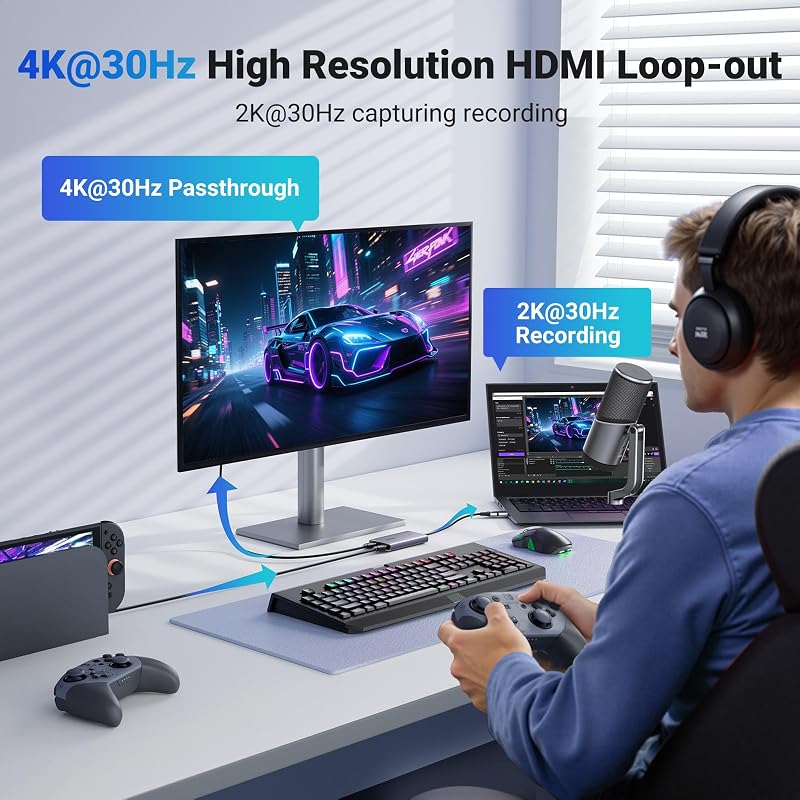
Addressing the monitoring limitations of basic dongles, the UGREEN 4K@30Hz Loop Out HDMI Capture introduces a dedicated HDMI passthrough port to support real-time previewing on a secondary display. The hardware accepts a 4K at 30Hz 4:4:4 signal and passes that exact resolution through its loop-out port with zero latency, allowing console players to view their game on a television while capturing footage on a computer. For recording and streaming, the internal processing chip manages video encoding up to 2K at 30fps or 1080p at 60fps over a USB 3.0 connection, utilizing either MJPEG compression or uncompressed YUY2 video formats depending on available system bandwidth.
Built inside a sturdy aluminum chassis weighing 88.2 grams, this card promotes passive heat dissipation to prevent frame drops during prolonged gameplay. It features a dual-interface USB-A and USB-C connection cable for wide host compatibility, supporting modern systems running Windows 8.1 through 11, macOS, Linux, Android 5.0 and above, and iPadOS 17. The manufacturer notes that while newer operating systems enjoy driver-free plug-and-play operation, Windows 7 systems require manual driver installation before the hardware is recognized by broadcast tools.
This capture card serves console enthusiasts playing on the Nintendo Switch, Switch 2, Xbox Series X, or PlayStation consoles who want to record or stream without introducing input lag to their main screen. The trade-off lies in the capture ceiling: the listing explicitly clarifies that 4K capture is not supported. Content creators seeking authentic 4K recording files will need to bypass this device in favor of UGREEN’s dedicated 4K encoding hardware.
UGREEN Full HD 1080P 30fps Video for Basic Presentations

Best for: Casual video meetings and light camera sharing
Pros
- Ultralight 19.9g aluminum build
- 24-month manufacturer warranty
- Dual USB-A and USB-C plug
Cons
- Limited to USB 2.0 speeds
- Maximum 1080p 30fps capture output
Operating as an accessible entry point in the lineup, the UGREEN Full HD 1080P 30fps Video card (model 40189) is tailored for basic video capture tasks such as web conferences, classroom lectures, and simple camera sharing. The unit accepts incoming HDMI video signals up to 4K at 60Hz with YCbCr 4:2:0 color sampling, scaling the output down to 1080p at 30Hz over a USB 2.0 interface. Because it operates on the 480 Mbps USB 2.0 bus, data transmission demands are modest, making it compatible with older PC hardware, tablets, mobile phones, and portable devices like the Kindle.
Portability is the primary design focus here. The device features a compact aluminum-alloy shell weighing a mere 19.9 grams, making it the lightest capture accessory in UGREEN’s roster. The integrated cable provides both USB-A and USB-C termination, enabling driver-free operation across Windows 8.1 and 10, Linux, iOS 17, and Android. It integrates smoothly with standard capture utilities like OBS Studio, XSplit, Potplayer, QuickTime Player, and USB Camera Viewer, while backed by a 24-month manufacturer warranty for extended peace of mind.
This model is ideal for educators, remote workers, or DSLR owners needing an uncomplicated bridge for video calls. However, its strict 1080p 30fps capture ceiling and reliance on USB 2.0 bandwidth mean it cannot handle fast-moving gaming footage without motion blur. Streamers prioritizing fluid 60fps gameplay will find this model inadequate for their broadcast requirements.
UGREEN 4K@60Hz Video Capture Card for Dedicated Content Creators

Best for: Streamers demanding true 4K60 capture and HDR
Pros
- True 4K 60fps recording support
- Triple 3.5mm dedicated audio jacks
- VRR and HDR passthrough
Cons
- Larger footprint on desk
- Requires full USB 3.0 host bandwidth
The UGREEN 4K@60Hz Video Capture Card (model 25173) represents a substantial hardware leap, delivering true high-resolution recording capabilities for serious broadcasters. Unlike lower-tier dongles that merely downscale incoming high-resolution feeds, this desktop capture box supports native 4K at 60Hz recording, alongside high-framerate options including 2K at 144Hz, 2K at 120Hz, and 1080p at 240Hz. It processes video across multiple formats, including MJPEG, YUY2, NV12, I420, and uncompressed RGB24, interfacing with host computers via USB 3.0 Type-C and USB 3.2 Gen 1 connections.
Passthrough capabilities match its capture prowess. The HDMI loop-out port supports 4K at 60Hz with full passthrough support for Variable Refresh Rate (VRR) and High Dynamic Range (HDR), preventing visual screen tearing and preserving color fidelity on gaming monitors. To manage the thermal energy generated by continuous 4K processing, the 155.1-gram aluminum chassis features integrated cooling holes. UGREEN also incorporates 7 distinct RGB lighting modes into the enclosure, giving it an aesthetic tailored for modern gaming desk setups.
Audio management is another critical strength, featuring a triple 3.5mm jack layout that includes a dedicated headphone output, an active microphone input, and a line-in port for external audio mixers. This makes the unit exceptionally well suited for multi-track Twitch and YouTube streamers who manage commentary and game sound independently. It gives way only to the HDMI 2.1 flagship for creators running bleeding-edge 4K 144Hz setups.
UGREEN 2K@30Hz USB 3.0 Video Capture for Handheld Gaming and Mobile Workflows
Best for: Handheld console players charging while streaming
Pros
- 100W PD fast-charging pass-through
- 4K 30Hz HDMI loop-out
- Uncompressed YUY2 format support
Cons
- No bidirectional host PC charging
- Capture limited to 2K 30fps
Designed specifically with modern portable gaming devices and mobile workstations in mind, the UGREEN 2K@30Hz USB 3.0 Video Capture (model 65856) solves the power delivery challenges common to compact capture rigs. This card integrates 100W Power Delivery (PD 3.0) passthrough charging, enabling users to power a Nintendo Switch, Steam Deck, or mobile device while simultaneously streaming its display output. By managing video ingestion and high-wattage charging over a single hub-style form factor, it eliminates the need for separate docks when broadcasting on the go.
For video workflows, the unit accepts 4K at 30Hz input via HDMI 1.4 and provides an uncompressed YUY2 video capture output at 2K 30fps or 1080p 60fps through USB 3.0. It also features a 4K at 30Hz HDMI loop-out port for real-time monitoring on an external screen. The casing is constructed from aluminum alloy for electromagnetic shielding and heat dissipation, housing tinned copper conductors that ensure reliable signal transfer during long gaming marathons. Weighing 6 ounces, it remains portable while offering substantial desktop utility.
System compatibility spans Windows 11, 10, 8.1, 7, macOS, Linux, and iPadOS 17, functioning seamlessly with modern smartphones such as the iPhone 15 Pro family. When powering your handheld setup, pairing the device with a compatible high-output wall plug like a ugreen 45w charger ensures sufficient current reaches both the console and capture hardware. Note that the 100W PD charging is strictly unidirectional to the source gaming device and cannot charge the host recording computer.
UGREEN 4K 144Hz Video Capture Card for Competitive High-Framerate Play
Best for: Competitive esports players demanding ultra-high refresh rates
Pros
- HDMI 2.1 with 4K 144Hz capture
- 10 Gbps USB 3.2 Gen 2 speed
- Included 8K HDMI and USB-C cables
Cons
- Requires high-spec host hardware
- HDCP must be manually disabled
Sitting at the pinnacle of UGREEN’s video capture lineup, the UGREEN 4K 144Hz Video Capture Card is tailored for competitive esports broadcasting where high refresh rates cannot be compromised. Featuring cutting-edge HDMI 2.1 input and loop-out ports, this hardware supports uncompressed 4K at 144Hz and 4K at 120Hz signals with 4:4:4 chroma sampling. By maintaining full Variable Refresh Rate (VRR) and HDR compatibility across its passthrough connection, competitive PC and console players can maintain peak display performance on high-end gaming monitors without experiencing latency or tearing.
Data transmission to the host computer is handled via a high-speed 10 Gbps USB 3.2 Gen 2 Type-C interface, which delivers the bandwidth required for native 4K 144Hz recording into OBS Studio or XSplit. The package includes a 5-foot braided 8K HDMI cable and a 1.6-foot braided USB-C cable, both fitted with aluminum connector shells to maintain signal integrity. Like its 4K60 sibling, the chassis includes dynamic RGB lighting and a triple 3.5mm audio interface supporting 48KHz/24-bit resolution across headphone, microphone, and line-in mixer connections.
Operating driver-free across Windows XP, 7, 8.1, 10, 11, macOS, Linux, iPadOS, and Android, this card serves high-end PC gamers and next-gen console streamers who refuse to sacrifice 120Hz or 144Hz gameplay while broadcasting. The only caveat is its high demand on host system hardware; recording uncompressed high-framerate 4K requires a robust computer configuration with native USB 3.2 Gen 2 port speeds to avoid dropped frames.
How to Choose the Right UGREEN Capture Card
Selecting the proper model from UGREEN requires looking past headline advertising terms and aligning specific hardware specifications with your streaming setup. The most important distinction to understand is the difference between input passthrough and actual capture resolution. Several UGREEN models advertise 4K input support but compress or downscale the resulting video file to 1080p or 2K. If your goal is to produce native 4K content for video archives, only the dedicated desktop units like the 4K@60Hz and 4K 144Hz models feature the encoding hardware and bandwidth necessary for true 4K recording.
Your display configuration is another critical deciding factor. If you stream console games from a PlayStation 5, Xbox Series X, or Nintendo Switch, you need a card with a dedicated HDMI loop-out port. Dongles lacking passthrough require you to play your game directly inside the OBS preview window, which introduces perceptible input lag that can ruin fast-paced gaming. For mobile console players using a Steam Deck or Switch on the road, selecting a card with integrated 100W Power Delivery simplifies your setup by combining video capture and charging into one device, which you can easily integrate alongside a ugreen charger station on your desk.
Finally, consider your audio routing and thermal demands. While compact dongles are lightweight and easy to carry, they lack dedicated 3.5mm audio jacks and rely purely on HDMI embedded audio. If your production involves analog microphone commentary, direct headphone monitoring, or an external sound mixer, the larger desktop capture cards with triple 3.5mm ports are essential. Furthermore, because prolonged 4K encoding generates significant heat, desktop models equipped with ventilation cutouts and heavier aluminum casings offer greater long-term stability than ultra-thin dongles during multi-hour broadcasts.
FAQ
Does a 4K input capture card always record in 4K resolution?
No. A capture card advertising 4K input simply means the internal receiver chip can accept a 3840×2160 video signal from your console or camera without displaying an invalid format error. Several UGREEN models accept a 4K signal but immediately downscale the captured video to 2K at 30fps or 1080p at 30fps/60fps before sending it over USB to your computer. Always verify the maximum capture or recording resolution in the product specifications to confirm whether the device encodes in native 4K.
How do you configure a UGREEN capture card in OBS Studio?
Setting up your card involves connecting the HDMI source to the card’s input, plugging the USB cable into a high-speed port on your computer, and opening OBS Studio. In the Sources window, click the plus icon and select Video Capture Device. Choose the UGREEN card from the device drop-down menu, set the resolution and framerate to match your card’s maximum capture specs, and configure the audio output mode to capture audio directly or output to your desktop monitoring device.
Why does my console output a black screen through the capture card?
A black screen is almost always caused by High-bandwidth Digital Content Protection (HDCP). Consoles like the PlayStation 4 and PlayStation 5 enable HDCP by default to prevent unauthorized recording of copyrighted media applications like Netflix. Because UGREEN capture cards adhere to standard digital copyright protocols, you must navigate to your console’s system settings and manually disable HDCP before the capture card can display or record the video feed.
What causes UGREEN capture card passthrough issues during gameplay?
Passthrough problems typically stem from HDMI cable bandwidth mismatches, incorrect display refresh rates, or power shortfalls. For instance, attempting to run high-framerate 4K 144Hz video through an older HDMI 1.4 or HDMI 2.0 cable will result in signal loss or screen flickering. Always ensure you are using certified HDMI 2.0 or HDMI 2.1 cables, confirm that your monitor matches the supported loop-out resolution, and connect the capture card directly to a powered root USB port on your motherboard rather than an unpowered hub.
Is an external power supply required for UGREEN capture cards?
None of the UGREEN capture cards reviewed here require a proprietary AC wall adapter for standard operation; they draw their necessary operating power directly from the host computer’s USB bus. However, the 100W PD model allows you to connect an external USB-C power supply so you can charge your source gaming console or mobile device while simultaneously transmitting video.
For creators streaming culinary content, capturing crisp overhead angles focused on a Stand Mixer Hub demands reliable passthrough and accurate color reproduction. Choosing the right UGREEN capture card ensures your production setup handles these demanding video feeds without dropping frames or overheating during long broadcast sessions.


