


As Amazon Associates, we earn from qualifying purchases. This means we may receive a small commission at no extra cost to you if you click through and make a purchase.
UGREEN has built an extensive lineup of desktop adapters and portable hubs tailored to expand modern laptops that have traded away legacy connections for minimalistic USB-C ports. The brand is widely known for delivering clean hardware enclosures, solid aluminum construction, and dependable power handling across consumer and professional computing setups. Selecting the right hub requires a careful look at how bandwidth is distributed between display channels, peripheral data buses, and incoming charging lines. Without evaluating these internal limits, buyers frequently encounter unexpected screen mirroring restrictions, reduced refresh rates, or disconnected storage drives during heavy operations.
Across this lineup, the five featured units differ sharply in their external monitor support, downstream USB bandwidth, chassis designs, and the presence of dedicated wired networking or legacy card readers. This hands-off comparative analysis reviews the manufacturer specifications, controller capabilities, and hardware interfaces of each model to help you determine which configuration integrates smoothly into your workstation without running into bus bottlenecks or operating system incompatibilities.
UGREEN Docking Stations Compared
| Model | Video Outputs | USB Data Speeds | Power Delivery | Networking |
|---|---|---|---|---|
| UGREEN USB C Docking Station Dual (B0G92M3TC7) | 2x HDMI (Up to dual 4K@60Hz) | 2x USB-C 5Gbps, 1x USB-A 3.0 (5Gbps), 1x USB-A 2.0 | 100W PD (85W to host, 15W reserved) | Not listed |
| UGREEN Steam Deck Dock 9-in-1 USB (B0CR6JND4M) | 1x HDMI (Up to 4K@60Hz, 2K@144Hz, 1080p@240Hz) | 1x USB-C 10Gbps, 1x USB-A 10Gbps, 2x USB-A 2.0 | 100W PD (Supports ROG Ally 30W Turbo) | 1000Mbps Ethernet |
| UGREEN Revodok Pro 9-in-1 USB-C Hub (B0BXDSPSPW) | 1x HDMI (Up to 4K@60Hz) | 1x USB-C 10Gbps, 2x USB-A 10Gbps | 100W PD pass-through | 1000Mbps Ethernet |
| UGREEN USB C Docking Station Triple (B0DRP1F6R7) | 2x HDMI, 1x DisplayPort (Up to triple 4K@30Hz) | 2x USB-C 10Gbps, 2x USB-A 2.0 | 100W PD (85W to host, 15W reserved) | 1000Mbps Ethernet |
| UGREEN USB C Docking Station Dual (B0D1XSKZRJ) | 2x HDMI (Up to dual 4K@60Hz) | 2x USB-C 10Gbps, 2x USB-A 10Gbps | 100W PD input port | Not listed |
UGREEN USB C Docking Station Dual for Dual Display Productivity
Best for: High-speed external drive workflows and dual screens
Pros
- Four dedicated 10Gbps USB data ports
- Dual 4K at 60Hz HDMI connections
- Sturdy aluminum desk footprint
Cons
- No SD card slots or Ethernet jack
- MacOS cannot extend distinct dual displays

Best for: Multi-display Windows workstations requiring triple video
Pros
- Three display outs via dual HDMI and DisplayPort
- Integrated 24-bit 192KHz audio jack
- Comprehensive 12-in-1 port selection
Cons
- MacOS mirrors identical content across all screens
- Triple display mode drops refresh rate to 30Hz

Best for: Dual HDMI desktop setups requiring card readers
Pros
- Dual 4K at 60Hz HDMI outputs
- 170MB/s high-speed card reader
- Generous 15-inch host cable
Cons
- MacOS limits external screens to mirror mode
- Omits integrated wired Ethernet
The UGREEN USB C Docking Station Dual is engineered as a 9-in-1 aluminum desktop accessory designed to expand a single full-featured Type-C connection into a dual-screen workstation. Identified under model number 85774, this unit prioritizes visual workspace by housing two independent HDMI ports capable of driving dual 4K monitors simultaneously at 60Hz, provided the host machine delivers DisplayPort 1.4 signaling. A standout ergonomic feature is its attached 15-inch host cable, which provides substantially more routing flexibility on cluttered desks than the stubby tether cables common to standard travel adapters. It also includes an integrated SD and TF card slot capable of 170MB/s read speeds, making it useful for creators moving photos and raw camera footage off flash memory cards.
Under the hood, data connectivity is split between two 5Gbps USB-C data ports, one 5Gbps USB-A 3.0 port, and a legacy USB-A 2.0 port reserved for input peripherals like a wireless keyboard and mouse receiver. For charging, the hub accepts up to 100W via its USB-C Power Delivery port, routing up to 85W of safe pass-through power to the connected laptop while reserving 15W internally to operate the connected ports and card reader. Users should note that the USB-C data ports do not supply device charging or secondary video tunneling, and a dedicated wall charger and cable must be supplied separately. Unlike specialized corporate hubs such as a lenovo thinkpad docking station dual monitor 2 hdmi, this dock relies entirely on native USB-C alternate mode from the host computer.
This particular ugreen 9 in 1 docking station dual monitor configuration suits Windows productivity workers using HP, Dell, ThinkPad, or Lenovo ultrabooks who require two extended 4K screens alongside basic peripheral connectivity. However, prospective buyers running Apple hardware must heed a crucial hardware limitation: macOS does not support Multi-Stream Transport over standard USB-C connections, meaning both external monitors will display identical mirrored images rather than separate virtual desktops. Furthermore, because this chassis omits an RJ45 port entirely, professionals who depend on a physical local area network will need to seek an alternate model that includes hardwired networking.
UGREEN Steam Deck Dock 9-in-1 USB for Handheld Gaming Desktops

Best for: Handheld console gaming and high-refresh monitors
Pros
- Foldable dual-panel ventilation stand
- Supports 1080p at 240Hz and 2K at 144Hz
- Enables ROG Ally 30W Turbo mode
Cons
- Single HDMI video output
- USB-A ports split between 10Gbps and 2.0
Designed specifically to transition portable gaming hardware into fixed desktop battlestations, the UGREEN Steam Deck Dock 9-in-1 USB pairs functional port multiplication with an integrated chassis stand. The physical dock incorporates an adjustable dual-panel folding mechanism that cradles handheld systems securely while preventing the back support plate from blocking the rear intake or exhaust vents of the console. This custom thermal clearance ensures that demanding hardware like the Valve Steam Deck, Asus ROG Ally, ROG Ally X, Lenovo Legion Go, and MSI Claw A1M can run extended gaming sessions without thermal throttling. In addition to portable consoles, the mechanical base supports productivity tablets including the iPad Pro, iPad Air, and Surface Pro series.
Gaming display fidelity is a central focus of the single HDMI port on this ugreen steam deck dock 9-in-1 solution. Rather than capping output at standard office refresh rates, the display pipeline supports 4K at 60Hz, 2K at 144Hz or 120Hz, and 1080p at up to 240Hz, allowing users to pair high-refresh esports monitors with their handhelds. Network stability is handled via an integrated 1000Mbps Gigabit Ethernet port to prevent latency spikes during multiplayer matches or massive game downloads. Peripheral connectivity includes two high-speed 10Gbps USB 3.2 Gen 2 ports (one Type-A and one Type-C) for external solid-state drives, two legacy USB-A 2.0 connections for gamepads and input devices, and an integrated MicroSD card slot for expanding game library storage.
The power delivery circuitry is rated for up to 100W input, easily supporting the ROG Ally in its full 30W Turbo mode when paired with an adequate power brick. The Steam Deck automatically negotiates its standard 45W draw, while the ROG Ally accepts up to 65W. This unit is the definitive choice for mobile gamers who want an all-in-one docking cradle that provides reliable cooling airflow, fast external storage channels, and low-latency network connections. It is not, however, suited for multi-monitor office setups, as it features only one physical video connection.
UGREEN Revodok Pro 9-in-1 USB-C Hub for Balanced Port Expansion

Best for: Mobile laptop users needing balanced connectivity
Pros
- 10Gbps USB-C and USB-A transfer channels
- Reliable gigabit Ethernet port
- Compact and lightweight enclosure
Cons
- Single external monitor limitation
- Plastic chassis rather than aluminum
The UGREEN Revodok Pro 9-in-1 USB-C Hub represents a balanced middle ground between travel-ready form factors and full-featured desktop utility. Built into a compact, lightweight grey plastic enclosure weighing roughly 0.2 kilograms, this ugreen revodok pro 9-in-1 usb-c hub targets hybrid workers who frequently commute between home and office desks. It converts a single USB-C port into an array containing one 4K@60Hz HDMI output, a 1000Mbps RJ45 Ethernet port, an SD and MicroSD card reader, and multiple USB connections capable of running simultaneously under heavy multi-device workloads without port dropouts.
Where this ugreen revodok pro docking station pulls ahead of older generation hubs is its data routing infrastructure. The hub features USB 3.2 Gen 2 bandwidth, delivering transfer rates of up to 10Gbps across one USB-C port and dual USB-A ports. This allows users to offload large media libraries, 4K video clips, and massive local archives to external NVMe drives at double the speed of traditional 5Gbps hubs. The 10Gbps Type-C port is restricted solely to data signaling and does not support display transmission or downstream power delivery. Pass-through power is handled by an independent 100W USB-C PD input port that channels electricity straight into the connected laptop.
When operating this hub with high-draw peripherals, buyers should keep a vital operational rule in mind: UGREEN explicitly advises against connecting or disconnecting the external PD power supply while actively screencasting or transferring data. Disrupting the power source causes a momentary power renegotiation on the main bus, which can trigger dropped display signals or corrupted files. Pairing this hub with a dependable wall source like a multi-port ugreen charger station ensures stable power delivery. This hub is ideal for MacBook Pro, MacBook Air, and Windows ultrabook owners who need fast data ports and wired networking, but only require a single external 4K monitor.
UGREEN USB C Docking Station Triple for Multi-Screen Workstations
For users who find dual external displays insufficient for their daily workflow, the UGREEN USB C Docking Station Triple elevates desktop real estate by providing three discrete video connections. Sold under the Revodok Pro 3121 designation, this 12-in-1 hub incorporates two HDMI ports alongside a dedicated DisplayPort socket. When connected to a single monitor, the dock can push resolutions up to 4K at 120Hz for fluid motion. Driving two displays enables dual 4K at 60Hz, while engaging all three video ports drops the maximum visual ceiling to 4K at 30Hz across each external display to remain within the total bandwidth constraints of the host system’s single USB-C connection.
Beyond its complex video routing array, this 12-in-1 workstation includes dual 10Gbps USB-C 3.2 data ports for rapid file transfers, paired with two USB-A 2.0 ports tailored specifically for low-polling accessories like mice, keyboards, or desktop microphones. A 1000Mbps Ethernet jack guarantees uninterrupted network reliability for video conferencing and large cloud uploads, while an SD and TF 3.0 card reader supports sustained transfers up to 104MB/s. Audio integration is another major benefit of this model, featuring a 3.5mm auxiliary port that supports high-resolution 24-bit 192KHz sound output for wired headphones or powered studio monitors.
The power infrastructure accepts a 100W input, supplying up to 85W of pass-through charging to the laptop while reserving 15W for internal operations. However, anyone shopping for a ugreen multi monitor dock macos solution must take note of Apple’s platform architecture. Under macOS, this dock operates strictly in mirroring mode (A+B+B+B), outputting identical imagery across all three external monitors. Windows users, conversely, benefit from full Multi-Stream Transport support for true independent desktop spreading. If you use a Mac and require multiple distinct extended displays, choosing a specialized DisplayLink hub like a plugable usb c triple display docking station is required to overcome native operating system boundaries.
UGREEN USB C Docking Station Dual for High-Speed Peripheral Transfers
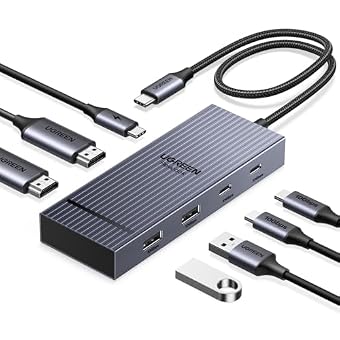
The 7-in-1 UGREEN USB C Docking Station Dual focuses entirely on high-bandwidth data transfers and dual visual pipelines while eliminating legacy card readers and network jacks to maintain a compact footprint. Enclosed in a sturdy aluminum chassis finished in black or grey, this dock features two HDMI ports capable of running dual 4K monitors at 60Hz simultaneously. To achieve this uncompressed dual 4K@60Hz performance, the connected laptop must feature a full-function USB-C or Thunderbolt 3/4 port that supports DisplayPort 1.4 alternate mode. If the host machine is restricted to the older DisplayPort 1.2 standard, output resolutions will step down to maintain hardware stability.
Where this dock separates itself from lower-tier alternatives is its uniform peripheral data speed. Instead of mixing slow USB 2.0 ports with a single fast connection, this dock delivers four independent 10Gbps USB 3.2 channels: two USB-A ports and two USB-C ports. This makes it an exceptional tool for digital editors, technicians, and data managers who routinely swap multiple fast external SSDs, high-capacity flash drives, and high-speed capture cards at once without running into an interface bottleneck. As with all UGREEN data-only ports, these four 10Gbps ports do not output video signals, nor do they charge external devices.
Power delivery is handled by a dedicated 100W USB-C input port. Because this ugreen 100w pd usb c dock does not include a proprietary wall adapter or charging cable in the box, users must supply an external charger rated at 100W or greater to achieve optimal charging speeds. Like the other dual-display docks in this family, macOS hardware will mirror external screens rather than extending them. For enterprise users on Windows laptops like the ThinkPad X1 or Dell XPS who want a clean, high-speed ugreen usb c docking station dual 4k solution without unnecessary legacy bulk, this dock delivers streamlined performance. Users needing wider PCIe tunneling should alternatively consider an advanced ugreen thunderbolt 4 dock.
How to Choose the Right UGREEN Docking Station
Conducting a proper ugreen docking station comparison requires evaluating your daily computing workflow against physical hardware limits. First and foremost, verify your operating system and display needs. If you run a Windows laptop with a full-function USB-C port supporting DisplayPort 1.4, models like the 9-in-1 dual HDMI dock (B0G92M3TC7) or the 7-in-1 dual dock (B0D1XSKZRJ) provide two independent 4K displays at 60Hz. If your work involves extensive multitasking across spreadsheets, code editors, and communication windows, the 12-in-1 triple monitor dock (B0DRP1F6R7) offers three video connections. However, if you are an Apple user, remember that all standard USB-C alternate-mode docks from this brand will mirror external displays under macOS. For Mac multi-display extension, these hardware hubs will not provide distinct desktops.
The second major consideration centers on peripheral data speeds and storage requirements. Hubs that use USB 3.2 Gen 2 controllers, such as the Revodok Pro 9-in-1 (B0BXDSPSPW) and the 7-in-1 dual dock (B0D1XSKZRJ), push transfer speeds up to 10Gbps. This capability cuts file transfer times in half when working with portable solid-state drives compared to older 5Gbps USB 3.0 interfaces found on the 9-in-1 dual display model (B0G92M3TC7). Photographers and videographers should pay close attention to the card reader specifications: while the 9-in-1 dual HDMI dock offers a blazing 170MB/s bus, the 12-in-1 triple dock caps SD and TF transfers at 104MB/s, and the 7-in-1 model removes card readers completely to maximize internal space for USB data controllers.
Power management is another critical variable when deciding which ugreen docking station to buy. Every model evaluated here incorporates a 100W Power Delivery input circuit, but how that electricity is allocated across connected hardware varies. Standard multi-port docks like the 12-in-1 and the 9-in-1 dual display dock reserve roughly 15W of incoming power to run internal microcontrollers, card readers, and video chips, passing up to 85W through to your laptop battery. If you are operating a high-draw gaming laptop or pairing a dock with a handheld console like the Asus ROG Ally, ensuring full power delivery support is paramount. The Steam Deck Dock (B0CR6JND4M) is specifically mapped to deliver the full 30W Turbo mode on the Ally while capping the Steam Deck safely at its native 45W draw.
Finally, do not overlook physical environment and networking needs. If your desk relies on an Ethernet patch cable for low-latency conferencing or competitive gaming, purchasing the 9-in-1 dual HDMI dock (B0G92M3TC7) or the 7-in-1 dock (B0D1XSKZRJ) will leave you without an internet jack, forcing you to rely solely on Wi-Fi. For wired networks, the Revodok Pro 9-in-1, the 12-in-1 triple dock, and the dedicated Steam Deck dock all include reliable 1000Mbps RJ45 ports. Similarly, if you want an angled cradle that actively cools a handheld console or tablet, the foldable dual-panel stand on the Steam Deck dock offers unique utility that flat desktop bricks simply cannot replicate.
FAQ
Can a UGREEN docking station support dual extended displays on a MacBook?
No. When connected to a macOS machine over standard USB-C, UGREEN docking stations only support mirroring mode (SST). Apple’s operating system does not natively support Multi-Stream Transport over standard USB-C alternate mode. Consequently, both external monitors connected to a dual-HDMI or triple-display UGREEN dock will mirror the exact same external desktop image rather than extending into separate, independent workspaces.
Why does a 100W UGREEN dock only charge laptops at 85W?
Docking stations that draw their operating power directly from pass-through USB-C chargers must supply their own internal chips, port transceivers, card readers, and display controllers. Docks like the 9-in-1 dual HDMI model and the 12-in-1 triple display model automatically reserve 15W of incoming current to guarantee peripheral stability, routing the remaining 85W to the host computer’s battery.
Do the USB-C data ports on UGREEN docks support external monitor video?
No. Across all the UGREEN hubs and docks reviewed, downstream USB-C data ports (whether running at 5Gbps or 10Gbps) are dedicated strictly to data transfer and peripheral connectivity. They do not carry DisplayPort alternate mode signals and cannot be used to drive USB-C portable monitors or output video through Type-C to HDMI adapters.
Can the UGREEN Steam Deck dock charge the ROG Ally at full 30W Turbo mode?
Yes. When connected to a 100W Power Delivery wall adapter and a compatible 100W-rated charging cable, the UGREEN Steam Deck Dock negotiates the required 65W power profile needed to activate the full 30W Turbo mode on the Asus ROG Ally and ROG Ally X, allowing the console to run at its highest performance preset.
Why do external monitors flicker when plugging or unplugging the USB-C charger?
When an external power adapter is connected or disconnected from a pass-through USB-C dock, the internal Power Delivery controller momentarily halts and renegotiates the power contract across the entire device bus. This microsecond interruption briefly resets the internal display controller, causing connected screens to flicker or go black momentarily before re-establishing the video handshake.


