


As Amazon Associates, we earn from qualifying purchases. This means we may receive a small commission at no extra cost to you if you click through and make a purchase.
HP holds an established presence in the portable computer market, particularly among budget-focused students, home office workers, and everyday users who prioritize travel-friendly dimensions. In the compact category, the brand centers heavily on 14-inch chassis designs that balance typing comfort with a reduced footprint, avoiding the cramped keyboards of smaller netbooks while keeping overall carry weights near three pounds. These systems serve as accessible workstations for web applications, video conferences, and essential document editing, giving shoppers an approachable entry point into portable personal computing.
While each small hp laptop in this lineup shares a similar 14-inch form factor, they differ substantially across operating system overhead, memory generation, internal storage technology versus external accessory bundles, and whether they retain original factory seals or feature reseller hardware expansions.
HP Small Laptops Compared
To conduct an effective hp small laptops comparison, buyers must look beyond exterior dimensions and examine the underlying hardware architecture. Storage formats, processor architectures, and operating system overhead dictate long-term system responsiveness far more than cosmetic styling. The table below outlines how these five 14-inch HP portable computers compare across core specifications.
| Model | Processor | Memory | Storage Architecture | Operating System |
|---|---|---|---|---|
| HP 14″ Ultra-Light Laptop for Student | Intel Celeron N4500 | 4GB DDR4 | 64GB eMMC + 64GB SD Card | Windows 11 Home in S mode |
| HP New Everyday Slim Laptop • | Intel N150 | 4GB DDR5 | 128GB SSD | Windows 11 Home |
| HP 14″ Laptop Computer for 2026 | Intel Quad-Core N150 | 4GB LPDDR5 | 128GB UFS + 500GB External | Windows 11 Pro |
| HP Chromebook 14 Laptop | Intel Celeron N4120 | 4GB | 64GB eMMC | Chrome OS |
| HP Stream 14 Inch Laptop | Intel Celeron N150 / N4120 | 4GB | 128GB UFS | Windows 11 S |
HP 14" Ultra-Light Laptop for Student for Multi-Monitor Study Workspaces

Best for: Students needing basic office and multi-monitor output
Pros
- Wi-Fi 6E connectivity
- Dual external FHD monitor support
- Included one-year Microsoft 365
Cons
- Relies on secondary SD card storage
- 4GB RAM limits heavy multitasking
The HP 14″ Ultra-Light Laptop for Student is configured specifically for entry-level school coursework and personal media tasks. Finished in white and weighing 3.2 pounds, this ultra-portable clamshell is powered by an Intel Celeron N4500 processor with integrated Intel UHD Graphics. Its anti-glare micro-edge display delivers 62.5% sRGB color gamut coverage. Notably, the hardware supports expanding your desktop across two external monitors via HDMI 1.4b and USB-C up to Full HD resolution at 60Hz without requiring an external docking station. Wireless connectivity is exceptionally modern for an entry-tier notebook, featuring Wi-Fi 6E and Bluetooth 5.4 alongside a 12-hour battery rating with fast charging support.
A careful inspection of the storage configuration reveals a critical hardware trade-off. The advertised 128GB total storage consists of a 64GB embedded eMMC boot drive supplemented by a 64GB external SD card. While an SD card provides convenient overflow space for documents, photos, and video files, it operates at lower read and write speeds than dedicated solid-state drives and is ill-suited for installing complex software or managing system-level files. The listing explicitly discloses that this brand-new unit has been expanded to its advertised capacity, providing a three-year warranty on the expanded SD card from Issaquah Highlands Tech and a standard one-year manufacturer warranty on all other laptop components.
This hp 14 ultra-light laptop suits secondary school students and casual home users who need included software like the provided one-year Microsoft 365 subscription and enjoy working across dual external displays. However, shoppers facing strict multitasking demands should recognize that the combination of an entry-level Celeron CPU and a hybrid SD card storage setup will yield to models featuring native internal solid-state media when handling data-heavy workloads.
HP New Everyday Slim Laptop • for Responsive SSD Daily Work

Best for: Everyday users seeking true internal SSD performance
Pros
- Dedicated 128GB internal SSD
- Modern Intel N150 processor
- Spill-resistant keyboard with Copilot key
Cons
- Modest 1366×768 screen resolution
- Non-backlit keyboard design
The HP New Everyday Slim Laptop • targets everyday home productivity and remote learning through upgraded platform architecture. Encased in a sleek chassis weighing 3.24 pounds, this notebook steps up to the modern Intel N150 processor paired with 4GB of power-efficient DDR5 SDRAM. For local file storage, it departs from lower-speed flash memory by utilizing a true 128GB internal solid-state drive, accompanied by 1TB of OneDrive cloud storage. Its visual presentation is driven by a 14-inch micro-edge HD display with anti-glare coating, while wireless duties are handled by Wi-Fi 6 and Bluetooth 5.4.
Communication features on this model are well-appointed for virtual classrooms and business meetings. It incorporates an HP True Vision 720p HD camera featuring temporal noise reduction to suppress image grain in low-light environments, paired with integrated dual-array digital microphones. Input ergonomics benefit from a full-sized spill-resistant keyboard that integrates a dedicated Microsoft Copilot AI shortcut key, alongside an HP Imagepad with multi-touch gesture support. Battery life is rated at up to 12 hours for video playback and up to 7.5 hours during continuous wireless streaming.
For shoppers researching a practical hp laptop for college students, this build delivers a tangible performance lift over older Celeron systems because its DDR5 memory and native SSD interface eliminate storage transfer bottlenecks. It gives way, however, to higher-tier enterprise models if you require advanced operating system management tools or extended physical accessories right out of the box.
HP 14" Laptop Computer for 2026 for Business and Peripheral Bundles
Best for: Home offices wanting an all-inclusive accessory bundle
Pros
- Comprehensive 6-in-1 accessory bundle
- Windows 11 Pro operating system
- Responsive quad-core N150 CPU
Cons
- Bulk storage requires external tethered drive
- Pro OS strains 4GB memory capacity
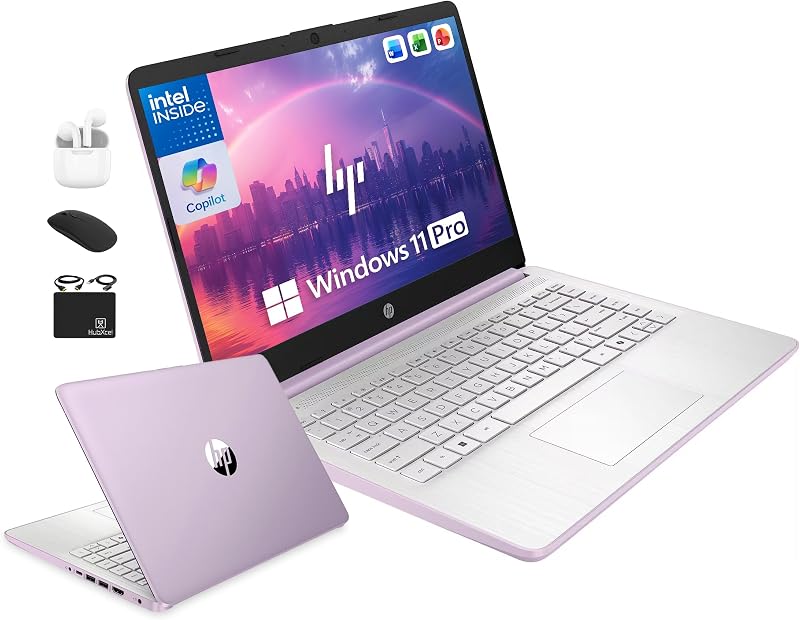
The HP 14″ Laptop Computer for 2026 is assembled for home business operators and academic users seeking an expansive out-of-the-box hardware bundle. Finished in Honey Lavender, this 3.2-pound machine runs on a 13th Generation quad-core Intel N150 processor capable of reaching up to 3.6 GHz with Turbo Boost across 4 cores, 4 threads, and 6MB of cache. It features a 14-inch anti-glare micro-edge display designed with flicker-free viewing technology, a 720p front-facing camera with dual microphones, and an integrated Copilot key for quick artificial intelligence interaction.
The storage setup on this configuration is unique, advertising 628GB of total storage. The internal drive is a responsive 128GB Universal Flash Storage (UFS) solid-state module, which is paired with an external 500GB portable hard drive included in the package. Beyond the external hard drive, the included 6-in-1 HubxcelAccessory bundle adds wireless earbuds, a USB extension cord, an HDMI cable, a mouse pad, and a wireless mouse. Software is equally comprehensive, featuring Windows 11 Pro with enterprise-grade hardware isolation and encryption, along with an included lifetime Microsoft Office license.
This model suits remote administrative workers and students who want a turnkey peripheral package without purchasing separate cables and pointers. Nevertheless, running the heavier Windows 11 Pro platform on 4GB of LPDDR5 RAM requires disciplined application management. Users must also accept the logistical reality that four-fifths of their storage capacity resides in a tethered external drive rather than inside the laptop itself.
HP Chromebook 14 Laptop for Simplified Cloud Dependability

Best for: Cloud-focused users prioritizing battery and OS speed
Pros
- Up to 14-hour battery life
- Lightweight, responsive Chrome OS
- HP Fast Charge battery support
Cons
- Limited 64GB eMMC internal capacity
- Incompatible with traditional Windows software
The HP Chromebook 14 Laptop takes a distinctly different path from its Windows-based siblings by running Google Chrome OS. Sporting a Mineral Silver finish with an Ash Gray keyboard and a total weight of 3.2 pounds, the laptop is driven by an Intel Celeron N4120 quad-core processor and Intel UHD Graphics 600. It features a 14-inch diagonal HD micro-edge anti-glare screen, custom-tuned stereo speakers, and 802.11ac dual-band Wi-Fi. Battery performance stands out across the comparison, delivering up to 14 hours on a single charge with HP Fast Charge replenishing approximately 50 percent capacity in 45 minutes.
Hardware specifications list 4GB of RAM and 64GB of reliable flash-based eMMC internal storage. While 64GB is restrictive on traditional desktop platforms, Chrome OS utilizes a lightweight cloud-first footprint. Automatic background updates, built-in security, and access to Android applications through the Google Play Store ensure smooth daily operation without consuming excessive local disk space. Backup and synchronization are integrated directly with Google Drive, Google One, and Google Assistant.
Shoppers hunting for reliable value among hp laptops on sale clearance 2026 will find this Chromebook an exceptional match for coursework, video streaming, and document creation. Because Chrome OS lacks the background services and registry bloat of Windows, it avoids typical memory sluggishness. However, it cannot run native Windows x86 desktop applications, making it unsuitable for users dependent on specialized local software.
HP Stream 14 Inch Laptop for Lightweight Mobile Note-Taking
Best for: Mobile note-takers wanting a slim stylish design
Pros
- Fast-booting 128GB UFS storage
- Webcam temporal noise reduction
- Lightweight 0.71-inch slim chassis
Cons
- Packaging opened for reseller upgrade
- Contradictory processor specifications in listing
The HP Stream 14 Inch Laptop is designed as a featherweight portable computer for campus transit and shared household typing. Presented in a Rose Gold clamshell measuring just 0.71 inches thick and weighing 3.24 pounds, it incorporates a 14-inch HD anti-glare screen with a 79% screen-to-body ratio to minimize bezels under bright library lighting. Multimedia features include a 720p HD webcam with temporal noise reduction, dual beamforming microphones designed to suppress keyboard clatter, and DTS-tuned audio speakers. It operates on Windows 11 Home in S mode and includes a pre-installed Microsoft 365 productivity suite.
For internal performance, the listing specifies a hybrid storage architecture centered on 128GB of fast UFS storage, which boots the operating system in seconds and communicates via a high-speed PCIe interface. External expansion is handled by a built-in microSD card slot. However, buyers should examine the technical specifications closely. The listing text notes an Intel Celeron N150 in the title while detailing an N4120 quad-core processor with 2400 MHz RAM speed and Wi-Fi 5 inside the specification sheet. Most importantly, the listing includes an explicit disclosure stating that the computer has been professionally opened and upgraded to 4GB RAM and 128GB UFS storage.
This portable notebook appeals to users seeking a stylish, ultra-thin machine for daily lecture notes and office applications. However, because third-party modifications break original factory packaging seals, prospective buyers prioritizing straightforward manufacturer warranty support should consider factory-sealed models instead.
How to Choose the Right HP Small Laptop
Selecting which small hp laptop to buy requires assessing your tolerance for hardware trade-offs against your daily computing requirements. Compact 14-inch laptops present an appealing blend of screen size and travel readiness, but their underlying architectures vary dramatically. Keeping the following critical criteria in mind will ensure you purchase a machine built to handle your actual workload.
- Operating System Memory Demands: General users frequently encounter hp laptop 4gb ram limitations when attempting to run multiple browser tabs alongside office applications on Windows 11. While 4GB of RAM is more than adequate for the streamlined architecture of the HP Chromebook 14 Laptop, Windows-based machines like the HP Stream 14 Inch Laptop require operating in S mode or using diligent tab management to avoid memory paging slowdowns.
- Storage Architecture and Speed: Long-term hp 14 inch laptop reliability depends heavily on how the operating system accesses data. True solid-state drives, such as the 128GB SSD found in the HP New Everyday Slim Laptop •, provide superior read and write speeds compared to eMMC flash modules. When considering models that reach their capacity using bundled accessories—such as the SD card expansion on the HP 14″ Ultra-Light Laptop for Student or the external hard drive paired with the HP 14″ Laptop Computer for 2026—remember that external storage cannot match the speed or durability of internal system drives.
- Warranty Terms and Reseller Modifications: Scrutinize the hp lightweight laptop warranty disclosures before completing a purchase. While standard factory-sealed units carry straightforward one-year manufacturer warranties, several customized listings feature third-party storage upgrades where the original box seal has been broken. In some instances, the external storage is warranted separately by a third-party seller rather than HP, which complicates hardware support if components fail down the road.
- Display Clarity and Workspace Expansion: Most models in this category feature 1366×768 HD anti-glare panels to maximize battery runtimes. If you require expansive screen real estate for large spreadsheets or side-by-side windows, prioritize machines with advanced display outputs. The HP 14″ Ultra-Light Laptop for Student stands out in this regard by natively supporting dual external Full HD monitors over HDMI and USB-C without requiring an expensive docking station.
By balancing storage speed, operating system efficiency, and warranty authenticity, you can identify the best compact hp laptop for your workflow without suffering post-purchase bottlenecks.
FAQ
Can a small HP laptop with 4GB of RAM run full desktop applications smoothly?
A small HP laptop equipped with 4GB of RAM can run basic productivity tools such as Microsoft Word, web browsers, and media players, but multitasking will be strictly limited. Under Windows 11, running several browser tabs simultaneously alongside background applications will consume most available physical memory, prompting the system to use virtual memory on the storage drive. This can result in noticeable hesitation. For users who only need web applications, the HP Chromebook 14 Laptop operates far more smoothly on 4GB of RAM than Windows-based configurations.
How do third-party storage upgrades impact the HP manufacturer warranty?
When an independent reseller opens a laptop to upgrade internal components or bundles separate storage media, the warranty coverage is often split. HP generally covers the original base hardware for one year, while the reseller may provide a separate warranty on the upgraded component, as seen with the three-year SD card warranty on the HP 14″ Ultra-Light Laptop for Student. If a problem arises, you may need to contact the reseller rather than HP for storage-related repairs, and unauthorized internal modifications can complicate official service claims.
What is the difference between eMMC, UFS, and SSD storage in 14-inch HP laptops?
These three technologies represent different tiers of solid-state storage. Embedded MultiMediaCard (eMMC) is compact, power-efficient flash memory commonly found in entry-level notebooks like the HP Chromebook 14 Laptop; it operates at moderate speeds similar to memory cards. Universal Flash Storage (UFS), featured in the HP Stream 14 Inch Laptop, provides higher data throughput and lower latency than eMMC. A dedicated Solid State Drive (SSD), such as the one inside the HP New Everyday Slim Laptop •, offers the highest sustained transfer speeds and durability, making it the most dependable option for Windows system responsiveness.
Can I remove Windows 11 Home in S mode on these small laptops?
Yes, models running Windows 11 Home in S mode allow you to switch out of S mode at no cost through the Windows Activation settings. Switching out of S mode permits the installation of standard executable programs from outside the Microsoft Store. However, because S mode restricts background tasks to preserve memory and battery life, switching to standard Windows 11 on a machine with 4GB of RAM may lead to slower overall performance if you install demanding third-party software.
Do these 14-inch compact laptops support fast charging?
Several models in this lineup include fast-charging technology. The HP Chromebook 14 Laptop and the HP 14″ Laptop Computer for 2026 specifically feature HP Fast Charge capabilities, allowing the battery to charge from empty to roughly 50 percent capacity in approximately 45 minutes when connected to its standard AC smart pin adapter. This feature is particularly valuable for mobile users who have limited time between classes or travel connections.


