As Amazon Associates, we earn from qualifying purchases. This means we may receive a small commission at no extra cost to you if you click through and make a purchase.
Plugable has earned a reputation among corporate fleet managers and home office architects for engineering pragmatic, highly compatible connectivity hardware. Rather than relying on proprietary software wrappers or aesthetic gimmicks, the brand focuses on industry-standard display architectures, reliable thermal management, and accessible North American technical support backed by engineers who participate directly in product development. In the multi-monitor docking station ecosystem, understanding the operational boundaries of display pipelines is critical, as mismatching a dock with your operating system can quickly lead to blank screens, missing drivers, or unexpected display mirroring.
While each unit in this lineup expands a desktop workspace, they diverge significantly in their internal video routing architecture: some rely on hardware-level DisplayPort Alternate Mode and Multi-Stream Transport for driverless Windows and ChromeOS performance, while others deploy DisplayLink virtual graphics chipsets to bypass native single-display output limits on Apple Silicon MacBooks at the expense of copy-protected content playback and system power delivery.
Plugable Docking Stations Compared
| Model | Video Architecture | Max Display Output | Host Power Delivery | Network Interface |
|---|---|---|---|---|
| Plugable USB C Triple Display Docking | DisplayLink plus DP Alt Mode | 1x 4K @ 30Hz + 2x 1080p @ 60Hz | 100W PD | Gigabit Ethernet |
| Plugable USB-C Triple Display Laptop Docking | Multi-Stream Transport (MST) | Dual 4K @ 60Hz or Triple (1x 4K @ 60Hz + 2x 1080p @ 60Hz) | 100W PD (plus 30W peripheral PD) | 2.5Gbps Ethernet |
| Plugable USB 3.0 Universal Laptop Docking | DisplayLink DL-3900 | Dual 1920×1200 @ 60Hz (Single 2560×1440 @ 50Hz) | No host charging | Gigabit Ethernet |
| Plugable Dual 1080p HDMI Universal Docking | DisplayLink Graphics | Dual 1920×1200 @ 60Hz | No host charging | Gigabit Ethernet |
| Plugable USB-C Docking Station | DP Alt Mode with MST | Dual 4K @ 60Hz | 65W PD | Gigabit Ethernet |
Plugable USB C Triple Display Docking for Cross-Platform Multi-Monitor Desks

Best for: Mixed-fleet offices and Apple Silicon Mac users
Pros
- Triple extended displays on macOS
- 100W host power delivery
- Gigabit Ethernet and six USB ports
Cons
- Primary 4K output capped at 30Hz
- Requires DisplayLink software drivers
The Plugable USB C Triple Display Docking station addresses the demanding challenge of orchestrating three external screens across disparate operating systems. Built as a 12-in-1 desktop expansion hub, it combines native USB-C DisplayPort Alternate Mode for its primary video output with integrated DisplayLink graphics processing for the secondary and tertiary video channels. This hybrid architecture delivers a maximum configuration of one 4K HDMI monitor running at 30Hz alongside two 1080p HDMI displays running at 60Hz. Crucially, this design bypasses the native single-display external monitor restriction found on base Apple M1, M2, and M3 hardware, enabling MacBook users to establish a genuine three-screen desktop.
Peripheral connectivity on this enterprise-grade hub centers around utility and stability, offering six USB 3.0 Type-A ports, a dedicated Gigabit Ethernet RJ-45 jack, 3.5mm stereo audio input and output, and 100W USB-C Power Delivery to keep the host laptop charged through intense workloads. Because the dock offloads two video streams through DisplayLink compression, macOS users must run the DisplayLink Manager application on macOS 11 or later to enable full functionality, whereas ChromeOS 100+ and Windows systems manage drivers with minimal friction. IT administrators configuring multi-monitor workstations often pair this device alongside traditional display link docking stations when standardization across mixed Windows and Mac laptop fleets is the baseline requirement.
This dock is ideally suited for hybrid enterprise teams, stock traders, and office professionals running Apple Silicon or Windows machines who require three distinct displays and single-cable 100W charging. However, because the primary Alt Mode display operates at a 30Hz refresh rate ceiling at 4K resolution, creative professionals editing high-frame-rate video or users sensitive to mouse cursor latency at 30Hz should evaluate whether a dedicated native MST dock or a high-bandwidth plugable thunderbolt 4 dock better serves their refresh-rate expectations.
Plugable USB-C Triple Display Laptop Docking for Windows High-Resolution Workstations

Best for: Windows power users wanting driverless triple displays
Pros
- Driverless dual 4K or triple displays
- 100W laptop PD plus 30W device PD
- Fast 2.5Gbps Ethernet interface
- High-speed 10Gbps USB ports
Cons
- Incompatible with macOS extended displays
- Requires Windows 11 minimum
Designed specifically to eliminate software driver overhead, the Plugable USB-C Triple Display Laptop Docking station—identified by its model designation UD-MSTH3—harnesses native Multi-Stream Transport (MST) to achieve expansive screen real estate. Housed in a space gray enclosure that can rest horizontally or vertically, this 15-port hub outputs either dual 4K video at 60Hz or a triple-monitor array featuring one 4K screen at 60Hz and two 1080p displays at 60Hz across its three HDMI outputs. Because it relies entirely on native graphics pipelines, this hardware runs completely driverless on modern Windows 11 and ChromeOS environments that support USB-C DisplayPort Alternate Mode, USB4, or Thunderbolt connectivity.
The UD-MSTH3 stands out in terms of peripheral bandwidth and electrical output. It provides a comprehensive selection of six USB ports, including two 10Gbps USB-C ports, one 10Gbps USB-A port for ultra-fast external NVMe solid-state drives, two 5Gbps USB-A ports, and a legacy USB 2.0 port. Network performance is upgraded with an integrated 2.5Gbps Ethernet port, supplying more than double the transfer speed of conventional Gigabit docks on supported local networks. For power management, the unit provides 100W Power Delivery to the connected laptop alongside an independent, front-facing 30W USB-C Power Delivery charge-only port designed to fast-charge smartphones and tablets without reducing the main system power supply.
Financial analysts, CAD designers, and data professionals who utilize Windows 11 will find this dock among the most responsive options available, free from the host CPU utilization associated with USB display drivers. The primary trade-off is operating system compatibility: the listing explicitly notes that the UD-MSTH3 is not recommended for macOS or ARM-based architectures. Because Apple operating systems do not support Multi-Stream Transport over standard USB-C links, connected MacBooks will mirror rather than extend across the three HDMI ports, making this unit strictly a Windows and ChromeOS powerhouse.
Plugable USB 3.0 Universal Laptop Docking for Legacy Hardware and Basic Dual Screens

Best for: Legacy laptop users needing dual HD screens
Pros
- Hybrid USB-A and USB-C cable included
- Dual HDMI monitor connectivity
- TAA compliant hardware build
Cons
- Does not charge host laptop
- No HDCP protected streaming support
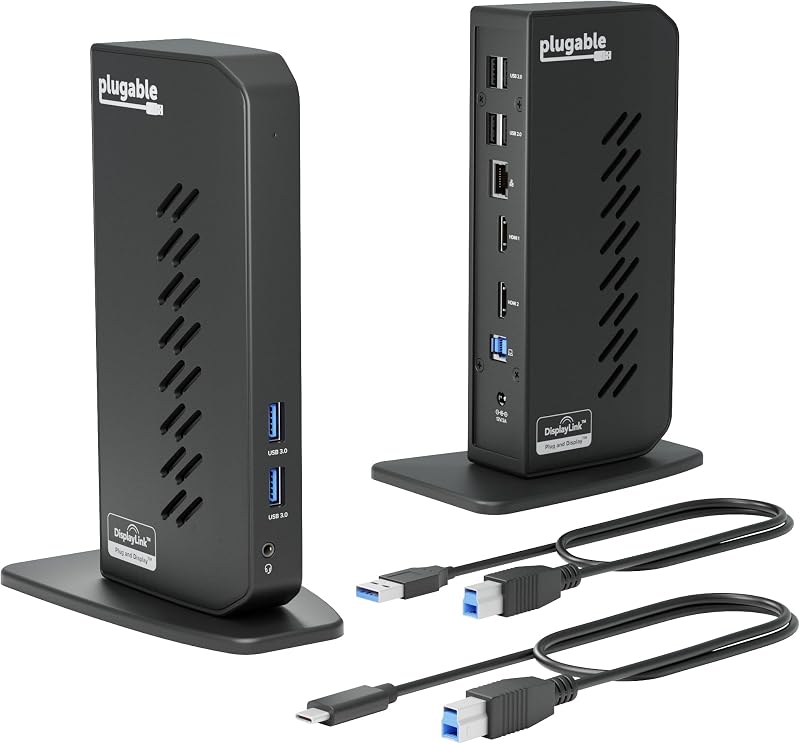
The Plugable USB 3.0 Universal Laptop Docking station is engineered as a practical utility bridge for older laptops, mixed-generation workstations, and desktop deployments requiring dual-screen expansion via standard USB channels. Using an included hybrid 2-in-1 cable featuring both USB 3.0 Type-A and USB Type-C connectors, this vertical hub supplies two HDMI video outputs driven by DisplayLink graphics. It supports dual external displays up to 1920×1200 at 60Hz, or alternatively drives a single HDMI monitor at 2560×1440 resolution at 50Hz. Because it operates through pure USB data streams, it allows machines devoid of native USB-C video capabilities to output extended desktop screens.
Expansion includes two front-facing USB 3.0 ports, four rear-facing USB 2.0 ports ideal for dedicated keyboard and mouse dongles, wired Gigabit Ethernet, and discrete 3.5mm headphone and microphone jacks. The dock is TAA-compliant, matching federal procurement standards, and carries a two-year hardware warranty paired with lifetime technical support. Driver installation is automated on Windows 10 and 11 via Windows Update, operates without extra configuration on ChromeOS 100 or later, and requires a manual DisplayLink software installation for macOS 14 or later. Linux and Unix distributions are explicitly unsupported.
Shoppers considering this universal dock must account for two major operational parameters: power delivery and media copy protection. The unit draws only 20 watts of total input power and does not provide charging power to the host computer, meaning your laptop power adapter must stay connected separately. Furthermore, because DisplayLink functions as a virtual display driver, the dock does not support HDCP-encrypted video streams, preventing playback from streaming platforms like Netflix, nor is it engineered for high-refresh gaming. For general productivity, office documents, and web portals, it remains an effective dual-screen solution for legacy computers.
Plugable Dual 1080p HDMI Universal Docking for Silicon MacBooks and Mixed Fleets
Best for: Basic dual 1080p productivity on Silicon Macs
Pros
- Bypasses Mac single-monitor display limits
- Includes both USB-C and USB-A host cables
- Space-saving vertical orientation
Cons
- No host laptop battery charging
- Incompatible with HDCP video playback
Targeting IT-managed deployments and users seeking dual-monitor productivity on hardware limited by default display constraints, the Plugable Dual 1080p HDMI Universal Docking station delivers dual 1920×1200 monitor support at 60Hz across two HDMI outputs. Designed in a space-saving vertical format, this 10-port hub features both USB-C and USB-A host connection cables right in the box, ensuring seamless physical pairing with legacy business laptops or current USB-C ultrabooks. It functions on Windows, macOS, and ChromeOS, using DisplayLink technology to bypass the native single-display restriction inherent to base Apple M1 through M5 MacBooks and MacBook Neo systems.
Peripherals connect via two 5Gbps USB 3.0 ports, four USB 2.0 ports, a 3.5mm combo audio port, and a Gigabit Ethernet connection. While smaller desktop docks often duplicate monitor setups or require specialized ports, this model focuses strictly on dual HDMI outputs for straightforward desk monitors. Buyers comparing this unit to alternatives like an anker laptop docking station dual monitor will find that Plugable relies heavily on standard USB data channels rather than raw DisplayPort Alt Mode, providing broad operating system versatility across multiple hardware generations.
The limitations of this universal dock follow the standard compromises of non-powered DisplayLink hardware. The dock operates at a 24-watt power rating and does not supply host battery charging, requiring users to keep their OEM laptop charger plugged into an open port. In addition, hardware-level HDCP encryption is unsupported, which means commercial copy-protected content from services such as Hulu and Netflix cannot be streamed to the connected screens. For business administration, spreadsheet multitasking, and general office software where laptop charging is handled separately, it delivers dependable dual-screen productivity across modern and older machines alike.
Plugable USB-C Docking Station for Simple Driverless Dual 4K Desks
Best for: Windows and Chromebook dual 4K setups
Pros
- Driverless plug-and-play setup
- Dual 4K 60Hz HDMI video output
- 65W integrated host laptop charging
Cons
- MacOS limited to single external screen
- Fewer total USB peripheral ports
The Plugable USB-C Docking Station (model UD-MSTH2) is tailored for users who want high-resolution dual-screen output without third-party driver installations or display management background processes. Utilizing DisplayPort Alternate Mode combined with Multi-Stream Transport (MST), this 10-in-1 desktop workstation supports up to two HDMI monitors operating at 4K resolution at 60Hz each on capable host laptops. Because the dock channels native GPU video signals across a single USB-C cable, video playback, animation rendering, and general interface responsiveness remain crisp and unaffected by virtual driver overhead.
The hub delivers 65W of USB-C Power Delivery to the host laptop, powered by an included 110W external power supply that provides ample headroom for peripheral accessories. Connectivity options include one front-facing 5Gbps USB-C data port, two 5Gbps USB-A 3.0 ports, one USB-A 2.0 port for basic input devices, a Gigabit Ethernet port, and a 3.5mm stereo headset jack. Setup requires zero driver downloads on supported operating systems, allowing users running Windows 10 or newer, USB4 laptops, and ChromeOS 137 or newer to achieve immediate plug-and-play capability upon plugging in the included 1-meter host cable.
Operating system compatibility requires careful verification prior to deployment. The UD-MSTH2 relies entirely on MST to split its dual display signals; because macOS does not implement MST for extended multi-monitor configurations, Apple laptops connected to this dock will be restricted to a single external extended monitor, with the second output merely mirroring the first. For Windows and Chromebook users requiring sharp, driverless dual 4K workspaces with integrated 65W charging, the UD-MSTH2 is a clean, capable solution that avoids the complexities of DisplayLink architecture.
How to Choose the Right Plugable Docking Station
Selecting the correct model from Plugable depends primarily on your host machine’s operating system, whether your work demands native GPU acceleration or broad software compatibility, and your workspace charging requirements. The most critical divide rests between DisplayLink-driven docks and Multi-Stream Transport (MST) hardware. If you operate an Apple Silicon MacBook—such as an M1, M2, or M3 base model—and demand two or three extended displays, you must select a DisplayLink-equipped unit like the Plugable USB C Triple Display Docking or the Plugable Dual 1080p HDMI Universal Docking station. These units install a virtual graphics driver to route video through standard USB data packets, successfully overcoming macOS hardware limits.
Conversely, if your workspace consists solely of modern Windows 10 or Windows 11 laptops with USB4 or Thunderbolt ports, driverless MST docks such as the Plugable USB-C Triple Display Laptop Docking (UD-MSTH3) or the Plugable USB-C Docking Station (UD-MSTH2) provide a superior video experience. These MST units interface directly with your graphics card via DisplayPort Alt Mode, delivering dual or triple displays with up to 4K resolution at 60Hz, zero driver lag, and complete support for copy-protected streaming content that DisplayLink docks block.
Power delivery is another defining selection factor that determines desk organization. The premium triple-display models deliver a full 100W of charging power to the host machine, eliminating the need to unpack your laptop power brick. The UD-MSTH3 even adds an independent 30W charging port specifically for mobile phones and peripherals. On the other hand, legacy universal models like the Plugable USB 3.0 Universal Laptop Docking station and the Dual 1080p HDMI unit do not provide host charging power at all. On these models, your laptop will run strictly on its own battery unless its factory power supply is simultaneously plugged in.
Finally, examine the peripheral demands of your workstation. If you manage high-speed external storage drives, the 10Gbps USB-C and USB-A connections on the UD-MSTH3 offer twice the data throughput of the 5Gbps ports found across the other models. Similarly, the 2.5Gbps Ethernet port on the UD-MSTH3 provides significant headroom over the Gigabit Ethernet interfaces on the rest of the lineup if your local network supports multi-gigabit speeds. Matching your display resolution, operating system constraints, and data bandwidth needs ensures a frictionless desktop deployment.
FAQ
Can I use the Plugable UD-MSTH3 to get triple extended displays on an Apple MacBook?
No, the Plugable UD-MSTH3 is not recommended for macOS systems. The dock relies on Multi-Stream Transport (MST) to route independent video signals to its three HDMI outputs. Because macOS lacks native operating system support for MST across USB-C connections, any connected Mac will mirror the secondary and tertiary screens rather than extending them. Mac users needing triple extended displays should select the DisplayLink-powered Plugable USB C Triple Display Docking station instead.
Why do some Plugable docks block video playback on Netflix and Hulu?
Docks powered purely by DisplayLink graphics chipsets, such as the Plugable USB 3.0 Universal Laptop Docking and the Plugable Dual 1080p HDMI Universal Docking station, do not support High-bandwidth Digital Content Protection (HDCP). DisplayLink captures screen buffers at the operating system level to compress and send video over USB data channels. To protect against unauthorized recording, streaming services like Netflix, Hulu, and Apple TV intentionally black out video playback when an active, non-HDCP virtual display driver is detected.
Do all Plugable USB docking stations provide power delivery to the laptop?
No, host charging depends entirely on the hardware design of the specific model. The Plugable USB C Triple Display Docking and the UD-MSTH3 provide 100W USB-C Power Delivery, while the UD-MSTH2 delivers 65W. In contrast, universal models designed to bridge older USB 3.0 Type-A systems, such as the Plugable USB 3.0 Universal Laptop Docking and the Dual 1080p HDMI Universal Docking station, draw low operational wattage (20W to 24W) and do not provide any battery charging to the host computer.
What is the difference between DisplayLink technology and USB-C DisplayPort Alt Mode?
USB-C DisplayPort Alternate Mode (DP Alt Mode) is a hardware protocol that routes raw video signals directly from your laptop graphics card through physical pins in the USB-C cable, requiring no software drivers and imposing no CPU overhead. DisplayLink, by contrast, is a software-and-hardware technology that converts video frames into standard USB data packets via host system software before sending them to a specialized chipset inside the dock, allowing multi-monitor output on computers that lack native multi-display video support.
What driver software is required to operate the Plugable USB-C Docking Station UD-MSTH2?
The Plugable UD-MSTH2 requires no driver software whatsoever. It operates as a true plug-and-play device on Windows 10 or newer and supported ChromeOS machines. Because it leverages hardware DP Alt Mode and Multi-Stream Transport, the host operating system recognizes and drives connected HDMI displays natively through the laptop internal graphics driver upon plugging in the USB-C cable.