


As Amazon Associates, we earn from qualifying purchases. This means we may receive a small commission at no extra cost to you if you click through and make a purchase.
HP maintains a prominent footprint in the desktop display market by delivering clean, accessible workplace screens built around IPS technology, slim profiles, and integrated eye care. In the 27-inch display class, the brand focuses on maximizing screen real estate for home offices, general corporate productivity, and multitasking environments. Buyers looking for an hp monitor 27 typically seek an everyday panel that balances broad viewing angles, reliable construction, and uncluttered desktop aesthetics without demanding complex calibration or specialized gaming hardware.
While these six displays share a 1080p native resolution and 27-inch screen dimensions, they diverge sharply in mechanical ergonomics, refresh rate ceilings, video input configurations, and whether they provide integrated desktop audio.
HP 27-inch Monitors Compared
| Model | Refresh Rate & Contrast | Stand Adjustability | Video Inputs | Integrated Audio |
|---|---|---|---|---|
| HP Series 3 27 inch FHD | 100Hz, 1300:1 | Tilt adjust with software guide | HDMI 1.4, DisplayPort 1.2, VGA | Dual 2W speakers |
| HP Series 5 527sh 27″ FHD | 100Hz, 1500:1 | Height and tilt adjustable stand | 2x HDMI, 1x VGA | Not listed |
| HP 27″ Monitor | 100Hz, 1500:1 | Tilt adjust (-5 to +25 degrees, no VESA) | 2x HDMI 1.4, 1x VGA | Not listed |
| HP 27 inch 1080P Computer Monitor | 75Hz, 1000:1 | Tilt adjust (-5 to +25 degrees) | 2x HDMI 1.4, 1x VGA | Not listed |
| HP 27 Monitor with Dual 2W | 100Hz, 1500:1 | Tilt adjust (-5 to +25 degrees, no VESA) | 2x HDMI 1.4, 1x VGA | Dual 2W speakers |
| HP 27h Full HD Monitor | 75Hz, Not listed | 100mm height and tilt adjust | HDMI, DisplayPort, VGA | Dual speakers |
HP Series 3 27 inch FHD for Modern Connectivity and Audio

Best for: General desktop productivity with DisplayPort needs
Pros
- Fluid 100Hz refresh rate
- Includes DisplayPort, HDMI, and VGA
- Integrated dual 2W speakers
Cons
- Moderate 250-nit brightness
- Tilt-only mechanical stand
The HP Series 3 27 inch FHD delivers an updated feature package aimed at daily office workflows and shared family workstations. Built around an IPS panel with an expansive 178-degree viewing angle, this hp 27 monitor pairs a 100Hz refresh rate with a 1300:1 static contrast ratio to improve frame fluidity and shadow separation compared to older standard office screens. The display outputs 250 nits of brightness through a matte screen finish, preventing distracting office glare while maintaining comfortable visibility for indoor documents and web tasks.
Connectivity is a key strength for this hp series 3 27 inch model, as it equips users with HDMI 1.4, legacy VGA, and a modern DisplayPort 1.2 connection. This input variety simplifies integration into dual-monitor setups or docks without requiring third-party adapters. In addition, HP integrates dual 2W speakers directly into the chassis, sparing desk space from extra desktop sound units for virtual calls. Comfort is rounded out by HP Eye Ease with Eyesafe certification, an always-on hardware low-blue-light filter designed to keep white balance natural while reducing visual fatigue.
This screen suits remote workers and office professionals who require both DisplayPort connectivity and built-in conference call audio on an everyday desk. However, with its 250-nit brightness ceiling and 72% color gamut, buyers working in sun-drenched offices or handling color-critical imagery may find better panel specifications in the higher-tier Series 5.
HP Series 5 527sh 27" FHD for Full Ergonomic Height Adjustment

Best for: Ergonomics-focused workers wanting height adjustability
Pros
- Height and tilt adjustable stand
- Deep 1500:1 contrast ratio
- Vibrant 99% sRGB coverage
Cons
- No DisplayPort input
- Lacks built-in speakers
Targeting workers who spend extensive hours at their desks, the HP Series 5 527sh 27″ FHD tackles posture issues directly with an ergonomic height and tilt adjustable foot. As part of a thorough hp 27 inch monitor comparison, the physical versatility of this stand sets it apart from simple tilt-only models, allowing users to align screen elevation with eye level without stacking risers. The panel also incorporates HP’s Ergonomic Comfort Guide within the display software to assist with ideal desk positioning.
Visually, the hp series 5 527sh represents a step up in color performance and panel contrast. It offers 99% sRGB color coverage, a deep 1500:1 static contrast ratio, and a peak brightness rating of 300 nits. The 100Hz refresh rate and 5ms gray-to-gray response time keep mouse navigation and document scrolling crisp. Dual HDMI inputs alongside a standard VGA port provide support for switching between a home desktop and a work laptop, housed in a chassis built from 85% post-consumer recycled materials and 5% ocean-bound plastics.
This monitor is the prime option for professionals demanding proper physical posture adjustment and refined color rendition directly out of the box. Users who depend on a native DisplayPort interface or integrated chassis speakers, however, will need to choose the Series 3 or the 27h instead, as this model omits both features.
HP 27" Monitor for Multi-PC Workstations
Best for: Dual-PC setups requiring dual HDMI inputs
Pros
- Smooth 100Hz refresh rate
- Dual HDMI 1.4 ports
- Includes Docztorm USB hub
Cons
- No VESA mount support
- No integrated speakers
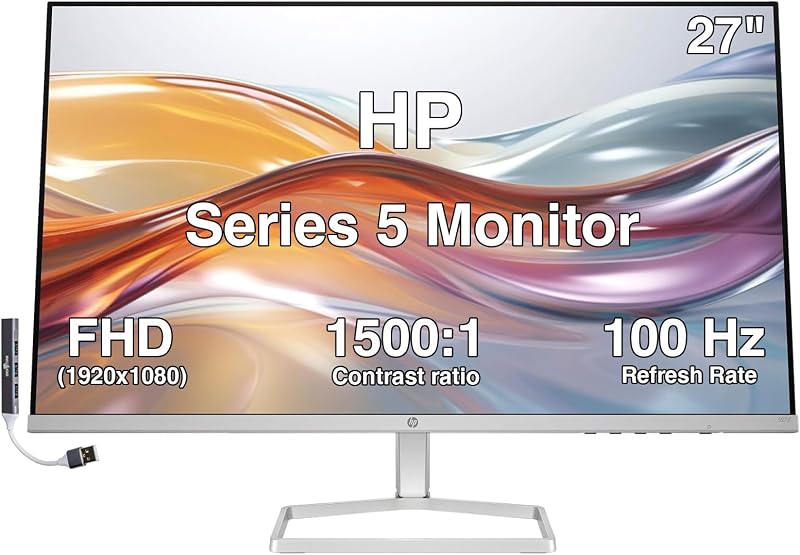
Serving as the direct modern replacement for the popular M27f, the HP 27″ Monitor focuses on an ultra-slim profile with a micro-edge borderless bezel on three sides. It employs a 100Hz refresh rate across its 1080p IPS panel, delivering responsive visual feedback for intensive typing, spreadsheets, and casual multimedia. Rated at 300 nits of brightness with a 1500:1 contrast ratio, this monitor hp 27 delivers bold text clarity and balanced shadow detail across wide horizontal and vertical sightlines.
The port layout features two HDMI 1.4 inputs and one VGA port, making it straightforward to toggle between two connected computing systems using on-screen controls. The package also includes a special edition portable Docztorm data hub providing up to 5Gbps transfer rates, expanding peripheral access for laptops with limited USB ports. For comfort, the panel provides a tilt adjustment range of -5 to +25 degrees alongside an anti-glare flat screen coating and integrated flicker-free low-blue-light hardware.
This 27 hp monitor suits general home users and office administrators who prioritize a slim, minimalist desktop aesthetic and want quick dual-HDMI switching. The primary limitation to keep in mind is structural: the listing explicitly notes there is no VESA mount support, meaning buyers cannot mount this panel to third-party monitor arms or multi-display desk clamps.
HP 27 inch 1080P Computer Monitor for Casual Motion and Color Accuracy

Best for: Casual multimedia users wanting AMD FreeSync
Pros
- AMD FreeSync tear-free support
- Solid 99% sRGB color support
- Includes Docztorm USB data hub
Cons
- Lower 75Hz refresh rate
- Basic 1000:1 contrast ratio
The HP 27 inch 1080P Computer Monitor offers an accessible entertainment and general computing setup, pairing a 75Hz refresh rate with AMD FreeSync variable refresh technology. FreeSync helps eliminate screen tearing and choppy frame delivery when viewing video media or casual graphical workloads. This hp 27 inch ips monitor maintains 99% sRGB color gamut coverage and provides wide 178-degree viewing angles, ensuring graphics and photos look consistent across the surface.
The hardware configuration includes two HDMI 1.4 ports and a VGA input, accompanied by dedicated cable management channels integrated into the stand to keep clutter tucked away. Unlike the matte-finished displays in the lineup, the specification sheet lists this unit with a glossy screen finish, which can enhance perceived vibrancy in controlled lighting but requires careful positioning away from direct windows. Like other bundled productivity editions, it ships with a portable 5Gbps Docztorm data hub for external peripheral expansion.
Buyers looking for smooth video playback and consistent sRGB reproduction will appreciate the balanced spec sheet. On the other hand, the 1000:1 contrast ratio and 75Hz ceiling yield to the 1500:1 contrast and 100Hz refresh rate seen on newer HP Series models, and its stand only supports basic forward and backward tilt.
HP 27 Monitor with Dual 2W for All-in-One Desk Setups
Best for: Clean desks needing built-in audio hardware
Pros
- Built-in dual 2W speakers
- Responsive 100Hz IPS panel
- High 1500:1 contrast ratio
Cons
- No VESA mount support
- Limited to tilt adjustment
Designed as the successor to the M27fwa, the HP 27 Monitor with Dual 2W integrates built-in sound without cluttering the minimalist, thin-and-light chassis. As an hp 27 monitor with dual speakers, it incorporates two 2W internal drivers capable of handling routine operating system alerts, remote meetings, podcasts, and training modules. This eliminates the clutter of external desktop soundbars and saves precious desk real estate.
The visual foundation matches HP’s updated standard: a 100Hz IPS panel displaying 1920×1080 resolution, a strong 1500:1 static contrast ratio, and a brightness output of 300 nits. Color performance remains reliable with 99% color gamut coverage and a tighter 0.28 pixel pitch for crisp line rendering. Video inputs consist of two HDMI 1.4 ports and a VGA connection, and the package provides an external Docztorm USB data hub to expand laptop docking capabilities.
This model is ideal for hybrid workers and students who need a clean, single-cord audio-visual station for everyday video calls. Shoppers should take note that, similar to its sibling without audio, this chassis does not include VESA mounting holes and limits physical adjustment to a tilt range between -5 and +25 degrees.
HP 27h Full HD Monitor for Hybrid Ergonomics and Legacy Support
Best for: Hybrid professionals needing height adjust and audio
Pros
- 100mm height and tilt adjust
- DisplayPort, HDMI, and VGA ports
- Integrated dual speakers
Cons
- Capped at 75Hz refresh
- Glossy screen surface description
The HP 27h Full HD Monitor is specifically constructed around the practical demands of hybrid remote professionals. Featuring a dedicated 100mm height and tilt adjustable mechanism, this hp 27h full hd monitor lets users slide the screen vertically to align perfectly with their seated posture, reducing neck strain over eight-hour work shifts. The display integrates intuitive joypad controls underneath the lower frame for swift menu navigation, complemented by HP Display Center desktop software management.
The rear panel offers one of the most complete port layouts in HP’s business lineup, supplying an HDMI port, a full-sized DisplayPort, and an analog VGA port. Built-in dual speakers provide amplified sound for video meetings, eliminating external audio clutter. The panel uses an IPS core operating at a 75Hz refresh rate with a 3-sided micro-edge bezel, housed in a sustainable structure built with 85% recycled ITE plastics, EPEAT Gold certification, and 100% recyclable packaging.
Hybrid employees seeking an all-in-one corporate screen with DisplayPort, internal speakers, and true height adjustability will find this model exceptionally practical. It concedes maximum refresh rates to the 100Hz Series 3 and Series 5 models, but compensates with superior mechanical adjustment out of the box.
How to Choose the Right HP 27-inch Monitor
Navigating the options to decide which hp monitor 27 to buy comes down to evaluating three critical structural factors: stand ergonomics, physical port requirements, and mounting compatibility. Because HP separates these features across different chassis designs, selecting the wrong display can result in frustrating desktop compromises.
- Ergonomic Stand Mechanics: Physical height adjustment is vital for preventing neck fatigue, yet only two models in this group include height-adjustable stands directly in the box: the HP Series 5 527sh (featuring an adjustable foot) and the HP 27h (providing 100mm of smooth vertical travel). The remaining models—including the Series 3, the standard 27″ monitor, and the Dual 2W variant—rely strictly on a tilt range of -5 to +25 degrees.
- VESA Wall and Arm Compatibility: If you intend to clear desk space using gas-spring monitor arms, pay close attention to mounting specs. The HP 27″ Monitor and the HP 27 Monitor with Dual 2W explicitly lack VESA mount support. Placing them on aftermarket arms requires awkward third-party clamp adapters, making factory-adjustable stands like the 27h or 527sh much safer investments for flexible workstations.
- Video Inputs and DisplayPort Access: While every monitor in this lineup features at least one HDMI port and a legacy VGA input, native DisplayPort connections are restricted to the HP Series 3 and the HP 27h. If your corporate laptop dock or PC graphics card outputs primarily via DisplayPort, choosing either the Series 3 or 27h prevents the need for active signal conversion dongles.
- Integrated Speakers versus Headphone Setups: For clean desks without separate audio units, built-in dual speakers are factory-installed on the HP Series 3, the HP 27 Monitor with Dual 2W, and the HP 27h. The HP Series 5 and the standard 27″ display omit integrated drivers, requiring you to rely on external desktop speakers, USB headsets, or laptop audio.
- Refresh Rates and Visual Smoothness: If fluid window transitions and reduced eye tracking strain are priorities, the newer 100Hz panels found on the Series 3, Series 5 527sh, standard 27″, and Dual 2W models deliver a noticeable upgrade in motion clarity over the 75Hz ceiling on the 27h and the FreeSync-equipped 1080P Computer Monitor.
For shoppers weighing display sizes against available desk space, our evaluation of the hp 32 inch monitor lineup provides perspective on size upgrades, while those evaluating alternative panel specifications can consult our overview of the msi 27 inch monitor 1440p category.
Similarly, users interested in contrasting panel engineering across different brands can review our analysis of an lg 27 inch monitor to determine how standard IPS office screens compare across manufacturers.
FAQ
Can all HP 27-inch monitors be mounted on monitor arms?
No. Several ultra-thin models, specifically the HP 27″ Monitor and the HP 27 Monitor with Dual 2W, explicitly feature no VESA mount support. Their chassis designs integrate the stand stem directly into the lower housing, preventing attachment to standard 75x75mm or 100x100mm VESA plates. If arm mounting is essential for your setup, verify VESA compatibility or select a model with complete factory height adjustments like the HP 27h or Series 5 527sh.
What is the benefit of a 100Hz refresh rate on an office monitor?
A 100Hz refresh rate renders visual updates 100 times per second, which is a noticeable leap over traditional 60Hz and 75Hz office displays. This elevated refresh rate produces smoother cursor tracking, reduces text ghosting when scrolling through long documents or spreadsheets, and creates a more fluid desktop experience that can reduce perceptual eye strain during extended work hours.
Do all HP 27-inch displays include built-in speakers?
No, built-in audio is only present on select models. In this lineup, integrated dual speakers are included on the HP Series 3 27 inch FHD, the HP 27 Monitor with Dual 2W, and the HP 27h Full HD Monitor. The HP Series 5 527sh, the standard HP 27″ Monitor, and the HP 27 inch 1080P Computer Monitor do not have integrated speakers listed and require external audio hardware.
What does HP Eye Ease do on these displays?
HP Eye Ease is an integrated hardware solution that constantly reduces high-energy blue light emissions to lower eye fatigue during prolonged screen use. Unlike basic software blue-light modes that impart an unnatural yellow tint across the screen, HP Eye Ease is Eyesafe certified to maintain true color accuracy and natural white balance while filtering harmful wavelengths.
Which HP 27-inch model is best for multi-device setups?
For connecting multiple systems simultaneously, models equipped with dual HDMI ports—such as the HP Series 5 527sh, the HP 27″ Monitor, and the HP 27 Monitor with Dual 2W—allow you to keep two digital sources connected at once alongside an analog VGA device. If your workflow requires a DisplayPort source alongside an HDMI device, the HP Series 3 and HP 27h are the proper options.


