


As Amazon Associates, we earn from qualifying purchases. This means we may receive a small commission at no extra cost to you if you click through and make a purchase.
ASUS has built one of the widest footprints in modern consumer computing by democratizing organic light-emitting diode displays across its mainstream laptop catalog. In the Vivobook family, these self-illuminating panels deliver authentic deep blacks, expansive color coverage, and elevated contrast ratios that surpass conventional liquid crystal displays. Yet, evaluating these machines from an ownership perspective requires looking past striking initial visual clarity to understand mechanical durability, thermal behavior, and long-term customer service realities. When deciding which ASUS Vivobook OLED to buy, hardware endurance factors such as 360-degree convertible hinge resistance and panel maintenance warrant as much attention as internal computing components.
Across the current lineup, these six machines diverge fundamentally in structural form factor, panel refresh rates ranging from 60Hz up to 120Hz, processing architecture split between Intel Core Ultra and AMD Ryzen AI silicon, and distributor packaging status where third-party upgraded storage configurations introduce distinct warranty considerations.
ASUS OLED Laptops Compared
| Model | Display & Refresh Rate | Processor & Memory | Storage Drive | Battery & Chassis Weight |
|---|---|---|---|---|
| ASUS Vivobook Flip 14 2-in-1 Laptop | 14-inch 1920×1200 60Hz Touchscreen OLED | Intel Core Ultra 7 256V, 16GB LPDDR5X | 1TB PCIe 4.0 NVMe SSD | Not listed, 2.37 kg |
| ASUS Vivobook 16 Flip Laptop | 16-inch 1920×1200 60Hz Touchscreen OLED | Intel Core Ultra 7 256V, 16GB DDR5 | 512GB NVMe SSD | 75 Wh, 6 pounds |
| ASUS Vivobook S16 Laptop | 16-inch 1920×1200 60Hz OLED | AMD Ryzen AI 9 465, 32GB DDR5 | 1TB NVMe SSD | 70 Wh, 3.75 pounds |
| ASUS Vivobook S 14 OLED Slim | 14-inch 2880×1800 120Hz Lumina OLED | AMD Ryzen AI 9 365, 24GB LPDDR5X | 1TB NVMe SSD | 75 Wh, 2.87 pounds |
| ASUS Vivobook S 16 OLED Laptop | 16-inch 3200×2000 120Hz OLED | Intel Ultra 9 185H, 16GB DDR5 | 1TB PCIe NVMe SSD (Resealed) | 75 Wh, 3.31 pounds |
| ASUS Vivobook S 14 OLED Laptop | 14-inch 1920×1200 60Hz OLED | Intel Core Ultra 7 258V, 32GB DDR5 | 2TB PCIe NVMe SSD (Resealed) | 75 Wh, 2.9 pounds |
ASUS Vivobook Flip 14 2-in-1 Laptop for Convertible Versatility

Best for: Students wanting a compact convertible touchscreen
Pros
- Flexible 360-degree convertible hinge
- Sharp 16:10 OLED touchscreen
- Modern Wi-Fi 7 connectivity
Cons
- Standard 60Hz refresh rate
- Heavier 2.37 kg chassis
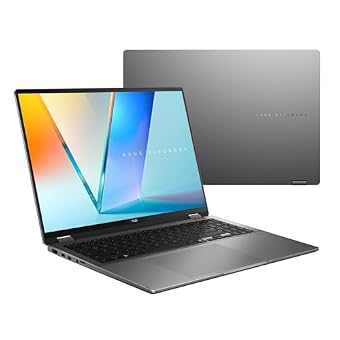
The ASUS Vivobook Flip 14 2-in-1 Laptop is engineered around a versatile 360-degree geared hinge mechanism, enabling smooth transitions between standard clamshell productivity, stand mode, tent mode, and handheld slate usage. Its 14-inch 1920×1200 touchscreen features an anti-glare coating and reaches up to 500 nits of peak brightness with full 100 percent DCI-P3 color gamut reproduction. Beneath the aluminum lid sits an Intel Core Ultra 7 256V 8-core processor paired with Intel Arc integrated graphics, 16GB of onboard LPDDR5X system memory, and a swift 1TB M.2 PCIe 4.0 NVMe solid-state drive for responsive local storage.
From an operational reliability perspective, convertible designs introduce physical trade-offs compared to fixed clamshell chassis. The continuous rotation of the 360-degree hinge requires internal display ribbon cables to undergo repetitive flex cycles, making long-term mechanical handling critical for shoppers seeking multi-year longevity. Additionally, the listed weight of 2.37 kilograms represents substantial mass for a 14-inch convertible, meaning extended handheld tablet use can lead to arm fatigue. For peripheral flexibility, the machine incorporates cutting-edge Wi-Fi 7 wireless connectivity, Bluetooth 5.4, a physical backlit chiclet keyboard, a Full HD webcam, and a high-bandwidth Thunderbolt 4 port.
This convertible configuration suits university students, commercial presenters, and field professionals who require interactive stylus inputs and adaptive viewing angles during small-group briefings. However, users prioritizing featherweight travel or ultra-smooth 120Hz scrolling will find more specialized utility in dedicated ultraportable clamshell alternatives.
ASUS Vivobook 16 Flip Laptop for Large Touch Workflows

Best for: Presenters needing a large convertible touch display
Pros
- Expansive 16-inch touchscreen panel
- Generous 75Wh fast-charge battery
- Adaptive 360-degree Dolby Atmos audio
Cons
- Substantial 6-pound overall weight
- Modest 512GB base storage
Offering an expansive canvas for collaborative work, the ASUS Vivobook 16 Flip Laptop expands the convertible concept into a substantial 16-inch form factor. The machine features a 16:10 aspect ratio WUXGA touchscreen with an 88 percent screen-to-body ratio, providing ample vertical height for spreadsheets, document review, and multi-window multitasking. Processing duties are handled by the Intel Core Ultra 7 256V processor featuring an integrated neural processing unit capable of up to 47 NPU TOPS, supported by 16GB of DDR5 system memory and a 512GB solid-state drive.
Integrating a 360-degree hinge assembly into a large 16-inch notebook demands careful mechanical consideration. With a listed total weight of 6 pounds, the dual hinges must manage substantial structural leverage whenever the display is adjusted or utilized in stand and tablet configurations. Shoppers should stabilize the base when interacting with the touchscreen to avoid chassis movement. On the durability and endurance side, ASUS outfits this model with a generous 75 Wh high-capacity battery supporting fast charging up to 60 percent in approximately 49 minutes, along with Microsoft Pluton security hardware and Windows Hello facial recognition built into the array.
This laptop serves corporate staff, educators, and enterprise users who frequently present digital slides directly from their machine in stand or tent orientations. Users who store heavy local media libraries may find the factory 512GB SSD somewhat limiting, potentially directing them toward higher-capacity fixed clamshell configurations across the lineup.
ASUS Vivobook S16 Laptop for High-Capacity Multitasking
Best for: Mobile workers requiring maximum onboard storage capacity
Pros
- Massive 2TB SSD and 32GB RAM
- Long-lasting 75Wh battery capacity
- MIL-STD 810H certified durability
Cons
- Resealed third-party configuration
- Standard 400-nit 60Hz panel
Best for: High-load desk workers wanting high-resolution output
Pros
- High-resolution 3200×2000 120Hz screen
- Fast 16-core Core Ultra 9 processor
- Dual high-speed Thunderbolt 4 ports
Cons
- Resealed box hardware modifications
- Shorter 6-hour rated battery run time

Best for: Traveling creatives prioritizing sharp 120Hz visuals
Pros
- Fluid 3K 120Hz Lumina OLED display
- Slim 0.63-inch portable chassis
- Comfortable 24GB memory buffer
Cons
- Lacks 360-degree touch rotation
- Shared integrated graphics memory

Best for: Power multitaskers seeking memory and battery endurance
Pros
- Massive 32GB system memory
- Robust 50 NPU TOPS processor
- Lightweight 3.75-pound 16-inch profile
Cons
- Standard 60Hz refresh rate
- Limited to Wi-Fi 6 wireless
The ASUS Vivobook S16 Laptop adopts a traditional clamshell chassis, abandoning folding hinges in favor of structural rigidity, slender dimensions, and thermal stability. Measuring 0.7 inches thin and weighing 3.75 pounds, this machine delivers desktop-grade workspace across its 16-inch WUXGA 1920×1200 OLED panel. It runs on the modern AMD Ryzen AI 9 465 processor, boasting up to 50 NPU TOPS for local machine-learning tasks, combined with an expansive 32GB of DDR5 RAM and a roomy 1TB solid-state drive. Shoppers exploring capable AMD silicon can also evaluate an asus ryzen 7 laptop within our brand coverage to understand performance gradations.
By utilizing a fixed display hinge, this 16-inch chassis eliminates the mechanical stress points typical of 360-degree convertibles, yielding superior rigidity during heavy keyboard typing sessions. The internal cooling design supports an efficient 70Wh battery rated for up to 23 hours of light continuous usage, bolstered by fast-charge capabilities reaching 60 percent in 49 minutes. Connectivity remains comprehensive without requiring external adapters, featuring two USB 3.2 Gen 1 Type-C ports, two USB 3.2 Gen 1 Type-A ports, HDMI 2.1 TMDS output, a 3.5 mm audio jack, an IR webcam with Windows Hello, and a physical privacy shutter.
Demanding analysts, coders, and productivity professionals managing dense spreadsheets or large datasets will appreciate the headroom provided by 32GB of system RAM. Those needing high refresh rate gaming panels or touch-driven pen inputs, however, will prefer looking toward high-refresh Lumina or convertible Flip editions.
ASUS Vivobook S 14 OLED Slim for High-Resolution Mobility
For mobile professionals prioritizing visual precision and easy transport, the ASUS Vivobook S 14 OLED Slim represents the engineering highlight of the brand’s compact clamshell family. Built into an aluminum chassis that measures just 0.63 inches thin with a listed carry weight of 2.87 pounds, this notebook houses an exceptional 14-inch 3K (2880×1800) 120Hz Lumina OLED display. The panel delivers a rapid 0.2ms response time, up to 600 nits of peak HDR luminance, and full 100 percent DCI-P3 color fidelity, making it a standout option for detailed visual evaluation.
Core performance is powered by the 10-core AMD Ryzen AI 9 365 processor featuring a dedicated NPU delivering over 45 TOPS, coupled with 24GB of high-speed LPDDR5X RAM and a 1TB SSD. The ASUS Lumina OLED panel incorporates advanced factory calibration and hardware-level blue light filtering designed to maintain color accuracy while reducing visual fatigue. Long-term reliability is reinforced by a robust 75 Wh battery pack, an ergonomic single-zone RGB backlit keyboard, and a dedicated Windows Copilot key. I/O selections include USB 4.0 Gen 3 Type-C with power delivery and display output, standard USB 3.2 ports, an HDMI 2.1 port, and an integrated Micro SD card slot.
This compact powerhouse is an ideal companion for digital graphic editors, traveling writers, and content managers who demand true 3K sharpness and fluid 120Hz frame rates on the go. Users who require an integrated physical numeric keypad or a folding tablet screen will find larger 16-inch or convertible Flip designs better suited to their workflow.
ASUS Vivobook S 16 OLED Laptop for High-Performance Workloads
The ASUS Vivobook S 16 OLED Laptop is built for maximum processing throughput, housing a 16-core, 22-thread Intel Ultra 9 185H processor capable of turbo boost clock speeds up to 5.1 GHz. Visual output is channeled through an ultra-sharp 16-inch 3.2K (3200×2000) 120Hz glossy OLED screen featuring VESA DisplayHDR True Black 600 certification, 600 nits peak brightness, and 70 percent blue light mitigation. Memory and storage stand at 16GB of DDR5 RAM alongside a 1TB PCIe NVMe solid-state drive, accessible through our guide detailing the asus vivobook 16gb ram 1tb ssd ecosystem.
Shoppers must exercise critical consumer awareness when evaluating this specific online configuration. The retail listing explicitly states that the original factory packaging has been opened and resealed solely to perform component upgrades. When third-party distributors unseal a brand-new notebook to swap storage drives or memory sticks, manufacturer warranty policies can vary substantially. In many instances, the primary manufacturer maintains coverage only for unmodified original parts, while the merchant or upgrade facility assumes warranty responsibility for the altered drive and potential disassembly wear.
Beyond packaging caveats, the unit is equipped with a 75Wh battery providing up to 6 hours of active run time under heavy workload demands, dual high-speed Thunderbolt 4 ports, Wi-Fi 6E connectivity, and an integrated physical numeric keypad. It serves workstation-focused professionals and compiling developers who require substantial Intel multi-threaded performance and high-resolution screen real estate, provided they verify distributor warranty terms before deployment.
ASUS Vivobook S 14 OLED Laptop for Maximum Storage Capacity
Combining compact portability with high-capacity local specifications, the ASUS Vivobook S 14 OLED Laptop is tailored for mobile professionals carrying massive archival file libraries. Built around an Intel Core Ultra 7 258V processor with Intel Arc graphics, this system features a full 32GB of DDR5 memory and a 2TB PCIe NVMe M.2 solid-state drive. The 14-inch WUXGA 1920×1200 OLED screen provides 400 nits of brightness and complete 100 percent DCI-P3 color gamut reproduction in an everyday 16:10 format.
Similar to third-party customized configurations, the listing explicitly notes that this computer has been resealed by the distributor to upgrade the internal SSD, providing a one-year warranty from ASUS on remaining factory components. Prospective owners should register the system serial number immediately upon arrival to confirm service status. Physical durability is certified through MIL-STD 810H military-grade standard testing, while a high-capacity 75Wh battery supports an estimated operational run time of up to 27 hours under conservative power profiles. Weighing 2.9 pounds, the chassis integrates dual Thunderbolt 4 ports, Wi-Fi 7 wireless connectivity, and an IR webcam with secure facial authentication.
This 14-inch variant is well suited for database administrators, mobile programmers, and frequent travelers who require expansive storage capacity and generous RAM without carrying external auxiliary storage enclosures. Those looking for factory-sealed units with higher 120Hz refresh rates will gravitate toward unsealed Lumina alternatives.
How to Choose the Right ASUS OLED Laptops
Navigating the modern Vivobook catalog requires balancing mechanical preferences, display panels, silicon architectures, and packaging disclosures. When conducting an in-depth asus – vivobook evaluation, prospective buyers should systematically examine four foundational criteria before selecting a model.
- Form Factor and Hinge Endurance: Choosing between a 360-degree convertible and a traditional clamshell is a foundational decision. Models like the Vivobook Flip 14 and 16 Flip provide touchscreen and stylus versatility across multiple physical configurations. However, 360-degree hinges endure continuous mechanical tension and rotational friction over their working life. Users who rarely utilize touch interaction should select standard clamshell units like the Vivobook S14 and S16, which offer simpler, more rigid hinge geometries with lower potential for hinge loosening over several years of use.
- Display Specifications and Longevity: While all six options feature vibrant OLED panels with 100 percent DCI-P3 color coverage, their resolutions and refresh rates vary significantly. Entry-tier panels provide 1920×1200 resolution at a standard 60Hz rate, which helps preserve battery run time. Advanced panels, such as the 3K and 3.2K displays found on the S 14 Slim and S 16 OLED, run at a fluid 120Hz with response times as quick as 0.2ms. To safeguard against permanent image retention or burn-in, users should leverage built-in software maintenance suites, auto-hide the Windows taskbar, and keep display sleep timers under five minutes during static desk use.
- Silicon Platform Differences: Choosing between Intel Core Ultra and AMD Ryzen AI configurations affects both thermal dissipation and unplugged battery efficiency. Intel Core Ultra Lunar Lake processors (such as the 256V and 258V) deliver exceptional power efficiency and modern Wi-Fi 7 wireless connectivity. In contrast, AMD Ryzen AI platforms excel in dense multi-core processing throughput, supported by integrated NPUs delivering up to 50 TOPS for local artificial intelligence workflows.
- Retail Packaging and Warranty Coverage: Several high-spec listings on online marketplaces feature systems that have been opened and resealed by third-party distributors to install aftermarket memory or larger solid-state drives. While these modifications provide high-capacity storage out of the box, they carry specific warranty implications. Disassembly by unauthorized vendors can complicate standard factory support requests. Buyers should carefully review product disclosures, inspect factory warranty registration periods, and clarify whether the seller or the original manufacturer provides hardware servicing on modified components.
FAQ
How do ASUS Vivobook OLED laptops prevent screen burn-in during long work sessions?
Modern ASUS OLED notebooks employ panel protection utilities built into their system management software. These features mitigate burn-in risks by subtly shifting pixels during extended idle intervals, automatically dimming static screen elements like the Windows taskbar, and activating dark screen savers after short periods of inactivity. Users can extend panel longevity by enabling dark mode across productivity applications and setting a rapid screen turn-off timer.
What are the warranty risks when purchasing a resealed ASUS Vivobook OLED?
When an online distributor unseals a factory box to upgrade internal components like the SSD or RAM, ASUS typically maintains warranty coverage only on the original, unmodified hardware components. Any aftermarket storage drive or memory module installed by the reseller is generally covered solely by that third-party vendor. If hardware failures occur due to improper internal disassembly or component mismatch, factory service centers may decline warranty repairs on the modified assemblies.
Which processor platform is more efficient, Intel Core Ultra or AMD Ryzen AI?
Both processor families provide notable energy efficiency enhancements over previous notebook architectures. Intel Core Ultra processors featuring Lunar Lake silicon focus on sustained battery longevity, advanced integrated graphics, and lower idle power consumption. Meanwhile, AMD Ryzen AI processors provide exceptional multi-threaded computational power, paired with high-performance neural processing units capable of delivering up to 50 NPU TOPS for local background AI processing tasks.
Are 360-degree convertible hinges durable enough for daily tablet use?
The 360-degree hinges on ASUS Vivobook Flip notebooks are engineered to support thousands of rotation cycles across standard, tent, stand, and tablet modes. However, they carry greater mechanical complexity than standard clamshell hinges. To maximize service life, users should always open and adjust convertible displays from the center of the lid rather than the corners to distribute tension evenly across both hinge mechanisms.
Does a 120Hz OLED screen drain the laptop battery faster than a 60Hz panel?
Operating an OLED panel at a 120Hz refresh rate consumes measurably more power than running at standard 60Hz because the display hardware redraws screen content twice as frequently. While 120Hz panels provide noticeable fluidity during scrolling and animation playback, users seeking maximum operational endurance on battery power can switch their display settings to a dynamic or fixed 60Hz refresh rate through the Windows display management panel.


