


As Amazon Associates, we earn from qualifying purchases. This means we may receive a small commission at no extra cost to you if you click through and make a purchase.
Acer is widely recognized in personal computing for engineering durable, utility-focused hardware designed to solve workstation connectivity limits. Within the expansion hub category, the brand prioritizes stable signal integrity, consistent voltage regulation, and standardized bus arbitration over cosmetic novelties. Many generic multi-port splitters suffer from bus saturation, unexpected thermal throttling, and brownouts when driving multiple high-power peripherals simultaneously. Acer addresses these hardware vulnerabilities by pairing dedicated controller silicon with purposeful power routing, ensuring connected peripherals receive reliable communication pathways across diverse computing environments.
Across the modern lineup, these three models diverge sharply in physical interface topology, internal controller bandwidth, and power distribution strategies to serve completely different workstation configurations. While the entry-level model focuses on extending legacy Type-A connectivity using supplemental 5V power balancing, the brand’s Type-C adapters deliver high-bandwidth 10Gbps pipelines, 4K at 60Hz display routing, and 100W Power Delivery passthrough for modern mobile workstations. Finding the best acer usb hub requires matching your peripheral power requirements and display protocols against each hub’s physical bus limits.
Acer USB Hubs Compared

Best for: Desktop setups needing legacy USB-A ports
Pros
- Extended 2-foot cable
- Auxiliary 5V power input
- Reliable GL3510 controller
Cons
- ABS plastic housing
- No display output
| Model | Host Interface | Data Bandwidth | Display Capabilities | Auxiliary Power Support |
|---|---|---|---|---|
| Acer USB Hub 4 Ports | USB 3.0 Type-A with 2-foot cable | 5Gbps shared across 4 ports | Not listed | 5V USB-C DC input only |
| Acer 6-in-1 USB C Hub 10Gbps | USB Type-C with 5.9-inch cable | 10Gbps shared across 3 high-speed ports, 480Mbps USB 2.0 | HDMI up to 4K at 60Hz | 100W PD input with 90W host charging |
| Acer 10Gbps USB C Hub | USB Type-C integrated | 10Gbps shared across 2 USB-C ports | USB-C up to 4K at 60Hz | 100W PD input with 90W host charging |
Acer USB Hub 4 Ports for Desktop Peripheral Expansion
The Acer USB Hub 4 Ports provides an effective solution for computing setups constrained by an absence of available Type-A connections. Encased in an Acrylonitrile Butadiene Styrene housing measuring 4.13 inches long, 1.18 inches wide, and 0.35 inches thick, the unit weighs 1.6 ounces. Unlike compact travel dongles with short pigtails, this multiple usb 3.0 hub integrates an extended 2-foot tether cable. This physical reach simplifies routing behind desktop towers beneath desks or onto elevated laptop stands, preventing physical torque on host ports. The chassis also incorporates anti-slip footings to keep the splitter anchored during repeated insertions, while an integrated LED indicator offers visual confirmation of live bus communication.
Internally, Acer deploys the Genesys Logic GL3510 controller chip, an established silicon package known for consistent bus arbitration and disciplined heat management. The four downstream USB 3.0 ports share a 5Gbps maximum aggregate data rate, enabling rapid file movements across Windows 11, ChromeOS, Linux, and macOS platforms without external drivers. However, standard host USB 3.0 ports output a strict electrical ceiling of 4.5 watts (900mA at 5V). When several high-power accessories—such as mechanical hard disk drives, barcode scanners, or audio interfaces—are connected at once, total bus voltage drops. This voltage starvation often causes peripheral disconnects or corrupted transfers on generic splitters.
To eliminate dropout risks, this acer powered usb splitter incorporates a dedicated 5V USB-C auxiliary terminal marked with IN 5V lettering. Supplying external 5V current through this port stabilizes the downstream power rails across all four USB-A connections. Users must note that this auxiliary port cannot transfer data, nor will it charge a host computer. For operators seeking a dedicated usba splitter for laptop with type c power port to support mice, keyboards, printers, and external drives, this unit functions reliably. Those needing high-resolution video transmission or multi-gigabit solid-state drive pipelines will need to step up to Acer’s Type-C adapters.
Acer 6-in-1 USB C Hub 10Gbps for Mixed Legacy Workstations
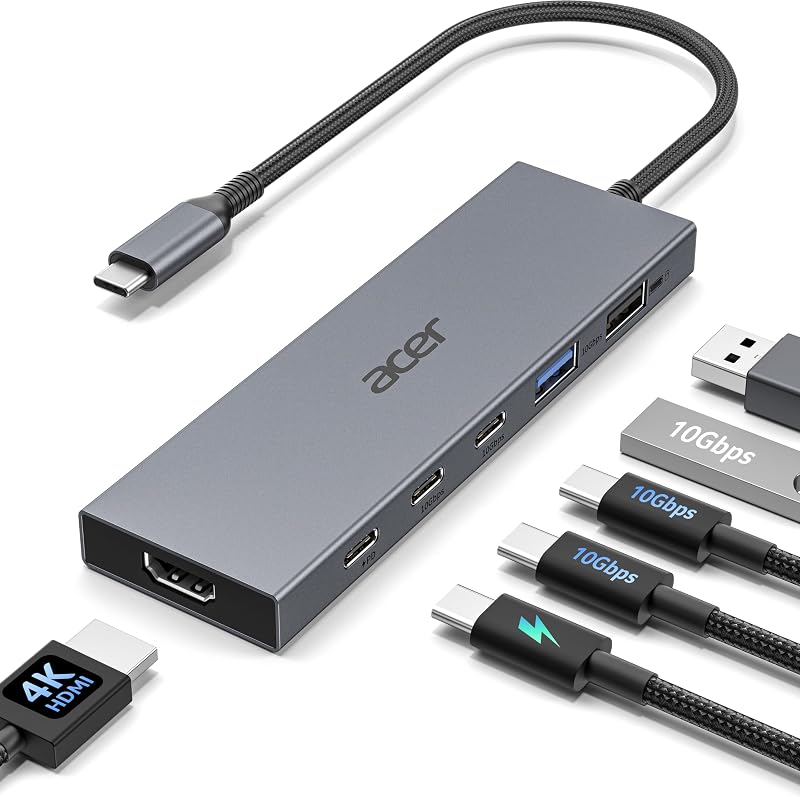
Best for: Workstations requiring HDMI and mixed ports
Pros
- 4K at 60Hz HDMI
- 100W PD with 90W charging
- Isolated USB 2.0 port
Cons
- Short 5.9-inch cable
- Plastic and composite build
The Acer 6-in-1 USB C Hub 10Gbps functions as a comprehensive bridge for mixed-port workstations, blending legacy connectivity with next-generation interface speeds. Housed in a grey enclosure with an integrated 5.9-inch cable, this acer usb c multiport adapter breaks out a single host Type-C connection into six dedicated interfaces. The port array includes one HDMI 2.0 output supporting 4K resolution at 60Hz, two USB-C 3.2 data ports rated for 10Gbps, one USB-A 3.2 port operating at 10Gbps, one USB-A 2.0 port operating at 480Mbps, and an isolated 100W USB-C Power Delivery charging port. This layout allows users to route high-bandwidth data, drive an external display, and deliver power upstream simultaneously through one connection.
A notable technical highlight of this hub is the deliberate physical isolation of downstream USB data pathways. High-speed USB 3.2 Gen 2 signaling operating at 10Gbps generates broadband radio frequency interference in the 2.4GHz spectrum, which frequently disrupts nearby 2.4GHz wireless peripherals like mouse and keyboard dongles. Acer addresses this issue by providing a dedicated USB-A 2.0 port alongside the high-speed 10Gbps channels. Placing wireless transceivers on this isolated 480Mbps channel eliminates pointer lag and missed keystrokes while leaving the two 10Gbps USB-C ports and the 10Gbps USB-A port free to deliver full throughput to external storage. When configuring a multi-device bench setup alongside a dedicated sabrent usb charger, this hybrid port architecture prevents common bus conflicts.
Visual output is handled by an HDMI port capable of rendering 4K resolution at 60Hz, providing fluid video playback and extended workspace clarity for creative workflows. Operating this display output requires a host device supporting DisplayPort Alternate Mode over USB Type-C. Meanwhile, the 100W Power Delivery circuit manages incoming energy, passing up to 90W of high-speed charging directly to host laptops like MacBook Pro, MacBook Air, iPad Pro, and Surface devices, while allocating 10W of operational overhead to internal controllers and downstream storage. While well suited for HDMI monitors and mixed USB hardware, users operating native Type-C display workflows should examine Acer’s all-USB-C counterpart.
Acer 10Gbps USB C Hub for Native Type-C Environments

Best for: Modern setups using Type-C monitors
Pros
- Native 4K 60Hz Type-C video
- Durable aluminum chassis
- Dual 10Gbps data ports
Cons
- No USB-A ports
- Requires host DP Alt Mode
The Acer 10Gbps USB C Hub provides a streamlined layout that discards legacy Type-A ports entirely in favor of an all-USB-C architecture. Built within an extruded aluminum enclosure, this compact adapter utilizes its metal housing as a passive thermal heat spreader. Routing high-throughput data streams across multiple channels creates substantial thermal energy that can cause thermal throttling in plastic enclosures. The aluminum shell actively conducts heat away from internal controllers, preserving reliable, sustained transfer speeds during large file backups or prolonged display sessions.
Functionally, the unit breaks out into four distinct USB Type-C connections tailored for modern hardware. At its core are two USB-C 3.2 data ports delivering transfer rates up to 10Gbps—twice the speed of standard USB 3.0 hubs—making it ideal for portable NVMe solid-state storage enclosures and high-speed card readers. A third Type-C connection is dedicated entirely to video output, delivering up to 4K resolution at 60Hz directly to modern Type-C monitors and portable display panels. Users evaluating advanced docking topologies, similar to those analyzed in our anker smart hub guide, will appreciate how clean signal routing minimizes desk clutter.
To support this high-performance pipeline, the adapter integrates a dedicated 100W Power Delivery pass-through port supporting 100W power input and delivering up to 90W to the host machine. Host systems must feature a full-featured USB-C port, USB4, or Thunderbolt 3 or 4 connection with DisplayPort Alternate Mode enabled for video output to function. The PD port is wired exclusively for upstream host charging and will not pass data or drive external displays. This focused design suits mobile creators using modern MacBooks, high-end tablets, and ultrabooks who require maximum throughput without legacy interface compromises.
How to Choose the Right Acer USB Hub
Navigating an acer usb hub comparison requires a clear assessment of your host computer’s port capabilities, peripheral power requirements, and necessary data bus limits. Selecting an ill-fitting hub can result in throttled transfer speeds, display signal failure, or peripheral disconnects. Review the following technical criteria to determine which acer usb hub to buy for your hardware configuration:
- Host Interface Compatibility: Your computer’s available ports represent the first hard constraint. If your machine features only standard rectangular Type-A ports, the Acer USB Hub 4 Ports is the only compatible unit among the three, featuring an extended 2-foot integrated cable that simplifies desk routing. Conversely, if your machine provides modern USB Type-C, Thunderbolt 3, Thunderbolt 4, or USB4 ports, choosing the 10Gbps USB-C models unlocks modern bus speeds and advanced display protocols.
- Power Requirements and Voltage Balancing: Power distribution determines whether your external accessories operate continuously or drop out under load. The entry-level 4-port splitter operates on basic host bus power for low-drain peripherals, but includes a 5V USB-C auxiliary power port to inject dedicated electrical current when connecting high-draw mechanical hard disk drives. In contrast, both the 6-in-1 hybrid hub and the 10Gbps all-USB-C model incorporate 100W Power Delivery circuits that accept up to 100W input, reserve approximately 10W to energize the hub’s internal controllers, and pass up to 90W directly to recharge your laptop battery.
- Display Output Standards: Video capabilities vary fundamentally across these designs. The basic 4-port Type-A hub contains no video conversion silicon and cannot transmit display signals to external screens. If your workstation requires connecting an external monitor or television using an HDMI cable, the Acer 6-in-1 USB C Hub 10Gbps is the necessary choice with its 4K@60Hz HDMI 2.0 interface. However, if your setup uses a modern Type-C portable monitor or studio monitor that receives video over a direct USB-C connection, the Acer 10Gbps USB C Hub fulfills that requirement via its native 4K@60Hz USB-C display output.
- Data Bus Speeds and RF Interference: Bus bandwidth dictates how quickly large files transfer across external storage. The entry-level model caps data speeds at 5Gbps, which is adequate for everyday document transfers and basic flash drives. Upgrading to the 10Gbps models doubles available theoretical throughput, enabling sustained real-world read and write speeds for high-speed external solid-state drives. Furthermore, users troubled by wireless mouse lag will value the 6-in-1 hub’s dedicated USB 2.0 port, which isolates 2.4GHz wireless transceivers from the radio frequency noise generated by active USB 3.2 data lines.
- Enclosure Durability and Thermal Management: The thermal performance of your hub impacts sustained transfer stability. The ABS plastic housing of the 4-port model is lightweight and durable for standard desktop duty cycles. However, dense data workflows and simultaneous 4K video rendering generate substantial internal heat, making the solid aluminum enclosure of the all-USB-C 10Gbps model superior for heat dissipation and preventing controller thermal throttling.
FAQ
Does the 5V USB-C port on the Acer 4-port hub charge a laptop?
No. The USB-C port labeled IN 5V on the Acer USB Hub 4 Ports is strictly an auxiliary power injection port for connected downstream peripherals. It lacks the step-up voltage converter circuitry and communication pins required to deliver Power Delivery charging back to a host computer. Its sole function is to supply external 5V current directly to the four USB-A ports, preventing voltage drops when high-draw devices like mechanical hard disk drives are connected.
Can the Acer 6-in-1 USB C Hub run a 4K monitor at 60Hz on any laptop?
No. Outputting a 4K resolution at a 60Hz refresh rate through the HDMI port requires that your host laptop’s USB-C port supports DisplayPort Alternate Mode with DisplayPort 1.4 bandwidth or higher. Furthermore, the connected monitor and HDMI cable must comply with the HDMI 2.0 standard or greater. If your laptop’s USB-C port only supports the older DisplayPort 1.2 standard, the output resolution will be constrained to 4K at 30Hz or downscaled to 1080p.
Why does the Acer 10Gbps USB C Hub omit standard USB Type-A ports?
The Acer 10Gbps USB C Hub is designed specifically for modern computing environments that have fully transitioned to Type-C connectivity. Eliminating rectangular Type-A ports allows for a more compact internal board layout, improved thermal management inside its aluminum housing, and dedicated trace paths for high-speed 10Gbps data and native 4K@60Hz USB-C video output. Users who still rely on legacy Type-A flash drives or cables should choose the 6-in-1 hub instead.
What happens when two external SSDs are used simultaneously on the 10Gbps ports?
The two 10Gbps data ports share the hub’s aggregate upstream bandwidth pool. When two fast external solid-state drives execute simultaneous high-speed file transfers, the internal controller balances bus traffic between both ports. While neither drive will achieve its maximum theoretical single-port throughput during concurrent heavy transfers, the controller firmware arbitrates data packets evenly to ensure stable, corruption-free file delivery without dropping drive connections.
Why do Acer 100W Power Delivery hubs pass only 90W to the host laptop?
Multiport USB-C hubs require dedicated electrical power to operate their internal components, including video scaler chips, USB hub controllers, LED indicators, and connected downstream accessories. When an external 100W Power Delivery charger is connected, the Acer hub consumes approximately 10W of power overhead to keep its own hardware running stably. The remaining 90W is delivered upstream to charge your laptop’s battery safely without causing sudden brownouts.


