


As Amazon Associates, we earn from qualifying purchases. This means we may receive a small commission at no extra cost to you if you click through and make a purchase.
TEAMGROUP has built a solid reputation in the memory market by offering a comprehensive spectrum of DRAM products, bridging the gap between baseline standard components and high-performance enthusiast hardware. Known for accessible engineering and adherence to strict manufacturing standards, the brand provides reliable memory solutions for system integrators, office environments, and high-performance gaming rigs alike. Whether outfitting an ultra-thin laptop or tuning an advanced desktop build, buyers turn to the brand for stable operation and predictable platform compatibility across modern CPU generations.
These four memory modules differ sharply in form factor, transfer speed, and power requirements, ranging from standard 1.1-volt JEDEC desktop and laptop modules at 4800MHz and 5600MHz up to factory-tuned 6000MHz dual-channel desktop kits equipped with specialized cooling spreaders, tighter latencies, and dedicated power management circuitry.
TEAMGROUP DDR5 RAM Modules Compared
| Model | Capacity & Form Factor | Speed & Latency | Voltage & Power | Platform Compatibility |
|---|---|---|---|---|
| TEAMGROUP Elite Plus DDR5 16GB | 16 GB (2x8GB), 288-Pin UDIMM | 4800 MHz, CL40 | 1.1V (Low voltage) | Intel 600/700 & AMD 600/800 Series |
| TEAMGROUP Elite SODIMM DDR5 16GB 5600Mhz | 16 GB (1Rx8), 262-Pin SO-DIMM | 5600 MHz, CL46 | 1.1V (Low voltage) | DDR5 Laptop Platforms |
| TEAMGROUP T-Create Expert CL30 Overclocking 10L | 32 GB (2x16GB), Desktop DIMM | 6000 MHz, CL30 | Not listed | Intel XMP 3.0 & AMD EXPO |
| TEAMGROUP T-Force Vulcan DDR5 32GB | 32 GB (2x16GB), 288-Pin DIMM | 6000 MHz, CL38 | 1.25V (Equipped with PMIC) | Intel 600/700 Series (XMP 3.0) |
TEAMGROUP Elite Plus DDR5 16GB for Entry Desktop Reliability

Best for: Entry desktop builds needing stable low-power memory
Pros
- JEDEC standard 1.1V operation
- On-die ECC data stability
- Broad Intel and AMD chipset support
Cons
- Conservative 4800MHz frequency
- Relaxed CL40 latency
The TEAMGROUP Elite Plus DDR5 16GB kit is designed from the ground up for desktop users who prioritize plug-and-play stability over extreme clock speeds. Supplied as a dual-channel 16 GB kit containing two 8GB 288-pin UDIMM modules, this package runs at an introductory JEDEC frequency of 4800 MHz with a CAS latency of 40. By adhering strictly to standard baseline parameters, it operates cleanly at 1.1 volts. This low-voltage profile ensures an effective power system configuration that suppresses unnecessary thermal output, making it an excellent choice for compact office desktops, general workstations, and home builds with basic airflow layouts.
Compatibility is a major asset for this baseline kit. The listing confirms that the memory supports Intel 600 and 700 series chipsets as well as AMD 600 and 800 series platforms. System builders evaluating standard components alongside wider ecosystem upgrades like corsair intel 300 series parts will appreciate the straightforward architecture of these modules. An optimized physical structure delivers reliable access efficiency, while integrated on-die ECC mechanisms detect and correct single-bit memory errors internally to reinforce long-term data transmission stability during sustained desktop workloads.
This kit best suits entry-level system builders, office administrators, and home users who want modern DDR5 memory without risking configuration headaches. Because it runs at standard JEDEC specifications, it avoids the lengthy memory training loops and cold-boot failures that can occur when pushing overclocked profiles on budget motherboards. It yields to the faster T-Force and T-Create kits when users require the high-speed bandwidth necessary for high-refresh gaming or heavy video rendering. TEAMGROUP includes a lifetime warranty and free technical support, though the listing explicitly notes that buyers must refer to the latest policy terms on the official website in case of discrepancies.
TEAMGROUP Elite SODIMM DDR5 16GB 5600Mhz for High-Speed Mobile Upgrades

Best for: Laptop users upgrading to fast mobile memory
Pros
- High 5600MHz mobile transfer rate
- Efficient 1.1V battery-saving profile
- Integrated on-die ECC protection
Cons
- Higher CL46 latency
- SO-DIMM laptop form factor only
The TEAMGROUP Elite SODIMM DDR5 16GB 5600Mhz module translates DDR5 generational advancements into portable devices. Designed in a compact 262-pin SO-DIMM form factor, this single 16 GB module achieves a swift 5600 MHz transfer rate with a CAS latency of 46. It is specifically manufactured for DDR5-compatible laptops and mobile workstations where internal space is at a premium. Running at an energy-efficient 1.1V working voltage, it helps conserve battery life and minimizes internal heat buildup, which is essential inside cramped laptop enclosures where thermal throttling can easily penalize mobile processor performance.
Internally, the module is configured with a single-rank 1Rx8 composition and lightweight physical profile. Data integrity is fortified through integrated on-die ECC support, which helps maintain system stability during demanding multitasking routines and extended work sessions. For users upgrading portable business machines like a dell laptop 16+gb ram configuration, this drop-in replacement delivers expanded memory capacity and higher bandwidth without demanding manual voltage or profile configuration.
This module is ideal for mobile professionals, software engineers, and notebook gamers who need to expand their laptop memory footprint for resource-heavy applications. It pairs effectively with high-efficiency mobile platforms like a lenovo ryzen 7 notebook where memory throughput impacts integrated graphics and multi-threaded calculations. The primary trade-off is its conservative CL46 latency, which is typical for JEDEC mobile memory. Buyers should confirm that their notebook BIOS supports 5600 MHz speeds natively, as unsupportive firmware will step the module down to 4800 MHz. The product is backed by TEAMGROUP with a lifetime warranty governed by the terms on their official website.
TEAMGROUP T-Create Expert CL30 Overclocking 10L for Creators and Low Latency

Best for: Content creators demanding low-latency performance
Pros
- Tight CL30 low-latency timings
- Dual Intel XMP and AMD EXPO
- High 6000MHz memory bandwidth
Cons
- Requires profile overclocking support
- Voltage not listed in specifications
The TEAMGROUP T-Create Expert CL30 Overclocking 10L memory kit is engineered specifically for creative professionals, 3D animators, and enthusiasts who demand low access latency alongside fast transfer speeds. Provided as a dual-channel 32 GB kit containing two 16 GB desktop modules, this memory kit operates at an impressive 6000 MHz frequency. Its defining characteristic is an ultra-tight Column Address Strobe latency of 30 (CL30), which significantly reduces internal memory wait states compared to standard JEDEC modules. Encased in a minimalist white heatsink, it provides a clean aesthetic for modern creator-focused desktop builds.
Platform flexibility is a major highlight of the T-Create Expert series. The listing confirms that this kit is compatible with both Intel XMP 3.0 and AMD EXPO overclocking profiles. This dual compatibility ensures that whether a creator builds on an Intel Core platform or an AMD Ryzen setup, enabling full 6000 MHz CL30 performance requires only a single toggle in the motherboard firmware. While the listing does not specify the precise operating voltage or pin count, achieving CL30 timings at 6000 MHz typically requires motherboard support for performance overclocking profiles and clean power delivery across the memory traces.
This kit best suits video editors, 3D artists, and competitive gamers who benefit directly from the reduced latency that CL30 timings deliver during heavy timeline scrubbing, asset compilation, and high-framerate gaming. It gives way to the standard Elite Plus when assembling entry-level office desktops where overclocking is unsupported. Because high-frequency, low-latency profiles place increased demands on the CPU integrated memory controller, buyers should ensure their motherboard BIOS is updated to the latest revision to ensure quick memory training and reliable boot stability.
TEAMGROUP T-Force Vulcan DDR5 32GB for Mainstream Gaming Rigs

Best for: Mainstream desktop gaming on Intel platforms
Pros
- Equipped with dedicated PMIC
- Reinforced cooling structure
- Fast 6000MHz gaming bandwidth
Cons
- Higher 1.25V operating power
- Intel 600 and 700 focus
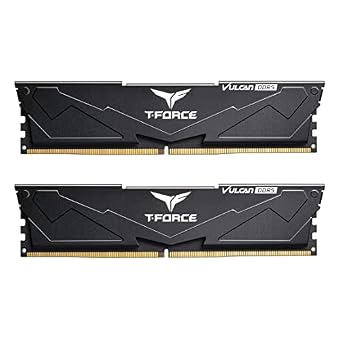
The TEAMGROUP T-Force Vulcan DDR5 32GB kit is built for PC gamers who want high-speed DDR5 performance combined with dependable thermal and electrical management. Supplying 32 GB of system memory across two 16 GB 288-pin DIMMs, this dual-channel kit operates at 6000 MHz with a CAS latency of 38. Finished in a sleek black aesthetic, the Vulcan series features a reinforced cooling structure designed to draw heat away from the memory chips during prolonged gaming sessions and heavy computing tasks.
To sustain its 6000 MHz transfer rate, the T-Force Vulcan operates at 1.25 volts, stepping above the baseline 1.1V standard. To manage this increased electrical throughput safely, TEAMGROUP equips the module with dedicated on-board Power Management ICs (PMICs). This integrated power regulation ensures stable and efficient power usage while filtering electrical ripple before it reaches the DRAM dies. The module also features on-die ECC for internal error mitigation and is explicitly designated as XMP 3.0 ready for Intel 600 and 700 series motherboard chipsets.
This kit is an excellent match for mainstream desktop gamers and builders assembling an Intel-based system who want substantial 32 GB capacity and 6000 MHz bandwidth without the pricing premium of ultra-low latency bins. It yields to the T-Create Expert for users requiring AMD EXPO profile support or tighter CL30 timings. Because the 1.25V operating voltage generates more ambient heat than baseline 1.1V modules, users should verify that their desktop case maintains steady internal airflow to prevent the PMIC and memory chips from absorbing excess heat during sustained heavy gaming loads.
How to Choose the Right TEAMGROUP DDR5 RAM Modules
Navigating a teamgroup ddr5 ram comparison requires looking closely at form factor, operating voltage, latency ratings, and firmware profile compatibility. Because DDR5 fundamentally redesigns power management and signal routing compared to previous generations, matching memory specifications to your hardware prevents common pitfalls such as POST failures, persistent memory training cycles, and thermal throttling.
The first step in deciding which teamgroup ddr5 to buy is identifying the correct physical form factor. Desktop systems require standard 288-pin UDIMMs such as the Elite Plus, T-Create Expert, or T-Force Vulcan. In contrast, portable machines, gaming notebooks, and mobile workstations require 262-pin SO-DIMMs. If you are upgrading modern business laptops or portable machines running productivity suites such as hp laptops windows 11 environments, the compact TEAMGROUP Elite SODIMM DDR5 16GB 5600Mhz is the required form factor. Desktop builders must also check vertical clearance under large CPU air coolers, where low-profile heatsinks like those on the Vulcan prevent fan interference.
Evaluating operating frequency alongside CAS latency is crucial when selecting the best teamgroup ddr5 16gb memory or 32GB kit. While frequency dictates raw bandwidth, latency determines how quickly the memory responds to individual read and write requests. A kit running at 6000 MHz with CL30 timings, such as the T-Create Expert, provides the lowest latency and optimal responsiveness for CPU-bound gaming and professional content creation. However, standard desktop users operating on locked motherboards are better served by the 4800 MHz CL40 Elite Plus, which trades aggressive speed for universal JEDEC plug-and-play reliability.
Power delivery and thermal considerations represent another critical dividing line. Baseline kits like the Elite Plus and Elite SODIMM operate at 1.1 volts, producing very little thermal dissipation and allowing for completely heatsink-free or low-profile designs. Overclocked modules like the 1.25V T-Force Vulcan generate more heat due to their higher voltage. The inclusion of dedicated on-board PMIC chips on modules like the Vulcan ensures precise voltage regulation, but builders must ensure adequate PC case ventilation so that the PMIC and memory chips remain within safe operational temperatures during extended multi-core workloads.
Finally, teamgroup ddr5 compatibility depends heavily on motherboard chipset and firmware profile support. If you are building an Intel 600 or 700 series machine, kits with Intel XMP 3.0 profiles like the T-Force Vulcan deliver quick, one-click profile activation. If your build uses an AMD platform, choosing a kit with AMD EXPO compatibility, such as the T-Create Expert, ensures that secondary sub-timings are correctly optimized for the Ryzen memory controller. For older or budget chipsets lacking overclocking capabilities, standard JEDEC kits like the Elite Plus avoid configuration hurdles entirely.
FAQ
What is on-die ECC in TEAMGROUP DDR5 memory?
On-die ECC (Error Correction Code) is an internal architectural feature integrated directly into DDR5 DRAM dies, including those used in the TEAMGROUP Elite Plus and Elite SODIMM. It detects and corrects single-bit errors within the memory cells themselves before data leaves the chip. This internal error mitigation is necessary due to the extreme density of DDR5 manufacturing processes. However, on-die ECC is distinct from traditional side-band ECC used in enterprise servers, meaning these modules remain non-ECC unbuffered kits designed for consumer desktop and mobile motherboards.
Can I install a TEAMGROUP desktop DDR5 module into a gaming laptop?
No, desktop and laptop DDR5 modules are physically and electrically incompatible. Desktop memory like the TEAMGROUP Elite Plus, T-Create Expert, and T-Force Vulcan uses a 288-pin DIMM layout that is substantially longer than laptop slots. Laptops require 262-pin SO-DIMM modules like the TEAMGROUP Elite SODIMM DDR5 16GB 5600Mhz. Attempting to install the wrong form factor will result in physical damage to the motherboard or memory slot.
What is the benefit of an integrated PMIC on DDR5 modules?
In previous DDR generations, voltage regulation was handled entirely by the motherboard power delivery circuitry. DDR5 migrates this responsibility directly onto the memory module itself through an integrated Power Management IC (PMIC), as seen on the TEAMGROUP T-Force Vulcan. The PMIC provides localized voltage conversion, delivering cleaner power, reducing electrical noise, and improving signal integrity when running at elevated voltages like 1.25V. The trade-off is that PMICs generate concentrated heat, making effective heat spreaders and proper case ventilation essential.
Why does the TEAMGROUP T-Create Expert support both XMP and EXPO?
Intel XMP 3.0 and AMD EXPO are proprietary memory profile standards designed for Intel and AMD platforms, respectively. By including validated configuration tables for both standards on the module firmware, the TEAMGROUP T-Create Expert CL30 allows builders on either platform to achieve validated 6000 MHz speeds with optimal timings via a single BIOS setting. This dual compatibility eliminates guesswork and ensures seamless timing optimization regardless of processor choice.
How does TEAMGROUP handle memory warranty and technical support?
TEAMGROUP offers a lifetime warranty and free technical support across its memory lineup, including the Elite Plus and Elite SODIMM modules. However, the product listings explicitly specify that buyers should consult the latest warranty terms on the official TEAMGROUP website, as those terms prevail in the event of any discrepancies. Users should retain original purchase receipts and ensure that the serial number labels on the memory modules remain intact to guarantee valid warranty coverage if service is ever required.


