
As Amazon Associates, we earn from qualifying purchases. This means we may receive a small commission at no extra cost to you if you click through and make a purchase.
Synology has earned a premier reputation in the network storage industry primarily through its DiskStation Manager operating system, which pairs intuitive management with rock-solid data integrity tools like snapshot replication and automated backups. For home offices and small organizations evaluating a synology 2-bay nas diskstation, the primary appeal lies in consolidating disparate external drives into a single automated hub with localized RAID 1 mirroring. However, operating within a dual-bay chassis introduces fundamental hardware constraints, as RAID 1 limits your usable volume to fifty percent of installed drive capacity while offering zero tolerance for a secondary disk failure during array rebuilds.
While compact two-bay units like the DS223, DS225+, and DS725+ provide accessible entry points with varying processor capabilities and expansion potential, comparing them against larger multi-bay solutions such as the DS423, DS1522+, and DS1825+ reveals the exact operational threshold where dual-drive redundancy must give way to multi-disk fault tolerance and extended manufacturer warranty protection.
Synology 2-Bay NAS Diskstations Compared
| Model | Drive Bays and Scalability | Processor and Hardware Focus | Warranty Period | Surveillance Camera Support |
|---|---|---|---|---|
| Synology DS225+ Private Cloud Media Server | 2 Bays (Non-expandable) | Intel CPU with Hardware Transcoding | 3-Year Warranty | Up to 30 IP Cameras |
| Synology DS725+ Expandable NAS Storage | 2 Bays (Scalable to 7 Bays with DX525) | Dual M.2 SSD Cache Slots | 3-Year Warranty | Up to 30 IP Cameras |
| Synology DS223 Home & Office Backup | 2 Bays (Non-expandable) | Energy-Efficient Realtek Platform | 2-Year Warranty | Supported (Motion Alerts and Schedules) |
| Synology DiskStation DS1522+ NAS Server Bundle | 5 Bays (Expandable via 2 eSATA Ports) | Ryzen R1600 2.6GHz, 32GB ECC Memory | Manufacturer Warranty | Not listed |
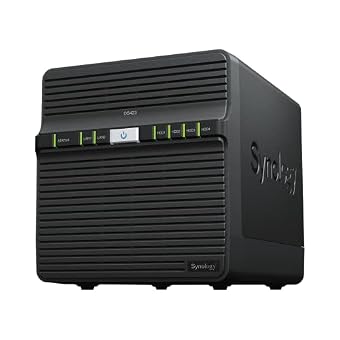
| Synology DS423 Family & Business Backup | 4 Bays (Non-expandable) | Quad-Bay Centralized File Server | 2-Year Warranty | Up to 30 IP Cameras |
| Synology DS1825+ Enterprise Video Production & | 8 Bays (Scalable up to 360TB) | High-Throughput 2,239 MB/s, 10/25GbE Slots | 3-Year Warranty | Not listed |
Synology DS225+ Private Cloud Media Server for 4K Streaming and Private Backup

Best for: Home media streaming and automated personal backup
Pros
- Intel CPU hardware transcoding
- Fast 282 MB/s transfer speeds
- Three-year hardware warranty
Cons
- Non-expandable two-bay chassis limit
The Synology DS225+ Private Cloud Media Server is engineered for users who require on-the-fly multimedia management alongside personal cloud capabilities. Built around an Intel processor dedicated to hardware transcoding, the unit enables seamless playback of 4K movies, shows, and photo libraries without recurring subscription fees. In our synology 2-bay nas diskstation comparison, the DS225+ stands out by reaching data transfer speeds up to 282 MB/s, ensuring that large media files, photo archives, and local network operations transfer without noticeable bottlenecking across home or creative studio networks.
From a data preservation and security standpoint, this synology ds225+ review reveals an architecture configured for multi-layered protection. The enclosure combines RAID redundancy with automated desktop and mobile backups, complemented by snapshot technology to safeguard files against unexpected corruption or user error. For surveillance tasks, the chassis accommodates up to 30 IP cameras with automated alerts and artificial intelligence detection routines. Synology backs this compact 1300-gram tower with a three-year hardware warranty, delivering a level of hardware reliability intended for environments where continuous uptime is critical.
This model is best suited for digital creators and home media enthusiasts seeking a self-hosted streaming and backup hub. Prospective purchasers evaluating a synology nas 2 bay configuration must weigh its fixed dual-bay nature; because the enclosure lacks secondary expansion ports, expanding storage capacity requires replacing existing drives one by one rather than attaching an external expansion unit.
Synology DS725+ Expandable NAS Storage for Scalable Business Infrastructure

Best for: Growing home labs needing future expansion
Pros
- Expands to seven total drives
- Dual M.2 SSD cache slots
- Supports 140TB maximum capacity
Cons
- DX525 expansion unit sold separately
The Synology DS725+ Expandable NAS Storage addresses the primary limitation of entry-level enclosures by combining a desktop-sized dual-bay footprint with robust growth capabilities. Designed to start with two drives and scale up to seven total drives via an optional DX525 expansion unit, the system allows total volume expansion up to 140TB. In a technical synology ds725+ vs ds225+ comparison, the DS725+ incorporates two dedicated M.2 slots for solid-state drive caching, which substantially accelerates random input-output performance for multi-user document access, database transactions, and virtualized workloads.
Data integrity is maintained through DiskStation Manager’s multi-layered protection framework, integrating automated multi-destination backups, RAID redundancy, and snapshot technology to mitigate data loss. The unit functions as a centralized professional surveillance station capable of handling 30 IP cameras with advanced motion detection and flexible retention schedules. Measuring 166 mm by 106 mm by 223 mm with an overall weight of 1510 grams, the enclosure is built with robust thermal management and supported by Synology’s three-year hardware warranty.
Small businesses, remote offices, and tech enthusiasts who anticipate rapid storage growth will find the DS725+ an ideal balance between compact deployment and future scalability. It provides an upgrade path for environments that would otherwise outgrow a fixed two-bay appliance, though shoppers should note that the DX525 expansion module must be acquired separately to reach its maximum 140TB volume threshold.
Synology DS223 Home & Office Backup for Essential Document Centralization

Best for: Basic file synchronization and desktop backups
Pros
- Compact and lightweight footprint
- Automated multi-device backup tools
- License-free private cloud software
Cons
- Shorter two-year warranty period
For fundamental document synchronization and scheduled endpoint protection, the Synology DS223 Home & Office Backup serves as a purpose-built private cloud hub. The unit is tailored to consolidate scattered personal files, spreadsheets, and media libraries from multiple Mac, Windows, and mobile devices into a single secure repository. Users benefit from built-in file sharing and version control tools that eliminate third-party cloud hosting fees while ensuring complete digital sovereignty over private records.
Evaluating synology ds223 reliability reveals an energy-efficient, whisper-quiet appliance that weighs 1280 grams and fits neatly into compact home offices. The DS223 handles automated synology diskstation 2-bay backup tasks seamlessly, routing critical datasets to secondary external drives or external cloud targets. When populating the drive trays with dedicated western digital nas mechanical drives, users obtain consistent continuous read-write stability. The hardware is backed by Synology’s standard two-year warranty alongside continuous DiskStation Manager software patches.
This model is best suited for budget-conscious home users and solo freelancers requiring reliable localized storage without heavy compute demands. It offers IP camera surveillance integration for basic property monitoring, though it lacks the expanded hardware transcoding power of the DS225+ or the M.2 caching and DX-chassis scalability found on higher-tier DiskStations.
Synology DiskStation DS1522+ NAS Server Bundle for High-Capacity Redundancy

Best for: Turnkey high-capacity office storage deployments
Pros
- Pre-bundled 50TB HDDs and SSDs
- 32GB ECC memory protection
- Quad 1GbE ports with failover
Cons
- Drives require manual installation
The Synology DiskStation DS1522+ NAS Server Bundle shifts storage capability away from two-bay constraints into high-capacity enterprise-grade redundancy. Powered by an AMD Ryzen R1600 dual-core 2.6GHz processor capable of boosting to 3.1GHz, this tower comes equipped with 32GB of DDR4 ECC SODIMM memory. The inclusion of Error-Correcting Code memory prevents silent data corruption, making it an exceptional server platform for virtualization, domain control, and database hosting.
In direct synology ds1522+ vs 2-bay evaluations, the bundle delivers massive turnkey capacity by including 50TB of storage across five 10TB SATA hard drives, alongside a 1TB SSD caching layer formed by two 500GB M.2 2280 NVMe solid-state drives. It is important to note that the chassis arrives in a sealed box with the hard drives and memory upgrades supplied separately, requiring physical installation before initialization. Network communication is handled via four RJ-45 1GbE LAN ports with Link Aggregation and failover support, flanked by two USB 3.2 ports and dual eSATA ports for additional expansion.
Businesses comparing a 2-bay chassis against a synology 5 bay platform will appreciate that five physical bays permit RAID 5 or RAID 6 configurations, allowing single- or dual-drive parity protection without losing half of total capacity. Housed in a rigid black metal enclosure with floor mount support, the DS1522+ bundle delivers manufacturer-backed hardware security for enterprise backup workflows.
Synology DS423 Family & Business Backup for Multi-Disk Fault Tolerance
Best for: Multi-drive redundancy without enterprise hardware overhead
Pros
- Four bays for RAID protection
- Immutable ransomware snapshots
- Sturdy metal chassis design
Cons
- Camera licenses purchased separately
The Synology DS423 Family & Business Backup bridges the gap between compact desktop enclosures and larger commercial towers. As a dedicated 4-bay diskless NAS, the DS423 provides the mechanical architecture necessary to deploy RAID 5 arrays, protecting active volumes against a single drive failure while retaining seventy-five percent of overall raw capacity. Constructed with a durable metal enclosure measuring 9 inches deep by 6.6 inches wide by 7.24 inches high, it provides structural stability and heat dissipation for 24/7 file sharing.
Designed to function as an on-premises replacement for public file management services, the DS423 offers comprehensive data protection through immutable snapshot technology, multi-destination backup routines, and permission-controlled team folders. For video surveillance, the platform supports up to 30 IP cameras with comprehensive archiving and analytics, though camera licenses must be purchased separately. Synology covers the DS423 with a two-year manufacturer hardware warranty and consistent DiskStation Manager updates.
This 4-bay chassis is best suited for growing families, creative teams, and small commercial offices that have outgrown the storage ceiling and rebuild risks of a two-bay DiskStation. It offers the parity protection required to guard against drive failure without demanding the complex server virtualization capabilities or larger footprint of 5-bay and 8-bay machines.
Synology DS1825+ Enterprise Video Production & for High-Throughput Media Workflows
Best for: Collaborative video editing teams and studio archives
Pros
- Blazing 2,239 MB/s throughput
- Supports 10GbE and 25GbE cards
- Scales up to 360TB storage
Cons
- Substantial 6000g chassis footprint
The Synology DS1825+ Enterprise Video Production & represents the summit of desktop enterprise capacity, engineered to sustain rigorous multi-user video editing environments. Boasting an 8-bay diskless layout, the DS1825+ achieves sustained throughput of up to 2,239 MB/s, supporting 50 or more concurrent editors collaborating on 4K and 8K video timelines. Storage capacity scales from 160TB across its internal drive bays up to a massive 360TB using dedicated expansion units.
Network flexibility is central to the design of the DS1825+, offering PCIe upgrade slots that accommodate 10GbE or 25GbE network interface cards to eliminate transmission delays during heavy file transfers. Data security is anchored by high-availability clustering, automated failover routines, and multi-tier backup configurations. Synology backs this 6000-gram commercial system with a comprehensive three-year warranty and dedicated enterprise support access. Creative studios examining multi-bay infrastructure like a qnap 8 bay deployment will note the DS1825+’s seamless integration with DiskStation Manager’s native ecosystem.
This 8-bay workstation server is best suited for post-production agencies, commercial studios, and enterprise data centers needing ultra-fast pipeline collaboration. While it stands leagues above standard dual-bay units in processing muscle and throughput, its physical footprint and heavy-duty capabilities make it unnecessary for basic file archival or light home streaming.
How to Choose the Right Synology 2-Bay NAS Diskstation
Determining which synology nas to buy begins with an honest assessment of your data redundancy tolerance and capacity ceiling. A standard synology 2-bay nas diskstation operates under RAID 1 mirroring or Synology Hybrid RAID across two disks, which duplicates every byte across both drives. While this provides immediate failover if one drive collapses, it cuts your total purchased storage capacity by 50 percent. When storage needs exceed initial estimates, a fixed 2-bay chassis like the DS223 or DS225+ requires purchasing two larger hard drives and performing a time-consuming sequential replacement.
Evaluating synology nas warranty and drive failure dynamics is another critical consideration. Rebuilding a failed hard drive in a two-bay enclosure subjects the surviving drive to continuous, high-stress read operations for many hours. If that second drive suffers mechanical failure or unrecoverable read errors during the rebuild process, the entire volume is lost. Stepping up to the 4-bay DS423 or the 5-bay DS1522+ provides support for RAID 5 or RAID 6 configurations, where data is distributed across multiple disks with dedicated parity, dramatically reducing rebuilding stress and offering continuous access even under hardware failure scenarios.
Scalability and expansion capabilities form the dividing line between basic and professional-grade appliances. If you prefer the compact footprint of a two-bay unit but require future capacity growth, the DS725+ offers the ideal pathway via its DX525 expansion port, scaling up to seven drives and 140TB of total volume. Furthermore, the DS725+ includes dedicated dual M.2 SSD caching slots that accelerate performance for active multi-user environments, a capability absent on entry-level models like the DS223.
Hardware warranty terms and workload requirements should finalize your purchase choice. Synology provides a 2-year warranty on budget-focused options like the DS223 and DS423, whereas professional platforms such as the DS225+, DS725+, and DS1825+ come with a 3-year warranty for continuous operations. For intensive multi-stream 4K transcoding, the DS225+ with its Intel hardware transcoding engine is the best synology 2-bay diskstation, whereas multi-user business deployments with virtual machines or 50+ concurrent editors will demand the Ryzen ECC memory platform of the DS1522+ or the 25GbE networking of the DS1825+.
FAQ
What happens when a hard drive fails in a Synology 2-bay NAS diskstation?
In a standard 2-bay Synology DiskStation configured in RAID 1 or SHR, data remains completely accessible on the surviving hard drive when one disk fails. DiskStation Manager alerts you via system notifications and audible beeps. You must replace the degraded drive with a healthy drive of equal or greater capacity, after which the NAS rebuilds the mirrored volume. However, because only two drives exist, the array has zero redundancy during the rebuilding period, making external backups vital.
How does the Synology DS725+ compare to the DS225+ in expansion capability?
While both units feature dual drive bays and a three-year hardware warranty, the DS725+ provides an external eSATA expansion port supporting the DX525 five-bay expansion unit for up to 140TB total storage across seven drives. In contrast, the DS225+ is a fixed two-bay system with no expansion enclosure port. Additionally, the DS725+ incorporates two internal M.2 NVMe SSD slots for cache acceleration, whereas the DS225+ focuses on integrated Intel CPU hardware transcoding for 4K media playback.
Is a 2-bay Synology DiskStation sufficient for business backup operations?
A 2-bay DiskStation can serve small offices for scheduled workstation backups, file sharing, and remote access. However, businesses must adhere to the 3-2-1 backup strategy: three copies of data across two different media types with one copy located offsite. Relying solely on a 2-bay unit exposes business operations to total volume loss if the surviving drive encounters read errors while rebuilding after an initial drive failure.
Why choose a 4-bay or 5-bay NAS bundle like the DS1522+ over a standard 2-bay unit?
Multi-bay systems like the DS423 and DS1522+ permit RAID 5 and RAID 6 configurations, which distribute data and parity blocks across three or more disks. This delivers higher storage efficiency (using 67% to 80% of raw disk space rather than 50%) and supports dual-drive failure protection in RAID 6. Furthermore, models like the DS1522+ include business-class ECC memory, quad LAN ports with failover, and dual M.2 cache slots that standard 2-bay units do not provide.
What warranty coverage does Synology provide across different DiskStation tiers?
Synology differentiates warranty periods based on product tier and intended workload. Standard value models like the DS223 and DS423 include a 2-year hardware warranty covering manufacturer defects. Plus-series desktop units designed for demanding workloads, including the DS225+, DS725+, and DS1825+, provide a 3-year warranty with access to technical support services. Enterprise models also feature dedicated account management options for business-critical deployments.