

As Amazon Associates, we earn from qualifying purchases. This means we may receive a small commission at no extra cost to you if you click through and make a purchase.
ORICO has established itself as a primary contender in desktop multi-bay storage, producing direct-attached storage enclosures that allow users to aggregate massive storage pools without configuring full network-attached hardware. For creative professionals, archival engineers, and media hoarders handling multiple high-capacity mechanical drives, the company provides multi-drive solutions spanning light-duty plastic chassis to heavy industrial metal enclosures. When managing multi-terabyte arrays, understanding how power stability, passive airflow, and cooling fans interact is critical because drive dropouts and controller resets frequently trace back to insufficient spin-up wattage or thermal throttling during extended read and write passes.
While each chassis reviewed here accommodates five SATA disks up to 110TB across 2.5-inch and 3.5-inch form factors, their underlying architectures diverge significantly: entry-tier variants like the magnetic-door plastic models prioritize rapid drive swapping via external transformers, while commercial-grade aluminum configurations integrate heavy-duty 150W internal power supplies, physical key locks, and onboard hardware RAID controllers to protect multi-disk integrity. Evaluating this orico 5 bay enclosure comparison reveals clear engineering distinctions that determine which unit sustains enterprise work without intermittent disconnections.
ORICO 5-Bay Hard Drive Enclosures Compared
| Model Name | Interface & Speed | Power Delivery | Cooling System | Hardware RAID Support |
|---|---|---|---|---|
| ORICO 5 Bay Hard Drive Enclosure (500U3) | USB 3.0 Type-B (5Gbps) | External power adapter | 60mm double-ball bearing fan | No (Individual / JBOD) |
| ORICO 5 Bay Hard Drive Enclosure (USB-C) | USB 3.1 Gen 1 Type-C (5Gbps) | External power adapter | 60mm double-ball bearing fan | No (Individual / JBOD) |
| ORICO 5 Bay RAID External Hard | USB 3.0 Type-A (230MB/s) | 150W built-in power supply | 80mm silent fan | Yes (RAID 0, 1, 3, 5, 10, JBOD, Clone, Clear) |
| ORICO 5 Bay Hard Drive Enclosure (Locking Non-RAID) | USB 3.0 Type-A / Type-B (5Gbps) | 150W built-in power supply | 80mm silent fan | No (Individual / JBOD) |
| ORICO 5 Bay USB 3.1 Hard (9758C3) | USB 3.2 Gen 1 Type-C (260MB/s) | 12V/10A external power adapter | 80mm quiet fan | No (Individual / JBOD) |
| ORICO RAID 5 Bay RAID HDD | USB 3.0 (5Gbps / 235MB/s) | 150W built-in power supply | 80mm silent fan | Yes (RAID 0, 1, 3, 5, 10, JBOD, Clone, Clear) |
ORICO 5 Bay Hard Drive Enclosure for Tool-Free Desktop Backups

Best for: Sleek push-to-open desktop storage
Pros
- Push-to-open latching design
- Robust 12V 10A power adapter
- High 260MBps sustained speed
Cons
- External power brick required
- No key locking mechanism

Best for: Physical key-locked independent pools
Pros
- Independent physical key locks
- Built-in 150W power delivery
- Solid aluminum heat dissipation
Cons
- Lacks hardware RAID modes
- Uses Type-B connection port
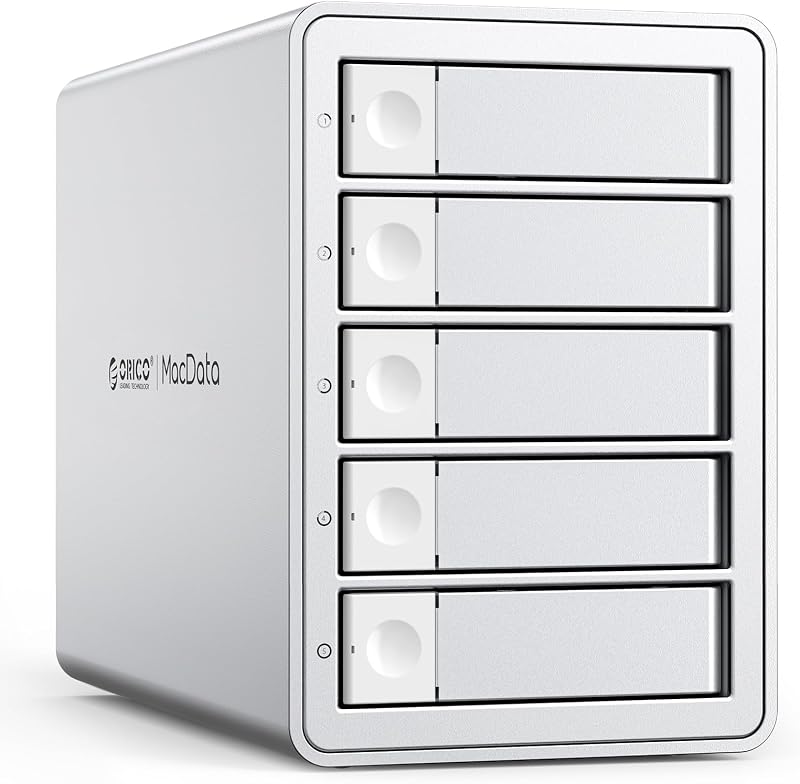
Best for: Standalone hardware RAID protection
Pros
- Internal 150W power supply
- Eight hardware RAID configurations
- Rugged alloy steel body
Cons
- Heavy desktop footprint
- Transfer capped at 230MBps
Best for: Modern USB-C laptop workstations
Pros
- Reversible USB-C interface
- Tool-free magnetic cover
- Universal system compatibility
Cons
- Plastic chassis construction
- No onboard hardware RAID

Best for: Quick desktop drive swaps
Pros
- Tool-free magnetic cover
- Supports up to 110TB capacity
- Double-ball bearing 60mm fan
Cons
- Molded plastic housing
- Legacy USB Type-B port
The ORICO 5 Bay Hard Drive Enclosure, designated under the model color 500U3, is engineered around rapid drive servicing and flexible desk-side access. Constructed from rigid molded plastic, this unit abandons traditional metal caddies in favor of a magnetic front-plate latching system that eliminates screws completely. The tool-free door snaps away effortlessly, allowing users to seat or swap 3.5-inch mechanical hard drives or 2.5-inch solid-state drives in seconds. The internal bridge board connects each bay to a SATA III backplane routed through a standard USB 3.0 Type-B upstream port, providing maximum theoretical interface bandwidth of 5Gbps. For users migrating legacy archives or testing drives pulled from a sea gate external harddrive enclosure, the rapid recognition feature mounts individual disks in approximately three seconds without manual driver installation.
Thermal mitigation and power integrity are handled through dedicated active ventilation and an external power brick. The rear panel incorporates an array of honeycomb exhaust cutouts paired with a 60mm double-ball bearing cooling fan to pull air past the tightly spaced drive bays. While a 60mm fan must spin faster than larger blowers to sustain airflow, the double-ball bearing mechanism reduces motor wear during extended copy sessions. The chassis integrates circuit safeguards against over-voltage, over-current, overheating, leakage, and short-circuits. Four front-mounted LED indicator lights display the operational status of installed media, signaling whether drives are actively writing or sitting idle.
This entry-tier enclosure is best suited for non-critical home storage expansion, secondary PC backup repositories, and rotating media drives across gaming consoles, routers, or desktop PCs. Because the enclosure lacks integrated hardware redundancy and relies on a lightweight plastic shell, it yields to heavier metal-cased options in production environments where continuous 24/7 drive spin-up and physical drop resistance are necessary. When running five high-draw mechanical platters simultaneously, users should note that the listing reports Windows as the primary target platform, with Linux configurations requiring careful handling for multi-drive pool mounting.
ORICO 5 Bay Hard Drive Enclosure for Modern USB-C Workstations
The second iteration of the magnetic plastic line, the ORICO 5 Bay Hard Drive Enclosure, updates the rear I/O connectivity to match modern laptop and workstation standards. It retains the toolless magnetic faceplate and tool-free drive loading mechanism, permitting quick swaps of five 2.5-inch or 3.5-inch SATA HDDs or SSDs up to a stated 110TB capacity ceiling. Instead of legacy Type-B plumbing, this enclosure features a USB 3.1 Gen 1 Type-C port communicating over the SATA 6.0 Gb/s protocol. This simplifies integration with current laptops, mini PCs, and smart TVs without requiring legacy adapter dongles, while still capping maximum theoretical transfer rates at 5Gbps.
Cooling inside the black plastic housing relies on the same internal airflow path as its Type-B sibling: an active 60mm double-ball bearing fan draws air across internal disk banks and evacuates thermal energy through rear honeycomb perforations. The internal controller features multi-protection engineering, shielding connected media from electric leakage, over-voltage surges, short-circuits, and dangerous temperature spikes. Quad status lights give the user immediate visual feedback regarding connection health and disk activity. The unit operates as a transparent multi-disk JBOD pool where each installed drive mounts as an independent volume letter within the host operating system.
This USB-C model represents an ideal solution for content creators and home office workers seeking seamless cable compatibility with contemporary host machines. However, the lightweight plastic frame and reliance on an external power transformer mean it is not intended for rugged production carts or multi-user enterprise servers. Users needing physical drive bay security locks or hardware-level array parity will find the advanced aluminum hardware RAID chassis further down the lineup far more capable of preventing drive dropouts under continuous, high-queue-depth operations.
ORICO 5 Bay RAID External Hard for Hardware Redundancy
Stepping into heavy-duty data preservation, the ORICO 5 Bay RAID External Hard departs completely from entry-level plastic housings. Built with an alloy steel structural body and finished with rugged aluminum exterior components, this multi-bay storage station is explicitly engineered for long-term continuous duty. Its hallmark feature is an integrated hardware RAID controller configured through rear physical dip switches, freeing the host computer from running resource-intensive software parity engines. The onboard controller supports eight discrete operating modes: RAID 0 for maximum throughput, RAID 1 and RAID 10 for mirrored redundancy, RAID 3 and RAID 5 for distributed parity striping, alongside JBOD, Clone, and Clear configurations.
Power delivery and thermal controls receive an enterprise-tier overhaul. Rather than relying on a dangling external power brick that can be bumped loose or fail under peak surge currents, the enclosure houses an internal 150W power supply. This robust wattage headroom prevents drive dropouts during simultaneous multi-disk spin-up cycles, which frequently strain lesser power adapters when populating five high-capacity enterprise mechanical disks such as a western digital 1tb drive or larger 22TB platters. Active cooling is managed by a large 80mm silent fan exhausting through front and rear honeycomb airflow grilles, which lowers internal cabinet temperatures and limits drive throttling during multi-hour array rebuilds.
Equipped with a USB 3.0 Type-A port that outputs sustained transfer rates up to 230MB/s, this enclosure suits video editors, archival engineers, and small-office server administrators needing standalone hardware protection. Because it provides dedicated RAID 5 parity without requiring proprietary desktop software, it guarantees cross-platform plug-and-play stability across Windows, macOS, and Linux workstations. Buyers looking solely for individual, non-striped drive pools without parity logic might find this heavy unit over-engineered, making the non-RAID locking variant a simpler alternative.
ORICO 5 Bay Hard Drive Enclosure for Secure Locking Non-RAID Storage
The ORICO 5 Bay Hard Drive Enclosure combines the structural rigidity of heavy-gauge aluminum with an independent drive-bay locking mechanism, designed specifically for non-RAID direct-attached deployments. Finished in grey anodized aluminum, this 5-bay DAS storage station accommodates up to 110TB across five 3.5-inch or 2.5-inch SATA disks (supporting up to 22TB per individual drive). Unlike magnetic tool-free designs, each drive bay on this chassis features a bracket-free installation tray secured with an independent physical key lock, ensuring drives cannot be accidentally dislodged or physically extracted while active data operations are underway.
To ensure flawless power stability across all five drive channels, ORICO integrated a high-output 150W internal power supply directly into the lower housing of the chassis. Removing the bulky external wall-wart transformer declutters workspace setups while guaranteeing an uninterrupted reservoir of electrical current to handle mechanical motor draw spikes. Thermal regulation is driven by an 80mm silent cooling fan working in concert with front-facing intakes and rear exhaust perforations. The aluminum exterior functions as an auxiliary heat radiator, maintaining stable operating temperatures across sustained read and write operations.
Connecting via USB 3.0 Type-A and Type-B interfaces, the enclosure achieves sustained transfer rates up to 235MB/s across SATA 6Gbps pipelines. It is the premier choice for system administrators, lab technicians, and creative professionals who utilize software-defined pools—such as ZFS, Unraid, or Windows Storage Spaces—and demand physical bay security paired with uncompromising internal power. It yields to the RAID edition only when independent hardware-level striping or hardware mirroring is required without host-level software intervention.
ORICO 5 Bay USB 3.1 Hard for Compact Push-to-Open DAS
Cataloged under model number 9758C3, the ORICO 5 Bay USB 3.1 Hard introduces an elegant desktop aesthetic paired with an intuitive mechanical latching system. Built with an alloy steel chassis wrapped in a compact modern shell, it discards traditional screw-down sleds in favor of a spring-assisted “push-to-open” mechanism. Users press the bay front to unlatch the door, slide a 2.5-inch or 3.5-inch SATA drive into place, and press it closed to seat the SATA interface. While modern fast storage systems like a wavlink thunderbolt 3 to nvme ssd adapter excel in raw bus bandwidth, this desktop unit maximizes raw volume capacity, accommodating up to 110TB of aggregate storage.
Power is routed through a dedicated 12V/10A external power adapter capable of sustaining up to 120W of aggregate continuous throughput. This provides ample current stability across all five bays, preventing premature drive disconnects when multiple platters wake from idle states. Heat extraction is handled by an integrated 80mm silent fan, pulling cool air through the chassis and expelling thermal build-up out the rear panel. Connectivity is modern and versatile, featuring a USB 3.2 Gen 1 Type-C interface with an included 2-in-1 USB-A/Type-C cable, achieving sustained read/write speeds up to 260MB/s for rapid media ingest.
This push-to-open enclosure is tailored for prosumers, multi-device households, and creative workstations needing a stylish, rapid-access DAS companion that connects directly to laptops, gaming consoles, tablets, and smart televisions. It delivers higher real-world transfer performance than early plastic models, but because it relies on an external power transformer rather than an integrated internal power supply, high-density server racks and secure shared studios will be better served by the locking aluminum 150W models.
ORICO RAID 5 Bay RAID HDD for High-Power Redundant Arrays
Best for: Secure high-power enterprise arrays
Pros
- Eight hardware RAID modes
- Built-in 150W power unit
- Key-locked aluminum drive bays
Cons
- Substantial chassis weight
- Complex dip switch setup
The ORICO RAID 5 Bay RAID HDD enclosure represents the flagship combination of physical hardware security, integrated industrial power, and advanced hardware array management. Enclosed in a heavy grey aluminum shell, this unit features bracket-free drive loading supplemented by independent key-operated security locks across all five bays. It supports up to 110TB total capacity (22TB per single disk) across 3.5-inch SATA drives, catering to engineering projects, expansive video production archives, and mission-critical backup repositories.
Under the hood, an integrated hardware RAID controller provides standalone configuration options for eight operational modes: RAID 0, RAID 1, RAID 3, RAID 5, RAID 10, JBOD, Clone, and Clear. Setting your array via hardware switches eliminates operating system overhead and provides persistent data redundancy that remains intact regardless of the host machine connected. The chassis eliminates external power supply failures by integrating an internal 150W power supply directly into its base, guaranteeing clean, stable DC voltage to high-RPM enterprise disks. Thermal control is managed by a quiet 80mm exhaust fan paired with precision front and rear venting.
Reaching sustained data transfer rates up to 235MB/s over a USB 3.0 connection, this enclosure is engineered for enterprise workflows where accidental drive extraction or host-level operating system crashes cannot be allowed to compromise array integrity. It provides the maximum level of hardware autonomy in ORICO’s 5-bay lineup. For single-drive non-redundant setups, this unit’s hardware RAID management may introduce unnecessary complexity, but for protected, redundant local archiving, it stands as the most complete desktop configuration.
How to Choose the Right ORICO 5-Bay Hard Drive Enclosure
Selecting the best orico 5 bay enclosure requires balancing power delivery architecture, thermal management capabilities, chassis materials, and your preferred method of storage management. When evaluating an orico 5 bay hard drive enclosure, power delivery is the single most critical factor determining long-term drive health. High-capacity enterprise mechanical drives draw significant surge current during motor spin-up. Enclosures featuring built-in 150W power supplies deliver superior voltage regulation directly across the SATA backplane compared to external power bricks, completely mitigating drive dropouts caused by transient voltage dips.
Chassis composition and active cooling directly impact drive longevity. Aluminum and alloy steel housings act as conductive heat sinks, drawing thermal energy away from disk bodies far more effectively than molded plastic. Furthermore, models incorporating larger 80mm silent cooling fans can displace higher cubic feet of air per minute at lower rotational speeds than compact 60mm fans, keeping high-RPM disks within safe thermal envelopes while reducing workstation acoustic noise. If your storage will be active for hours during massive backups, prioritized metal enclosures with 80mm cooling become mandatory.
Drive retention mechanisms also dictate which orico 5 bay to buy depending on your operating environment. If your enclosure sits on an open desk in a multi-person office or shared production environment, independent physical key locks prevent catastrophic accidental disk removal during active write operations. Conversely, if you operate a personal media workstation requiring frequent drive indexing and offline archival rotation, a magnetic tool-free faceplate or push-to-open latching system saves substantial setup time by allowing drives to be seated in seconds without screws or specialized tools.
Finally, consider whether your workflow requires an orico 5 bay raid external hard drive enclosure with onboard hardware logic, or a transparent direct-attached storage unit managed via your operating system. Hardware RAID offloads parity calculations from your computer’s CPU and presents a single unified volume across different machines without configuration files. If you prefer building software-defined storage pools through your host operating system, an individual JBOD-mode enclosure gives you direct access to each drive’s SMART health telemetry without hardware controller interference.
FAQ
Can I use both 2.5-inch SSDs and 3.5-inch HDDs simultaneously in an ORICO 5-bay enclosure?
Yes, ORICO 5-bay enclosures support both 2.5-inch and 3.5-inch SATA hard drives and solid-state drives across their SATA backplanes. When installing smaller 2.5-inch drives into bracket-free or toolless bays, ensure the SATA data and power pins align correctly with the backplane connectors to maintain stable data transmission and prevent physical connector strain.
Why does an internal 150W power supply improve multi-bay enclosure reliability?
Mechanical hard drives require a sudden surge of electrical current—often up to 2 amps per disk on the 12V rail—when the spindle motors spin up from a dead stop. External power adapters can struggle to satisfy this simultaneous surge across five enterprise platters, leading to voltage drops and dropped drives. An integrated 150W internal power supply provides ample power headroom, ensuring stable voltage across prolonged multi-disk workloads.
How do hardware RAID switches differ from software RAID on a computer?
Hardware RAID is executed directly by an integrated controller chip built into the ORICO enclosure, managed via physical switches on the rear panel. The enclosure handles array mirroring, striping, or parity calculations internally, presenting a single pre-configured drive volume to the operating system. Software RAID relies on your computer’s CPU and operating system utilities to manage array logic, which requires re-configuration if moving the storage array across different operating platforms.
What should I do if my ORICO enclosure drops drives during heavy file transfers?
Drive dropouts typically stem from insufficient port power, aggressive operating system sleep timers, or thermal throttling. Ensure your enclosure is connected directly to a rear motherboard USB port rather than an unpowered hub, disable USB selective suspend settings in your operating system power profile, and ensure the cooling fan vents remain unobstructed to allow proper continuous airflow across all drive bays.
Can I access individual drives independently in a non-RAID ORICO enclosure?
Yes, standard non-RAID ORICO enclosures operate in JBOD or individual mode, where each populated bay appears as a distinct drive letter or storage volume within your operating system. This allows you to manage different drive capacities, run separate file formats, and inspect independent SMART diagnostic health data for each individual disk installed.