



As Amazon Associates, we earn from qualifying purchases. This means we may receive a small commission at no extra cost to you if you click through and make a purchase.
Redragon has carved out a recognized presence in desktop gaming peripherals, producing audio gear engineered for budget-conscious workstations and battle stations. Within the desktop audio space, the brand focuses on compact stereo speakers and under-monitor soundbars characterized by plug-and-play USB power, straightforward 3.5mm analog interfaces, integrated volume potentiometers, and ambient lighting accents. Shoppers researching the brand typically prioritize low-clutter form factors and functional desktop audio over high-end acoustic reproduction, making mechanical resilience, wire durability, and long-term control stability the most decisive ownership factors.
While sharing a core design language, these six models diverge significantly in chassis engineering, control ergonomics, and signal routing, ranging from modular split-chassis units and traditional two-piece satellite towers to unified horizontal soundbars equipped with modern wireless Bluetooth reception.
Redragon PC Speakers Compared
| Model | Enclosure Construction | Control Hardware | Lighting Profiles | Inter-Speaker Cable Reach | Warranty Coverage |
|---|---|---|---|---|---|
| Redragon GS550 | ABS and Aluminum | Rotary knob with on/off switch | Static red LED backlight | Up to 31 inches (80 cm) | Limited |
| Redragon GS500 | Plastic | Rotary knob with on/off switch | Static red LED backlight | Up to 33 inches (85 cm) | 1 year |
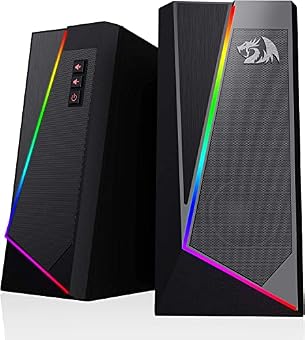
| Redragon GS520 | ABS and Aluminum | Individual push buttons | 6-mode touch-controlled RGB | Up to 31 inches (80 cm) | Limited |
| Redragon GS560 | Not listed | Rotary knob with on/off switch | 4-mode audio-sync RGB | Single soundbar chassis | Not listed |
| Redragon GS515 | Plastic | Multi-action control dial | 6-mode preset RGB | Single soundbar chassis | Limited |
| Redragon GS510 | ABS | Rotary knob with on/off switch | 4-mode touch-controlled RGB | Up to 39 inches (or 33 in listed) | Limited |
Redragon GS550 PC Gaming Speakers 2.0 for Modular Desktop Setups

Best for: Desktops needing convertible satellite or soundbar placement
Pros
- Modular interlocking chassis design
- Durable ABS and aluminum enclosure
- Front-mounted headphone and microphone pass-through jacks
Cons
- Fixed 31-inch bridge cable restricts wide setups
- Non-customizable static red backlighting
The Redragon GS550 PC Gaming Speakers 2.0 stand out due to their interlocking modular chassis design. Designed with a convertible frame labeled by the manufacturer as a shapeshifter, this 2.0 channel stereo core configuration can function as two independent vertical desktop satellites flanking a display or interlock horizontally to sit as a pseudo-soundbar beneath the screen. The exterior casing combines Acrylonitrile Butadiene Styrene (ABS) with aluminum trim, presenting a sturdier structural profile than bare plastic units. Redragon incorporates its signature red LED backlighting across the front fascia, matching classic desktop gaming palettes.
From a hardware reliability perspective, the GS550 relies on a dedicated analog rotary dial on the front panel that unifies the master volume control with the physical power switch. This mechanical design eliminates digital menu hunting, though physical potentiometers inherently face gradual wear from dust intrusion over several years. A distinct structural advantage is the inclusion of front-mounted 3.5mm microphone and headphone pass-through jacks, allowing users to connect communication headsets without stressing computer motherboard ports. Power is handled via a standard USB connection, paired with dual 3.5mm audio and microphone plugs.
This model is ideal for users with dynamic desk arrangements who value the freedom to switch between traditional stereo separation and low-profile horizontal placement. However, desk width is strictly governed by the fixed 31-inch (80 cm) bridge cable running between the two speaker units. If your workstation spans across dual monitors or exceeds standard desk spacing, this limited bridge wire prevents wider positioning, making longer-wired stereo satellites or dedicated single-body soundbars a better operational fit.
Redragon GS500 PC Gaming Speakers 2.0 for Compact Fixed Workstations

Best for: Shoppers seeking traditional compact desktop stereo satellites
Pros
- Clear 1-year manufacturer warranty
- Convenient front-panel audio pass-through ports
- Simple integrated power and volume knob
Cons
- All-plastic chassis without metal accents
- Red LED backlight cannot be disabled
The Redragon GS500 PC Gaming Speakers 2.0 offer a traditional, angled satellite form factor tailored for tight tabletop footprints. Unlike its convertible sibling, the GS500 utilizes a rigid, all-plastic enclosure designed solely for upright tabletop positioning. The drivers are housed behind textured grilles accented by fixed red LED illumination. While evaluating compact desk components alongside larger installations like a dedicated red dragon soundbar, the GS500 provides a dedicated stereo soundfield while claiming minimal surface area on crowded surfaces.
The control assembly mirrors classic analog audio designs, utilizing a front-facing rotary potentiometer that turns the system on and progressively scales volume. Redragon equips the front panel with auxiliary 3.5mm headphone and microphone ports, minimizing mechanical strain on computer rear I/O panels. The manufacturer listing notes an explicit 1-year warranty for the GS500, offering clearer coverage parameters than the undefined limited warranty terms accompanying several alternative models in the catalog. The inter-speaker bridge cable extends up to 33 inches (85 cm), providing slightly more breathing room than the GS550.
Shoppers seeking a simple, permanent desktop audio solution with predictable physical controls will appreciate the GS500. It sacrifices the aluminum chassis accents and modular flexibility of the GS550 in favor of a straightforward, single-purpose structure. For wide desk surfaces or multi-monitor setups, the 33-inch cable remains a limiting boundary, but for standard single-screen gaming desks, the hardwired connection points and predictable analog switchgear minimize setup failure points.
Redragon GS520 Wired 2.0 Channel Stereo for Low-Profile Push-Button Operation

Best for: Users wanting sealed push buttons and RGB
Pros
- Durable push buttons avoid potentiometer scratchiness
- Touch-controlled 6-mode RGB with off switch
- Brushed aluminum and ABS styling
Cons
- 31-inch cable limits speaker separation
- No front-panel headphone pass-through port
The Redragon GS520 Wired 2.0 Channel Stereo departs noticeably from the rotary control aesthetic found on earlier units. Known in product literature as the Anvil, this model features an urban minimalist aesthetic with brushed metal styling incorporated into its ABS and aluminum construction. Rather than single-color red illumination, the GS520 introduces multi-mode RGB lighting bands across the lower housing, featuring six selectable visual modes and a quick touch-control interface that enables full lighting deactivation during work hours.
Hardware durability is uniquely defined here by its digital interface: the GS520 replaces mechanical rotary potentiometers with individual push buttons for volume up and volume down. This engineering choice completely removes the scratchy audio static that can develop when mechanical rotary sliders accumulate particulate debris. Acoustic output is driven by 2-inch speaker drivers housed within the sealed 2.0 channel stereo framework, powered via USB with a standard 3.5mm auxiliary audio input plug. The listing notes touch-based input handling alongside tactile volume keys.
This system suits computer users who prioritize contemporary RGB aesthetics and prefer the tactile certainty of sealed digital buttons over rotating dials. However, the inter-speaker connecting wire measures 31 inches (80 cm), demanding that the units remain clustered closely beside a single display. Buyers looking for an expansive soundstage across wide dual-display desks will find the hardwired 31-inch span restrictive, making wider-tethered alternatives necessary.
Redragon GS560 RGB Desktop Soundbar for Under-Monitor Sound and Visual Sync

Best for: Minimalists wanting under-monitor audio with no cable clutter
Pros
- Single-chassis build eliminates fragile bridge wiring
- Dynamic audio-sync RGB lighting bar
- Compact 16-inch footprint fits under monitors
Cons
- Narrower stereo separation than split satellites
- Enclosure material is not specified
The Redragon GS560 RGB Desktop Soundbar shifts away from separate satellite towers entirely, packing its audio components into a unified 16-inch horizontal soundbar. As Redragon’s initial foray into dedicated desktop soundbars, this unit is dimensioned specifically to sit directly beneath a computer monitor. The chassis houses an upgraded driver core rated at 4 watts maximum output power with a listed frequency response ceiling of 20 KHz, engineered to deliver clear desktop sound and balanced bass without cluttering side desk space.
A primary reliability benefit of a single soundbar chassis is the complete elimination of fragile inter-speaker bridge wiring. All internal driver connections remain protected within the rigid central enclosure. User interaction is managed via a compact front-mounted rotary dial that toggles power and regulates volume. Backlighting features four dynamic and static lighting profiles, including an audio-light synchronization mode that visualizes audio tempos across the integrated light bar. The unit connects via a single USB power lead and a 3.5mm analog audio plug.
The GS560 is an ideal choice for compact workstations, student desks, or clean aesthetic setups where dangling cables between stereo towers create clutter or pinch hazards. It concedes true wide-angle stereo separation to two-piece satellite sets due to its compact 16-inch horizontal baffle. For shoppers deciding which redragon speaker to buy for straightforward under-monitor utility without wire management headaches, the GS560 provides dependable all-in-one execution.
Redragon GS515 RGB Desktop Soundbar for Hybrid Bluetooth and Dual Driver Sound
Best for: Multi-device desks requiring Bluetooth and under-monitor sound
Pros
- Dual Bluetooth 5.3 and wired connectivity
- Dual 50mm full-range drivers up to 10W
- Intuitive multi-function control dial
Cons
- All-plastic housing construction
- Single dial controls multiple combined functions
The Redragon GS515 RGB Desktop Soundbar advances desktop functionality by combining traditional wired computer connections with integrated Bluetooth 5.3 wireless streaming. Built from durable black plastic, this horizontal soundbar is engineered to nest beneath monitor stands while outputting audio through dual 50mm full-range drivers capable of up to 10W output. Unlike strictly hardwired PC peripherals, this model allows users to transmit music wirelessly from smartphones, laptops, or tablets up to a listed 10-meter operating boundary.
Hardware operation centers on a multi-functional rotary control dial that serves triple duty: adjusting master volume, cycling through operational input modes, and managing the six preset RGB lighting sequences via integrated press commands. While standard desktop speaker setups remain tethered to the PC, adding modern wireless reception brings this model closer to modern desktop streaming hubs. Similar wireless versatility is often sought across larger home ecosystems like cambridge audio bluetooth configurations, yet the GS515 keeps that capability strictly sized for personal desk spaces.
The GS515 is best suited for multi-device operators who alternate between PC audio during work or gaming sessions and wireless smartphone streaming while lounging away from the keyboard. The multi-action dial condenses several operational functions into one control interface, which introduces slightly more operational complexity than dedicated single-function switches. It represents a significant technological step up for shoppers who need wireless utility alongside standard desktop soundbar form factors.
Redragon GS510 RGB Wired Desktop Speakers for Wide-Spaced Multi-Monitor Desktops
Best for: Wider desks and multi-monitor computer displays
Pros
- Generous inter-speaker cable reach up to 39 inches
- 4-mode touch-controlled RGB with off setting
- Independent tactile rotary volume potentiometer
Cons
- Bulkier desk footprint than soundbars
- Lacks front-facing headset pass-through ports
The Redragon GS510 RGB Wired Desktop Speakers return to a two-piece satellite architecture, specifically addressing the wire-length constraints found on earlier models. Enclosed in a resilient ABS frame sporting a low-key urban profile, the GS510 emphasizes clear bass response through its full-range 2.0 channel stereo core. The front grilles are complemented by four selectable RGB lighting profiles operated by a top-mounted touch sensor, allowing users to toggle ambient visuals or extinguish lighting entirely with a tap.
Where this model establishes a major practical advantage is its physical wiring span. The product listing notes an inter-speaker cable reach extending up to 39 inches (with 33 inches / 85 cm referenced in operational plug-and-play specifications), making it the longest tether in Redragon’s wired desktop catalog. Volume control and system power are assigned to a tactile front-mounted rotary dial, ensuring smooth manual volume level management. As with the rest of the wired lineup, power and audio signals flow via standard USB and 3.5mm connections, backed by limited warranty terms.
The GS510 is tailored for gamers and creators utilizing large monitor mounts or dual-screen displays who require wider physical distance between speaker units to establish a proper stereo listening triangle. Because its enclosure is wider and the cable offers extended reach, it avoids the placement compromises inherent to shorter 31-inch models, making it the most layout-tolerant split stereo option in the manufacturer’s wired roster.
How to Choose the Right Redragon PC Speakers
Navigating a thorough redragon speaker comparison requires evaluating your physical desk layout, cable pathways, and mechanical preferences. Desktop speakers operate in close proximity to computer hardware, monitor arms, and peripheral wiring, making chassis dimensions and cable spans just as critical as listed driver specifications. Choosing the right unit comes down to balancing structural design, control hardware, and connection architecture against your everyday workstation habits.
- Chassis Architecture and Form Factor: Shoppers must first decide between a split two-piece satellite system and a unified horizontal soundbar. Models like the Redragon GS500, GS520, and GS510 provide distinct left and right channels that you can angle directly toward your seating position, maximizing spatial stereo perception. Conversely, soundbars like the Redragon GS560 and GS515 slide flat beneath a monitor riser. Soundbars consume less usable desk area and completely eliminate vulnerable bridge cables, making them ideal for minimalist workspaces, whereas split units yield better directional channel separation. The GS550 offers a rare middle ground by allowing its two satellite halves to lock together into a single horizontal block.
- Control Interfaces and Wear Resistance: Physical controls represent a frequent mechanical wear point on budget desktop audio. The GS500, GS550, GS560, and GS510 utilize classic analog rotary potentiometers that combine power switching with volume leveling. While highly intuitive, mechanical dials can eventually collect airborne dust, occasionally causing scratchy static during adjustments over prolonged use. The GS520 replaces the rotary dial entirely with sealed push buttons for discrete volume steps, eliminating potentiometer noise entirely. For users who switch audio sources frequently, the GS515 features a multi-function dial that manages volume, connectivity modes, and RGB patterns through combined rotational and press inputs.
- Inter-Speaker Cable Reach: For split satellite pairs, the distance separating the two units is permanently dictated by the hardwired umbilical bridge cable. The GS550 and GS520 provide approximately 31 inches (80 cm) of wire, which is sufficient for laptops or compact single monitors up to 24 inches. The GS500 increases this reach slightly to 33 inches (85 cm), while the GS510 offers up to 39 inches of separation. If your workstation features a 32-inch gaming monitor or dual side-by-side displays, purchasing a speaker set with an insufficient inter-unit wire will force the speakers into awkward positions behind screen bezels.
- Audio Connectivity and Signal Isolation: Five of the six models in this comparison rely exclusively on hardwired 3.5mm analog connections powered by a standard 5V USB cable. If you plan to connect your computer audio while maintaining wireless smartphone playback, the GS515 is the sole model equipped with Bluetooth 5.3. When routing analog audio alongside complex home multimedia setups—ranging from personal PC stations to specialized rooms running an lg sound suite—ground loop isolation is an operational factor. Powering USB speakers from an ungrounded desktop port can occasionally induce low-frequency ground hum, which is easily resolved by plugging the USB power cable into a dedicated external wall adapter.
- Enclosure Materials and Lighting Control: Chassis rigidity directly influences durability against accidental desktop impacts. The GS500 and GS515 utilize standard plastic casings, whereas the GS550 and GS520 reinforce their ABS enclosures with aluminum elements. Lighting control also varies across models: while the GS500 and GS550 feature static red backlights, the GS520, GS510, and GS560 incorporate touch-sensitive sensors that let users instantly disable dynamic RGB illumination during work hours or video conferencing.
FAQ
Do Redragon PC speakers require dedicated software drivers to function?
None of the Redragon PC speakers evaluated require proprietary driver downloads or background software suites. All six models operate on standard USB plug-and-play architecture, pulling standard 5V power over USB while receiving uncompressed analog audio via a standard 3.5mm auxiliary connector. The operating system recognizes the connection as a standard analog output device, ensuring immediate compatibility across Windows, macOS, Linux, and gaming consoles without driver instability or software bloat.
How do you resolve buzzing or humming static in USB-powered speakers?
Buzzing or high-pitched ground loop noise in USB-powered audio equipment typically occurs when the speaker draws power from the exact same motherboard or USB hub that processes high-current graphics card or processor loads. To eliminate this interference, disconnect the speaker’s USB power cable from the computer chassis and connect it directly into a standard 5V USB wall adapter plugged into a clean wall outlet or surge protector. Separating the electrical power path from the PC’s ground plane almost always eliminates unwanted electrical noise.
Can the lighting effects be completely turned off on all models?
Lighting control depends on the specific model. The Redragon GS520 and GS510 feature dedicated capacitive touch sensors on their top panels that cycle through dynamic lighting modes and include an explicit tap-to-dark setting. The GS560 soundbar also features touch controls for its dynamic lighting patterns, and the GS515 allows lighting adjustments via its multi-function dial. However, the GS550 and GS500 utilize fixed red LED accent lighting that remains illuminated as long as the speaker power switch is engaged.
What is the difference between Redragon rotary knobs and push-button volume controls?
Rotary knobs, found on models like the GS500, GS510, GS550, and GS560, utilize an internal mechanical potentiometer that physically alters electrical resistance to raise or lower audio volume smoothly. These knobs double as physical on/off toggle switches at their lowest rotation. Push buttons, such as those on the GS520, send digital step commands to internal sound processors. While push buttons lack the rapid sweep of a rotary dial, they eliminate mechanical potentiometer wear and avoid the crackling audio static that can occur when dust enters a physical rotary wiper assembly.
Are any of these Redragon desktop speakers waterproof or water-resistant?
None of the Redragon PC speakers in this lineup are water-resistant or waterproof. All six listings explicitly confirm that these units are not waterproof, featuring open acoustic grilles, exposed rear wire reliefs, and unsealed 3.5mm ports. They are designed exclusively for indoor desktop and tabletop computer setups. Care should be taken to keep beverages, open liquids, and high-humidity environments away from the speaker chassis to prevent electrical shorts and driver damage.


