


As Amazon Associates, we earn from qualifying purchases. This means we may receive a small commission at no extra cost to you if you click through and make a purchase.
LG has established a distinct presence in the desktop display market by pairing high-performance panels with clean, minimalist aesthetics. The brand is particularly well regarded for its production of crisp IPS panels, broad color coverage, and the integration of television-style smart software into modern desktop hardware. Buyers who select a white monitor often prioritize a cohesive, bright workspace aesthetic, but aesthetic considerations must be weighed against long-term physical comfort, port connectivity, and panel durability. A monitor chassis may look clean on a desk, yet the underlying hardware determines daily satisfaction.
In this lineup, these six models diverge sharply across aspect ratios, stand adjustability, resolution clarity, and whether they operate as traditional PC displays or standalone webOS smart devices. Understanding how these hardware variations affect daily posture, cable management, and visual comfort is essential when deciding which display will reliably support your specific workflow over years of continuous use.
LG White Monitors Compared
| Model | Screen Size and Resolution | Panel Type and Refresh | Contrast and Brightness | Stand Adjustability | USB-C Capability |
|---|---|---|---|---|---|
| LG 27US500-W | 27-inch 4K UHD (3840 x 2160) | IPS, 60Hz | 1000:1, 300 cd/m² | Tilt only | Not listed |
| LG 34U530A-W | 34-inch WFHD (2560 x 1080) | IPS, 100Hz | 1000:1, 400 cd/m² | Tilt, Height, Swivel | Display and Data |
| LG 34SR60QC-W | 34-inch QHD (3440 x 1440) | VA (1800R Curve), 100Hz | 3000:1, 300 cd/m² | Tilt only | Not listed |
| LG 27US550-W | 27-inch 4K UHD (3840 x 2160) | IPS, 60Hz | 1000:1, 300 cd/m² | Tilt, Height, Swivel, Pivot | Not listed |
| LG 27U730SA-W | 27-inch 4K UHD (3840 x 2160) | IPS, 60Hz | 1000:1, 350 cd/m² | Tilt, Height, Swivel, Pivot | 65W Power Delivery |
| LG 34SR63QA-W | 34-inch QHD (3440 x 1440) | VA (1800R Curve), 100Hz | 3000:1, 300 cd/m² | Tilt only | 65W Power Delivery |
LG 27US500-W Ultrafine Monitor 27-Inch 4K for Basic Ultra-High-Definition Work

Best for: Entry-level 4K productivity on a static desk
Pros
- Crisp 4K UHD resolution
- Wide 90% DCI-P3 color
- Anti-glare matte panel finish
Cons
- Tilt-only stand lacks height adjustment
- No USB-C connectivity included
The LG 27US500-W Ultrafine Monitor 27-Inch 4K is a 16:9 desktop display centered on visual clarity and color reproduction. Built with an IPS panel running at 3840 x 2160 resolution, it delivers a sharp pixel density that prevents visible grain when reading fine typography or editing high-resolution digital photography. The display features a matte anti-glare finish, a 1000:1 contrast ratio, a maximum brightness of 300 cd/m², and covers up to 90% of the DCI-P3 color spectrum. For desktop utility, the monitor incorporates LG OnScreen Control software, which allows users to partition windows across the desktop through mouse clicks rather than physical bezel buttons.
From an ergonomic perspective, this model reveals its budget-oriented compromises. The included stand mechanism permits tilt adjustment only, meaning users cannot alter the screen height, pivot the display into portrait orientation, or swivel it toward a colleague. Unless positioned on an aftermarket monitor riser, the fixed low height can lead to neck strain during prolonged work sessions. Port selection is straightforward, offering HDMI and DisplayPort inputs alongside an external power adapter, but the listing makes no mention of USB Type-C connectivity. This requires laptop users to supply their own docking stations or dongles to maintain display output and battery charging.
This display suits desktop PC users and creative workers who prioritize 4K resolution clarity and accurate IPS viewing angles over physical stand adjustments. However, those who require full postural alignment straight out of the box will find it gives way to the more flexible ergonomic arm found on the sibling 27US550-W model.
LG 34U530A-W 34-inch UltraWide WFHD for High-Refresh Multitasking
Best for: Multitasking office workers seeking extra width
Pros
- Full tilt, height, and swivel stand
- Smooth 100Hz refresh rate
- USB-C display and data transfer
Cons
- Lower 1080p vertical resolution
- Power delivery wattage not specified
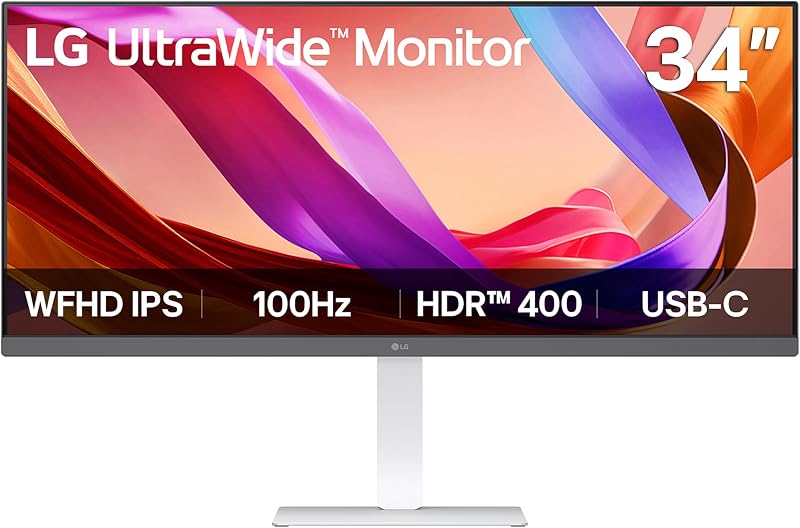
The LG 34U530A-W 34-inch UltraWide WFHD expands desktop real estate into a 21:9 panoramic format. Operating at 2560 x 1080 resolution, it provides extensive horizontal room to run multiple documents or browser windows side by side without requiring a second screen. The IPS panel offers a 100Hz refresh rate, VESA DisplayHDR 400 certification with a peak brightness of 400 cd/m², and 99% sRGB color gamut coverage. Audio is handled by integrated stereo speakers featuring Waves MaxxAudio processing, while software support includes the Switch app for custom grid partitioning and Reader Mode for warmer color temperatures during long reading tasks.
Physical usability is a notable strength of this model. Unlike entry-level ultrawides that ship with static legs, the supplied mounting hardware allows users to adjust tilt, height, and swivel, ensuring the monitor aligns properly with natural eye level. This mechanical flexibility is ideal when setting up an expansive office space alongside modern furniture such as a maverickfurni white desk with drawers. Connectivity is also versatile, incorporating HDMI, DisplayPort, and a USB Type-C port that handles display output and data transfer. However, buyers should be aware that the listing does not specify power delivery wattage for the USB-C interface, meaning laptops may still require their original external power bricks.
This model is an effective choice for general administrative workers, spreadsheet managers, and everyday multitaskers who value smooth 100Hz scrolling and full mechanical stand adjustability. It gives way to the curved QHD ultrawides when high pixel density or sharp small-font rendering is required, as the 0.31mm pixel pitch on a 34-inch 1080p panel produces softer text than 1440p displays.
LG 34SR60QC-W 34-inch QHD for All-in-One Entertainment and Streaming
Best for: Standalone streaming and curved panoramic productivity
Pros
- Deep 3000:1 VA contrast ratio
- Built-in webOS streaming and AirPlay
- Sharp 3440×1440 curved screen
Cons
- No USB-C connection
- Stand lacks height adjustment
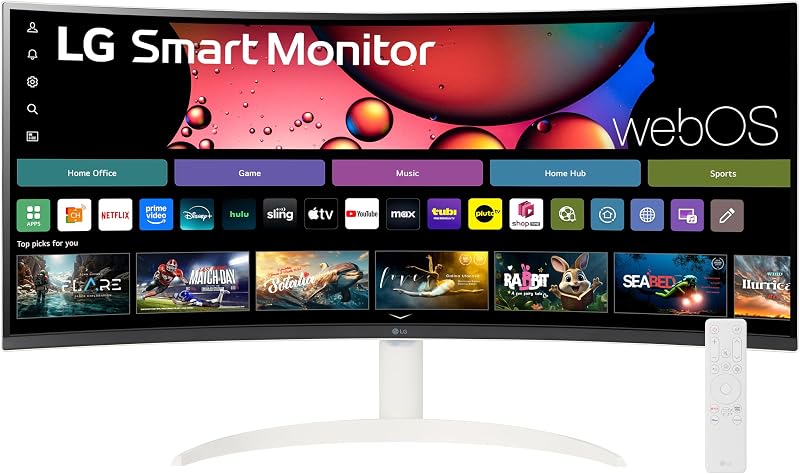
The LG 34SR60QC-W 34-inch QHD combines a panoramic computer monitor with television functionality. The 34-inch ultrawide screen features a 3440 x 1440 QHD resolution built upon a curved VA panel with an 1800R radius. The native 3000:1 contrast ratio produces deeper black levels than standard IPS alternatives, making dark scenes in films and games appear rich and saturated. Color reproduction covers up to 99% of the sRGB gamut with HDR10 processing, and motion is rendered at a 100Hz refresh rate across broad 178-degree viewing angles.
Where this monitor diverges from traditional monitors is its operating system. Powered by webOS23, it functions independently of a desktop tower or laptop. Users can stream video services such as Netflix, Prime Video, and Disney+, access over 300 free LG Channels, and utilize cloud computing platforms like Microsoft 365 directly through the monitor. Hardware connections include two HDMI ports and three USB ports, backed by wireless support for Apple AirPlay 2, HomeKit, Screen Share, and Bluetooth. Built-in speakers handle audio output without requiring external desktop units.
Despite its smart software suite, the hardware exhibits practical trade-offs. The stand provides tilt adjustment but does not offer height adjustment, which can make positioning difficult for taller users. Furthermore, the monitor does not include a USB Type-C port, forcing laptop users to rely on conventional HDMI connections. It is well suited for dorm rooms, bedrooms, or secondary spaces where a single screen must double as both a PC workstation and an independent streaming television, but gives way to the 34SR63QA-W if single-cable laptop charging is essential.
LG 27US550-W 27-inch Ultrafine IPS 4K for Ergonomic Color Accuracy

Best for: Designers needing full ergonomic positioning
Pros
- Full tilt, height, swivel, pivot stand
- Sharp 4K UHD IPS panel
- 90% DCI-P3 color coverage
Cons
- Standard 60Hz refresh rate
- No built-in USB-C hub
The LG 27US550-W 27-inch Ultrafine IPS 4K addresses the postural limitations often found in standard desktop displays. Featuring a 27-inch IPS panel with a 3840 x 2160 resolution, it maintains a fine 0.16mm pixel pitch that produces crisp details for image retouching, code review, and fine-line layout drafting. The screen features a 1000:1 contrast ratio, 300 cd/m² brightness, and HDR10 support with up to 90% DCI-P3 color gamut coverage. It integrates LG Switch app compatibility alongside gaming utilities like Dynamic Action Sync and Black Stabilizer to maintain visual clarity across different lighting environments.
The primary advantage of this model is its comprehensive ergonomic stand. The mechanism allows for smooth tilt, height, swivel, and 90-degree pivot adjustments. Being able to rotate the screen into a vertical orientation is particularly advantageous for programmers reading long source files, writers handling vertical documents, and analysts parsing lengthy spreadsheets. The white rear chassis and clean stand profile maintain aesthetic consistency while meeting proper workplace health guidelines.
This monitor is best suited for visual creators and office professionals who spend long hours at their desks and require both sharp 4K resolution and comprehensive physical adjustments. It gives way to the 27U730SA-W when buyers need integrated USB-C power delivery or autonomous smart television features, as the 27US550-W is strictly a computer display without power-charging hub hardware.
LG 27U730SA-W 27-Inch Smart 4K UHD for Modern Single-Cable Workstations
Best for: Compact hybrid home offices requiring 65W charging
Pros
- Single-cable 65W USB-C charging
- Stand adjusts height, tilt, swivel, pivot
- Integrated webOS smart platform
Cons
- Locked at 60Hz refresh rate
- 1000:1 contrast limits deep blacks
The LG 27U730SA-W 27-Inch Smart 4K UHD represents the convergence of high-density computing, single-cable docking, and independent media playback. Built with a 27-inch IPS panel operating at 3840 x 2160 resolution, this monitor reaches an elevated brightness level of 350 cd/m² and incorporates an ambient light sensor that automatically adjusts panel luminance to match ambient room conditions. It includes HDR10 with Dynamic Tone Mapping, an included remote control, integrated stereo speakers, and runs LG webOS to support cloud office suites, wireless screen sharing, AirPlay 2, and embedded video streaming applications.
Connectivity on this unit is tailored for modern laptop workflows. The monitor features a USB Type-C port equipped with 65W Power Delivery, enabling compatible laptops to transmit video, pass data, and receive operating power through a single connection. This eliminates cable clutter and avoids the need for an external docking station. Additional physical ports include two HDMI inputs and two USB data ports. The hardware package is completed by a versatile stand providing tilt, height, swivel, and pivot adjustments, ensuring proper ergonomic placement on any work surface.
This model is the ideal match for remote professionals using modern ultrabooks who want a clutter-free desk setup with premium ergonomic versatility. It gives way only if an expansive horizontal field of view is needed, in which case an ultrawide model like the 34SR63QA-W becomes the more practical alternative.
LG 34SR63QA-W 34 inch Smart Curved for Expansive Media and Laptop Charging
Best for: Curved ultrawide setups needing laptop charging
Pros
- 65W USB-C power delivery
- Immersive 1800R curved 1440p panel
- Rich 3000:1 VA contrast ratio
Cons
- Stand lacks height adjustment
- VA viewing angles narrower than IPS
The LG 34SR63QA-W 34 inch Smart Curved provides an expansive panoramic workspace paired with high-wattage docking capabilities. Spanning a 34-inch 21:9 curved VA panel with an 1800R curve, it operates at a sharp 3440 x 1440 QHD resolution with a native 3000:1 contrast ratio. The panel achieves a 100Hz refresh rate and covers 99% of the sRGB color spectrum with HDR10 enhancement. Like its sibling models, it integrates webOS23, granting direct access to streaming applications, free streaming channels, and cloud computing environments without powering on an external computer.
Where this model significantly improves upon the 34SR60QC-W is in workstation connectivity. It is equipped with a USB Type-C port that provides fast data transmission alongside up to 65W power delivery. This single port charges connected laptops while routing video signals, substantially reducing wire clutter across a bright white desktop. Additional connectivity includes two HDMI ports, two USB 3.0 ports, a 3.5mm headphone jack, and built-in speakers. To see how curved displays from this manufacturer compare across varied workplace configurations, reviewing our guide on lg ultrawide curved monitor options offers additional perspective on panoramic panel behaviors.
Despite its advanced port selection, buyers should note that the physical stand is limited to tilt adjustment, lacking vertical height travel. Users seeking comprehensive ergonomic positioning may need to utilize the rear mounting interface. Nonetheless, this display suits professionals and media enthusiasts who desire an immersive curved screen with reliable single-cable laptop charging and built-in streaming capabilities.
How to Choose the Right LG White Monitor
Choosing the correct white display requires balancing aesthetic appeal with mechanical health, panel characteristics, and hardware connectivity. A white chassis complements clean modern offices, but a monitor’s daily usability depends on its functional alignment with your workflow. Consider the following critical criteria before deciding on a specific model:
- Ergonomics and Stand Adjustability: Physical posture directly affects long-term comfort. Models like the 27US500-W, 34SR60QC-W, and 34SR63QA-W provide only tilt adjustments, fixing the monitor at a static height. For prolonged typing, coding, or daily office duties, models featuring full tilt, height, swivel, and pivot adjustments—such as the 27US550-W and 27U730SA-W—allow users to position the top third of the panel at natural eye level without requiring aftermarket risers.
- Aspect Ratio and Resolution Clarity: A standard 16:9 4K panel provides dense pixel clarity (3840 x 2160) across a 27-inch canvas, ensuring razor-sharp text and precise photo rendering. Conversely, a 21:9 ultrawide expands horizontal viewing space by 34 percent, making side-by-side document management effortless. Note the resolution differences within the ultrawide category: the 34U530A-W utilizes a 2560 x 1080 resolution with a wider pixel pitch, whereas the 34SR60QC-W and 34SR63QA-W utilize a sharper 3440 x 1440 canvas that maintains fine typographic detail.
- Panel Technology (IPS vs. VA): The lineup divides between IPS and VA panels. Displays such as the 27US500-W, 27US550-W, and 34U530A-W utilize IPS panels, which excel at maintaining accurate color consistency across wide viewing angles. In contrast, the curved 34SR60QC-W and 34SR63QA-W feature VA panels that offer a higher 3000:1 contrast ratio, delivering significantly deeper black levels for evening movie viewing and dark-room entertainment.
- USB-C Power Delivery and Docking: Modern laptop users benefit from single-cable docking. The 27U730SA-W and 34SR63QA-W provide USB Type-C ports capable of delivering up to 65W of power, charging your notebook while receiving display signals. In contrast, the 34U530A-W supports display and data over USB-C without a specified power rating, and the 27US500-W, 27US550-W, and 34SR60QC-W lack USB-C entirely, requiring separate HDMI or DisplayPort cables along with a dedicated laptop power brick.
- Dedicated PC Monitor vs. Smart webOS Device: Traditional monitors like the 27US500-W and 27US550-W function purely as visual peripherals for connected computers. Smart displays equipped with webOS, such as the 34SR60QC-W, 27U730SA-W, and 34SR63QA-W, feature onboard processors, remote controls, wireless networking, and media streaming apps, allowing them to function as independent televisions and cloud computing terminals even when a PC is powered down.
FAQ
Do LG white monitors come with built-in speakers?
Speaker inclusion varies by model. The 34U530A-W includes built-in stereo speakers enhanced by Waves MaxxAudio, and the webOS-equipped models—including the 34SR60QC-W, 27U730SA-W, and 34SR63QA-W—feature integrated speakers to support independent television streaming. Conversely, traditional desktop productivity models like the 27US500-W and 27US550-W do not list integrated stereo speaker systems, requiring users to rely on external desktop speakers or headphones.
Can a 65W USB-C port keep a high-power laptop charged?
The 65W USB Type-C Power Delivery found on the 27U730SA-W and 34SR63QA-W provides ample wattage for common ultrabooks, lightweight business notebooks, and standard productivity laptops during typical office tasks. However, high-performance workstations or laptops running demanding 3D workloads may require 90W to 140W under load. When connected to a 65W port under heavy processing stress, such machines may charge very slowly or draw supplementary power from their internal batteries.
What is the functional difference between IPS and VA panels in this lineup?
IPS panels, featured on the 27US500-W, 27US550-W, 27U730SA-W, and 34U530A-W, provide stable color reproduction and wide 178-degree viewing angles without color shift, making them suitable for color-critical tasks and collaborative viewing. VA panels, used on the curved 34SR60QC-W and 34SR63QA-W, deliver a native 3000:1 contrast ratio that renders deeper, truer black tones in dim lighting, though their viewing angles are narrower than IPS equivalents.
Can LG white monitors be mounted on standard third-party monitor arms?
Most LG displays incorporate standard VESA-pattern screw holes on their rear casings, and the 34U530A-W specifically highlights VESA compatibility. Installing a monitor on an articulating monitor arm allows users to bypass the limitations of tilt-only stands, such as those included with the 27US500-W, 34SR60QC-W, and 34SR63QA-W, enabling customized height and swivel placement.
Do LG webOS smart monitors require a computer to access the internet?
No, monitors equipped with webOS, such as the 34SR60QC-W, 27U730SA-W, and 34SR63QA-W, operate as autonomous smart systems. They feature onboard Wi-Fi, support Apple AirPlay 2, and provide native access to major streaming services, free streaming channels, and web-based cloud productivity applications like Microsoft 365 without needing an active connection to a PC.


