


As Amazon Associates, we earn from qualifying purchases. This means we may receive a small commission at no extra cost to you if you click through and make a purchase.
Kodak holds a singular position in consumer imaging, serving as the foundational brand that introduced personal photography to generations of casual snappers and hobbyists. In the contemporary instant imaging market, the brand bridges nostalgic tactile prints with digital convenience, deploying two distinct chemical-free printing philosophies across its mobile devices: dye sublimation ribbon cartridges and thermal zero-ink paper. Shoppers seeking a hybrid kodak camera printer often do so to avoid the ongoing expense and bulk of legacy chemical films while enjoying immediate tangible keepsakes.
Across this lineup, the hardware fundamentally bifurcates between multi-pass dye sublimation systems that favor archival picture quality at the expense of mechanical complexity, and direct thermal zero-ink units that emphasize pocketable speed and jam-resistant simplicity. Understanding the functional differences among these models allows buyers to match their shooting habits to the appropriate balance of print longevity, cartridge mechanics, and long-term hardware reliability.
Kodak Instant Cameras Compared
Conducting a rigorous kodak printer camera comparison requires looking past exterior shell designs to inspect the underlying print engines, optical components, and interface limitations that dictate daily usability. The following breakdown organizes the key technical specifications established by the manufacturer across all five models.
| Model | Print Technology | Film Format | Sensor Resolution | Display Screen |
|---|---|---|---|---|
| KODAK Mini Shot 2 Retro 2×3 (White) | 4PASS Dye Sublimation | Kodak Instant Print 2.1 x 3.4 | 10 MP | 1.7-inch LCD |
| KODAK Dock Plus 4×6 Photo Printer | 4PASS Dye Sublimation | Glossy photo paper 4×6 | Not listed | Not listed |
| Kodak Step Touch | ZINK Zero Ink | ZINK 2 x 3 | 13 MP | 3.5-inch Touchscreen |
| KODAK Mini Shot 2 Retro 2×3 (Yellow) | 4PASS Dye Sublimation | Kodak Instant Print 2.1 x 3.4 | 10 MP | 1.7-inch LCD |
| KODAK Printomatic Full-Color Instant Print Digital | ZINK Zero Ink | ZINK 2 x 3 | 5 MP | 4.5-inch (Optical Viewfinder) |
KODAK Mini Shot 2 Retro 2×3 for Portable Laminated Snaps

Best for: Vintage styling fans seeking archival keepsakes
Pros
- Claimed 100-year print longevity
- Bordered and borderless printing modes
- Built-in flash integration
Cons
- Delicate ribbon cartridge mechanics
- Maximum 1-second shutter ceiling

Best for: Everyday pocket shooters wanting laminated prints
Pros
- Protective 4PASS laminate overcoat
- Bluetooth mobile companion printing
- Print cancel option saves paper
Cons
- Small 1.7-inch viewing display
- Slow 55-second multi-pass print time
The KODAK Mini Shot 2 Retro 2×3 in white functions as a dual-purpose device that integrates a digital capture sensor with an internal 4PASS dye sublimation printing carriage. Instead of relying on instant chemical packets, this device feeds Kodak Instant Print 2.1 x 3.4 media back and forth four times to lay down individual layers of yellow, magenta, and cyan dye before sealing the sheet under a protective laminate coat. This lamination step provides practical resistance against fingerprint oils, moisture droplets, and rapid daylight fading, yielding an output designed for lasting storage in scrapbooks or wallet sleeves.
From an operational standpoint, the unit houses a 10 MP digital camera with automatic exposure control and shutter speeds ranging from 1/100 to 1/1600 seconds. Users frame compositions via a modest 1.7-inch rear screen, which allows them to capture images and either print them immediately or discard faulty shots before burning through a print cycle. The integrated Bluetooth radio connects directly to iOS and Android devices running the KODAK Photo Printer app, turning the camera into a portable phone printer. While this multi-pass approach ensures vibrant color rendition, the mechanical 55-second print cycle exposes the feed rollers to dust intrusion if operated outdoors, requiring clean working environments to prevent ribbon misfeeds.
This camera fits everyday travelers and family chroniclers who value finished image protection over rapid fire shooting. Those who prioritize higher sensor resolution or a broad touch display might look toward more expansive digital interfaces, while photographers who want a purely pocketable, point-and-shoot experience without ribbon cartridges may prefer simpler thermal alternatives.
KODAK Dock Plus 4×6 Photo Printer for Stationary Household Albums
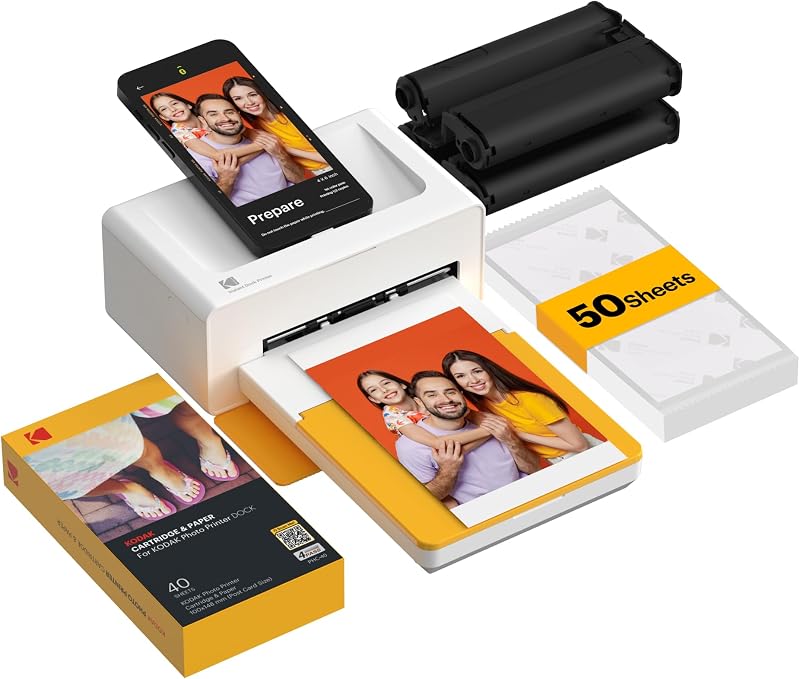
Best for: Home scrapbooking and larger desktop prints
Pros
- Generous 4×6-inch print size
- Physical phone charging dock
- Fade-resistant lamination finish
Cons
- Lacks integrated camera sensor
- Requires AC wall power
Departing from integrated capture lenses, the KODAK Dock Plus 4×6 Photo Printer is a dedicated tabletop base station engineered to produce full-size 4×6-inch borderless prints. The chassis incorporates an integrated smartphone docking connector alongside standard Bluetooth wireless protocols, allowing users to physically seat their mobile device for direct data transfer while simultaneously replenishing its internal battery during heavy output sessions. Because it draws steady energy from an external AC wall outlet rather than an internal lithium pack, the unit maintains consistent thermal head temperatures throughout continuous production runs.
The internal mechanics utilize four-pass dye sublimation ribbon cartridges containing yellow, magenta, cyan, and black color elements to transfer dye onto glossy photo paper. Each 4×6-inch print completes in approximately 55 seconds, emerging fully dry and sealed under an impervious overcoat layer that protects against water contact and surface smudges. The listing notes limited warranty coverage and a single-copy run structure controlled entirely through the companion mobile software, where users can crop, adjust contrast, and configure border settings before engaging the mechanical paper drive.
Because the Dock Plus lacks an optical sensor or shutter mechanism, it suits home users focused on archiving smartphone libraries, family albums, and decorative framing rather than spontaneous outdoor capture. Shoppers looking for an all-in-one pocket camera will find its 4.5 by 8.5-inch desktop footprint ill-suited for transit, shifting priority to self-contained hybrid capture units.
Kodak Step Touch for Touchscreen Composition and Zoom

Best for: Mobile creators needing touchscreen photo editing
Pros
- Spacious 3.5-inch touchscreen LCD
- 10X optical zoom capability
- Adhesive-backed inkless Zink paper
Cons
- Lacks protective lamination layer
- Mechanical pop-up flash assembly
The Kodak Step Touch represents the most feature-dense capture platform in the brand’s hybrid roster, pairing a 13 MP digital sensor with an interactive 3.5-inch LCD touchscreen interface. Unlike the miniature review windows found on retro dye sublimation variants, this large screen provides an onboard editing suite where photographers can apply digital filters, frames, and stickers directly on the device before activating the print engine. The physical camera assembly also incorporates a 10X optical zoom mechanism, pop-up flash, selfie mirror, auto timer, and the capacity to capture 1080p HD video footage to an optional MicroSD card.
Printing relies entirely on ZINK Zero Ink technology, running 2×3-inch sheets embedded with heat-sensitive color crystals that activate under targeted thermal pulses. This eliminates all ink ribbons, toner cartridges, and delicate multi-pass feed mechanisms, yielding moisture-resistant and tear-resistant prints backed by peel-off adhesive. Photographic detail approaches the crispness seen on traditional point-and-shoots like the kodak easyshare 14 megapixels line, while automatic exposure and shutter speeds up to 1/4000 second maintain sharpness across bright outdoor scenes.
This model is tailored for creative crafters, event bloggers, and journal enthusiasts who demand instant tactile stickers and extensive on-camera editing control. Users who insist on true continuous-tone color fidelity or archival museum-grade print stability, however, may find the thermal paper’s color gamut secondary to the richer saturation produced by multi-layer dye sublimation hardware.
KODAK Mini Shot 2 Retro 2×3 for Archival Bordered Keepsakes
Finished in a vintage yellow exterior, this iteration of the KODAK Mini Shot 2 Retro 2×3 shares the established 4PASS dye sublimation printing engine while delivering specific output versatility. The device prints on Kodak Instant Print 2.1 x 3.4 media and gives the user tactile menu choices between classic bordered photos with note-taking space or full borderless frame coverage. The internal lamination process bonds a clear defensive shield over the pigment layers, backing manufacturer claims that prints resist water droplets, fingerprints, and UV degradation for over 100 years under proper storage.
Image capture is managed by a 10 MP sensor equipped with automatic exposure, a built-in flash for low-light environments, and a rolling shutter mechanism with exposures up to 1 second. The 1.7-inch LCD screen allows shooters to inspect framing and cancel accidental exposures to prevent wasting loaded print media. Beyond capturing live scenes, the hardware links via Bluetooth to the KODAK Photo Printer application, letting users push smartphone camera rolls directly to the internal print carriage. This dual functionality offers a reliable bridge for users familiar with a dedicated kodak small camera layout who still want wireless peripheral printing capabilities.
This yellow edition suits nostalgic gift recipients, scrapbook hobbyists, and casual portraitists who prioritize physical print durability over swift output. Conversely, users operating in high-volume environments where rapid-fire printing is paramount will encounter physical wait times during the multi-pass mechanical sequence.
KODAK Printomatic Full-Color Instant Print Digital for Fast Frictionless Snapshots
Best for: Casual party guests and instant sticker fans
Pros
- Continuous shooting while printing
- Adhesive sticky-back photo paper
- Simple point-and-shoot operation
Cons
- No included USB charging cable
- Lacks digital composition display
The KODAK Printomatic Full-Color Instant Print Digital takes a minimalist approach to instant photography, stripping away digital menu screens in favor of an optical viewfinder and direct physical operation. Built around a 5 MP image sensor (with listing specifications recording a 30 MP effective resolution baseline) and a wide-angle f/2 aperture lens, the camera focuses on raw speed. Its internal processor allows continuous shooting at up to 3 frames per second, letting users snap consecutive photos even while the built-in printer is actively ejecting the previous capture.
Like other zero-ink hardware, the Printomatic utilizes 2×3-inch ZINK photo paper with adhesive backing, producing water-resistant, tear-resistant, and smudge-free stickers without ribbons or liquid ink supplies. A built-in ambient light sensor automatically triggers the integrated flash when illumination drops, and captured files store directly to a user-supplied MicroSD card. The simplified chassis mirrors the point-and-click immediacy of a traditional kodak disposable camera, though it dispenses with disposable shells in favor of a rechargeable internal power source, albeit without an included USB cable in the standard packaging.
This camera is purpose-built for children, party settings, and casual social gatherings where users want immediate sticker output without navigating smartphone apps or display menus. Users desiring granular framing precision, manual print selection, or deep color saturation will find its automated, screenless workflow restrictive compared to display-equipped alternatives.
How to Choose the Right Kodak Instant Cameras
Selecting which kodak printer camera to buy requires understanding the physical constraints and material demands of each imaging technology. Print durability serves as the primary dividing line across the catalog. Devices employing 4PASS dye sublimation, such as the two Mini Shot 2 Retro variants and the Dock Plus, transfer three separate color ribbon coatings onto paper before sealing the surface under an impervious protective laminate layer. This design makes the resulting prints impervious to spills, surface smudges, and ultraviolet fading. Conversely, ZINK systems like the Step Touch and Printomatic rely on heat-activated crystals embedded within the paper itself; while these sheets offer convenient adhesive backing and resist physical tearing, they lack an exterior laminate and can shift color under extreme heat or direct sunlight exposure.
Mechanical reliability and maintenance represent another essential consideration. The debate between a kodak 4pass vs zink printer centers on internal moving parts versus thermal simplicity. Dye sublimation cartridges contain delicate plastic film ribbons that can bind, crinkle, or jam if ejected prematurely or subjected to airborne grit during their repeated four-pass cycles. In contrast, ZINK paper feeds linearly through a static thermal printhead in a single forward pass, substantially reducing mechanical failure points. However, users must keep thermal printheads free of paper dust to prevent faint horizontal print streaks over extended ownership cycles.
Shooting control and composition interfaces further distinguish the lineup. If you require precise framing and the option to cancel accidental shots before expending paper, the touchscreen on the Kodak Step Touch or the preview windows on the Mini Shot models are essential safeguards. If instantaneous, low-friction operation is your goal, the optical viewfinder on the Printomatic eliminates software menus entirely. For those who prioritize print size and stable desktop production over mobile shooting, the stationary Dock Plus remains the logical choice.
FAQ
What is the difference between Kodak 4PASS and ZINK printing?
Kodak 4PASS technology uses thermal dye sublimation, passing the paper back and forth four times through the carriage to lay down yellow, magenta, and cyan dye ribbons followed by a protective clear laminate layer. ZINK Zero Ink uses specialized paper embedded with heat-sensitive color crystals that activate via thermal pulses in a single pass. 4PASS prints offer superior continuous-tone color fidelity, fingerprint resistance, and archival longevity, whereas ZINK paper provides instant, ink-free adhesive stickers with simpler single-pass mechanical feed paths.
Can I print pictures from my smartphone on these Kodak cameras?
Yes, several models include integrated Bluetooth radios that allow them to function as standalone wireless photo printers. Both the white and yellow versions of the KODAK Mini Shot 2 Retro connect to iOS and Android devices via the KODAK Photo Printer app, as does the stationary KODAK Dock Plus. The Kodak Step Touch also provides Bluetooth connectivity for mobile printing and file transfers, whereas the screenless KODAK Printomatic does not support wireless smartphone printing.
Do Kodak instant camera printers save digital copies of my photos?
Image saving depends entirely on the camera hardware. The Kodak Step Touch and the KODAK Printomatic both include MicroSD card slots that save digital files directly to removable memory, allowing you to store and reprint photos later. In contrast, the KODAK Mini Shot 2 Retro models do not feature onboard memory card storage; they operate as instantaneous point-and-print devices or companion smartphone printers via their mobile application.
What should I do if a Kodak 4PASS ribbon cartridge jams?
If a dye sublimation cartridge binds, power down the device completely to disengage the mechanical feed rollers before attempting to open the access door. Never forcibly rip or tug a caught ribbon, as this can bend the internal alignment guides or scratch the delicate thermal printhead. Gently extract the cartridge casing, check that the film ribbon is wound tautly across its plastic spools, and reinsert it after ensuring the paper track is clear of obstructions.
Are Kodak instant print photos waterproof?
Both print formats provide practical water resistance, but through different physical methods. 4PASS prints are sealed under a distinct clear top-coat lamination layer during the final mechanical pass, making them impervious to water droplets, humidity, and fingerprint smudges. ZINK prints are composed of durable composite paper that resists moisture penetration, tears, and surface smudging naturally, though prolonged soaking can degrade the backing adhesive on sticker sheets.


