


As Amazon Associates, we earn from qualifying purchases. This means we may receive a small commission at no extra cost to you if you click through and make a purchase.
ASUS established a distinguished reputation in the portable hardware space by experimenting with versatile form factors, spanning from budget multimedia slates to high-end convertible workstations. Across its history with handheld computing, the manufacturer emphasized visual fidelity through proprietary display enhancements such as TruVivid processing, ergonomic lightweight profiles, and accessible expansion options like microSD storage. For consumers assessing the best asus tablet models, the hardware catalog represents two distinct philosophies: dedicated mobile media slates operating on legacy Android firmware, and modern hybrid devices running desktop-class operating systems. A thorough asus zen tablet comparison requires examining not only hardware specifications, but also software longevity, battery maintenance, and ongoing component reliability.
These four devices diverge between dedicated lightweight media slates powered by older mobile chipsets and a high-performance Windows detachable engineered for intensive multitasking and modern computing workloads.
ASUS Tablets Compared
| Model | Display Specs | Processor | Memory and Storage | Operating System |
|---|---|---|---|---|
| ASUS ZenPad 10 (Z301M-A2-WH) | 10.1-inch IPS (1280 x 800) | MediaTek MTK 8163B Quad-Core 1.3 GHz | 2GB RAM, 16GB Storage | Android 7.0 |
| ASUS ZenPad 10 (Z301MF-A2-WH) | 10.1-inch IPS (1920 x 1200) | MediaTek MTK 8163A Quad-Core 1.5 GHz | 2GB RAM, 16GB Storage | Android 7.0 |
| ASUS Zenpad 7″ (Z170C-A1-BK) | 7.0-inch IPS (1024 x 600) | Intel Atom x3-C3200 Quad-Core 1.2 GHz | 1GB RAM, 16GB Storage | Android 4.4 / Android 5.0 |
| ASUS ROG Flow Z13 (GZ301ZA-PS53) | 13.4-inch 120Hz IPS (1920 x 1200) | Intel Core i5-12500H (Up to 4.5 GHz) | 16GB LPDDR5, 512GB PCIe SSD | Windows 11 Home |
ASUS ZenPad 10 10.1-inch IPS WXGA for Casual Streaming
Best for: Higher-resolution video viewing and reading
Pros
- Full HD 1920×1200 IPS display
- Faster 1.5 GHz quad-core processor
- Reversible USB-C connectivity
Cons
- Stuck on Android 7.0
- Limited 16GB internal storage

Best for: Offline media playback on standard definition
Pros
- TruVivid 10.1-inch IPS screen
- Expandable storage up to 128GB
- Includes power adapter and cord
Cons
- Outdated Android 7.0 OS
- Modest 2GB RAM capacity
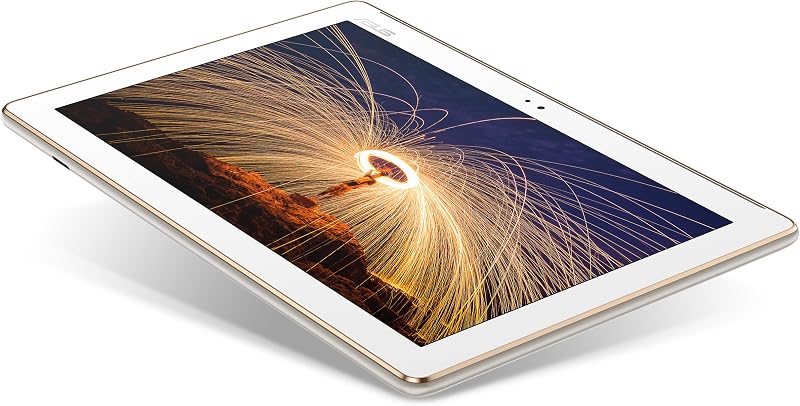
The ASUS ZenPad 10 10.1-inch IPS WXGA model Z301M-A2-WH represents a classic approach to personal multimedia tablets, focusing on screen comfort and physical ease of handling. Built with a 10.1-inch IPS display delivering a 1280 x 800 resolution, this slate utilizes ASUS TruVivid technology to reduce visual glare and enhance image clarity during everyday video viewing. Internal processing is handled by a 64-bit quad-core MediaTek MTK 8163B processor clocked at 1.3 GHz, paired with 2GB of system RAM and 16GB of onboard storage. The tablet incorporates a 5-megapixel rear camera alongside a 2-megapixel front-facing sensor for basic image capture and standard video calls, supported by a 4680 mAh battery designed to provide steady uptime during media sessions. Included in the package are a power adapter, charging cord, user e-manual, and a warranty card covering one year of domestic repair with one-way free shipping.
From an advocate perspective regarding asus zen tablet reliability, buyers must evaluate the operational boundaries of this slate. Because the hardware operates on Android 7.0, it no longer receives modern asus tablet OS support or security patches. As contemporary applications update their minimum software thresholds, certain modern streaming services, web browsers, and secure banking applications will refuse to install or execute properly. Furthermore, 16GB of internal flash storage leaves limited room for large software libraries once the system partition takes its share, though users can mitigate space constraints via the dedicated microSD slot that supports cards up to 128GB SDXC. Hardware features described in product documentation also note a reversible USB-C connector for convenient charging and an integrated fingerprint sensor for fast biometric unlocking.
This standard definition slate suits shoppers who want a dedicated offline entertainment panel for watching local video files, listening to audiobooks, or displaying digital cookbooks in a kitchen setting. Users seeking high-definition streaming or intensive multitasking will find that this device gives way to its Full HD sibling or to modern convertible hardware with up-to-date operating environments.
ASUS ZenPad 10 10.1-inch IPS WXGA for High-Definition Reading
The ASUS ZenPad 10 10.1-inch IPS WXGA model Z301MF-A2-WH steps up visual fidelity by upgrading the 10.1-inch IPS panel to a Full HD resolution of 1920 x 1200. This increased pixel density delivers substantially sharper text rendering and crisper image clarity, making digital magazines, graphic novels, and high-definition video playback much more engaging than on entry-level displays. Under the hood, this variant integrates an upgraded quad-core 64-bit MediaTek MTK 8163A processor operating at 1.5 GHz. The supporting hardware features include 2GB of RAM, 16GB of internal storage, a 4680 mAh internal battery, a 5MP rear camera, a 2MP front camera, and a microSD card expansion tray accommodating up to 128GB cards. ASUS ships this model with a power adapter, charging cable, user e-manual, and a one-year domestic warranty with one-way free shipping.
While the enhanced 1920 x 1200 screen improves visual reproduction over the lower-resolution Z301M counterpart, both variations face identical software lifecycle considerations. Running on Android 7.0, this model lacks modern operating system updates, which restricts access to recent application versions requiring newer Android application programming interfaces. Users can still rely on basic offline multimedia tools, web browsing through legacy-compatible clients, and preloaded reader applications. Hardware conveniences include a reversible any-way-up USB-C port for simplified cable attachment, rapid fingerprint security, and a bundled promotion for 100GB of Google Drive storage for one year as listed on the original packaging.
Readers prioritizing sharp typography and clear photo viewing will appreciate the elevated panel quality of the Z301MF. However, users expecting to run current office productivity tools or demanding 3D games will need to step beyond legacy Android slates entirely, looking instead toward high-performance hybrid machines with active desktop operating systems.
ASUS Zenpad 7" for Ultra-Portable Compact Use
Best for: Ultra-compact offline reading and basic tasks
Pros
- Lightweight 0.6-pound chassis
- Compact 7-inch form factor
- Intel quad-core processing
Cons
- Obsolete Android operating system
- Only 1GB RAM installed
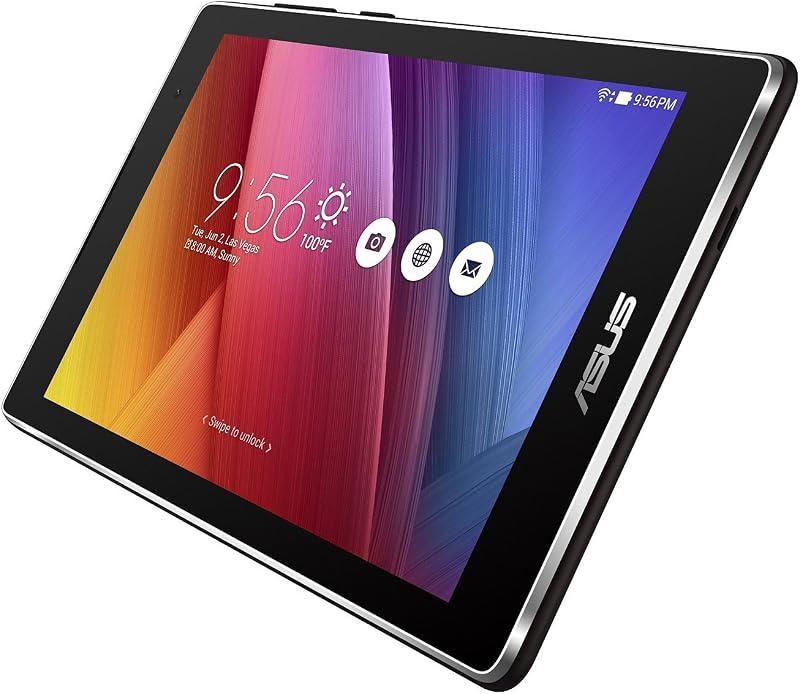
The ASUS Zenpad 7″ model Z170C-A1-BK focuses on pocketable convenience, weighing a mere 0.6 pounds. The device centers around a 7-inch IPS WSVGA display with a 1024 x 600 native resolution, making it remarkably compact for single-handed reading and brief digital interactions. Driving this small slate is a 64-bit Intel Atom x3-C3200 quad-core processor running at 1.2 GHz, paired with 1GB of DDR3 RAM and 16GB of eMMC storage. Connectivity options include standard 802.11b/g/n Wi-Fi and Bluetooth 4.0, packaged within a durable black chassis covered by a one-year North America warranty from ASUS Computers.
Hardware realists must acknowledge the strict operational limitations imposed by an Intel Atom processor paired with only 1GB of system RAM. With Android 4.4 KitKat listed on the core specifications and Android 5.0 Lollipop noted across product descriptions, this tablet sits firmly in legacy status. Modern web scripts and background services can quickly exhaust the 1GB memory pool, causing sluggish response times or frequent application closures. Furthermore, potential buyers should note that while the package includes the standalone tablet, the listing does not specify a bundled power adapter or charging cord, requiring users to supply their own compatible charging equipment.
This compact slate remains practical exclusively for targeted, low-overhead assignments such as reading plain text documents, offline e-books, playing stored music files, or acting as an ultra-lightweight display unit. Anyone requiring modern social applications, cloud office suites, or fluid multitasking should bypass 7-inch legacy hardware in favor of larger, modern computing platforms.
ASUS ROG Flow Z13 for Demanding Hybrid Computing

Best for: Demanding productivity, gaming, and creative work
Pros
- Current Windows 11 Home platform
- Intel Core i5-12500H processor
- 120Hz PANTONE validated display
- Detachable backlit keyboard included
Cons
- Heavier 2.5-pound tablet weight
The ASUS ROG Flow Z13 model GZ301ZA-PS53 transitions out of mobile slate limitations and into the realm of full-scale performance computing. This 2022 convertible machine is powered by a 12th Generation 14-core Intel Core i5-12500H processor featuring an 18MB cache and boost clock speeds reaching up to 4.5 GHz. Backed by 16GB of high-speed LPDDR5 RAM and a rapid 512GB PCIe 4.0 solid-state drive, the Z13 eliminates bottlenecking when managing heavy productivity workflows or multitasking across numerous software suites. Graphics processing is managed by integrated Intel Iris Xe Graphics, rendering content smoothly onto a 13.4-inch 16:10 Full HD (1920 x 1200) touchscreen with a fluid 120Hz refresh rate, 100% sRGB color space coverage, and PANTONE Validation for precise color fidelity.
To sustain sustained performance within a compact detachable chassis weighing 2.5 pounds, ASUS engineered an intelligent cooling module utilizing liquid metal thermal compound on the processor and a custom vapor chamber. The device runs on Windows 11 Home, delivering comprehensive operating system support, uninterrupted access to security patches, and broad software compatibility across enterprise, creative, and gaming applications. The hardware includes a bundled detachable RGB backlit keyboard, an active stylus-compatible digitizer, integrated HD audio, and a memory card slot. For extreme desktop graphical power, the tablet features proprietary XG Mobile support, allowing users to dock with an external graphics unit (sold separately) over high-bandwidth connections. Users configuring mobile desktop setups can also link the device to an asus zen screen to extend their desktop workspace when working in field environments.
The ROG Flow Z13 represents a complete departure from older media slates, addressing power users, creative professionals, and students who demand desktop capability in an ultraportable form factor. It renders legacy Android tablets obsolete for productive workflows, delivering commercial durability and software relevance that older mobile devices cannot provide.
How to Choose the Right ASUS Tablet
Deciding which asus zen tablet to buy requires understanding the profound technological divide between legacy Android entertainment tablets and contemporary Windows convertible systems. Shoppers should assess their usage models, software needs, and hardware reliability requirements across several key criteria before committing to a specific purchase.
- Operating System Support and App Compatibility: The primary differentiator across these models is operating system lifecycle. Older slates like the asus zenpad 10 and asus zenpad 7 rely on Android versions ranging from 4.4 KitKat to 7.0 Nougat. Because these mobile platforms have ceased receiving official platform updates, many modern cloud apps and streaming services from digital storefronts no longer operate on them. In contrast, the asus rog flow z13 features Windows 11 Home, ensuring regular security patches, enterprise software compatibility, and full desktop application execution for years to come.
- Processing Power and Multitasking Memory: The physical memory installed in a tablet directly determines its software longevity. The 1GB RAM on the 7-inch slate and 2GB RAM on the 10.1-inch models limit usage to single, low-intensity tasks and basic media streaming. Meanwhile, the ROG Flow Z13 provides 16GB of LPDDR5 memory and a 14-core Intel Core i5 processor, allowing users to execute demanding photo editing tools, extensive web browser sessions, and creative workflows without system hesitation. Those needing workstation versatility can also weigh convertible form factors against traditional clamshell machines like an asus ryzen 7 laptop when looking for computing longevity.
- Display Characteristics and Resolution: Display requirements vary depending on whether you intend to read text, stream video, or edit creative content. The 1024 x 600 panel on the 7-inch model offers basic visual fidelity, while the 1280 x 800 resolution on the Z301M delivers decent standard definition video streaming. Stepping up to the 1920 x 1200 panel on the Z301MF significantly sharpens on-screen typography. For professional-grade visual accuracy, the ROG Flow Z13 provides a 120Hz refresh rate, PANTONE validation, and 100% sRGB coverage, ideal for digital illustration and high-frame-rate interaction.
- Battery Health and Thermal Management: When evaluating older hardware, shoppers must remain mindful of potential asus zenpad battery issues that arise from aging lithium-ion cells in older manufactured stock, such as reduced capacity or slow charging cycles. Legacy models rely on passive heat dissipation for low-wattage MediaTek and Atom processors, whereas the high-output ROG Flow Z13 integrates liquid metal thermal interface material and vapor chambers to sustain performance without thermal throttling under heavy computational loads. Users exploring dual-display setups might even contrast this convertible approach with dedicated multi-panel hardware like an asus dual screen laptop to find their optimal balance of thermals and screen real estate.
FAQ
Do older ASUS ZenPad tablets still receive Android software updates?
No, legacy ASUS ZenPad tablets do not receive modern Android operating system upgrades or regular security patches. Models such as the Z301M and Z301MF remain on Android 7.0, while older units like the Z170C operate on Android 4.4 or 5.0. As a consequence, many modern applications available on app stores will flag these devices as incompatible due to outdated API levels. Buyers should treat these legacy models as offline media slates or basic e-readers rather than platforms for modern app multitasking.
Can the ASUS ROG Flow Z13 run desktop Windows applications?
Yes, the ASUS ROG Flow Z13 runs a full version of Windows 11 Home on an Intel Core i5 processor. This allows it to install and run standard desktop software, including office suites, professional video editing tools, digital audio workstations, and PC gaming clients, offering a vastly different computational experience compared to mobile-only Android tablets.
How do I address battery drain and charging issues on older ASUS ZenPad tablets?
Older lithium-ion cells can lose effective capacity over time. To maximize battery stability on legacy ZenPad models, use the original power adapter and cord specified in the packaging to ensure steady voltage delivery. Minimizing screen brightness, disabling background location services, and avoiding resource-heavy background processes can help mitigate accelerated power drain on older 4680 mAh cells.
Can storage be expanded on ASUS ZenPad and ROG Flow tablets?
Yes, storage expansion is supported across these models through external card slots. The ASUS ZenPad 10 models feature a microSD card slot supporting up to 128GB SDXC cards, providing space for locally stored video files, music libraries, and photos. The ASUS ROG Flow Z13 includes an onboard memory card slot alongside its internal 512GB PCIe 4.0 SSD, giving users convenient removable media access.
Which ASUS tablet is best for productivity and note-taking?
The ASUS ROG Flow Z13 is distinctly superior for productivity and active note-taking. It includes a detachable backlit keyboard for high-speed typing and incorporates active stylus support on its 120Hz touchscreen. Combined with desktop Windows 11 multitasking and 16GB of RAM, it handles complex productivity workflows that legacy 1GB and 2GB Android slates cannot accommodate.


